Palo Alto Networks Certified NGFW Engineer · Blueprint Master Cheat Sheet
Master Cheat Sheet & Mental Models Hub
The consolidated, high-density reference guide mapping directly to the official 3-Domain Certified Next-Generation Firewall (NGFW) Engineer blueprint and the Master Cheat Sheet. Equipped with visual mental models, high-yield exam rules, troubleshooting traps, and CLI verification commands.
1.1 Configure Interfaces
Domain 1 · 40% Weight
Blueprint 1.1
Mental Model: PAN-OS Interface Types Comparison Matrix
Domain 1.1 Architecture
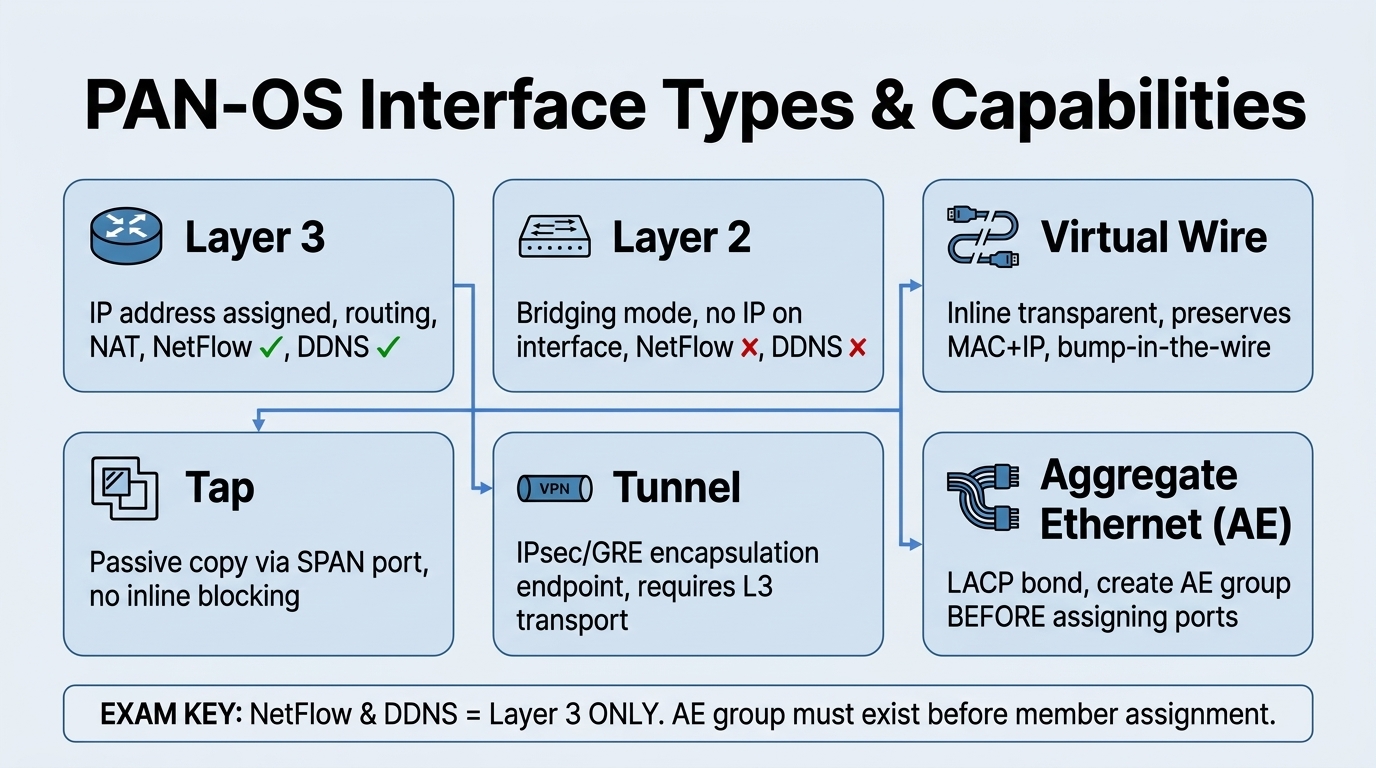
Visual Takeaway: Layer 3 interfaces are routed hops requiring IP addresses and support NetFlow/DDNS; Virtual Wire inserts transparently without MAC or IP modification while still enforcing full security policy; Layer 2 provides bridge switching.
📋 Interface Types Comparison Matrix
Cheat Sheet pg. 1–2
| Interface Type | Use Case | Key Characteristics | Typical Configuration |
|---|---|---|---|
| Layer 3 | Routed networks & internet gateway | IP address assigned, supports routing protocols, supports NetFlow & DDNS | Assigned to Virtual Router + L3 Security Zone |
| Layer 2 | Transparent switching between segments | No IP on interface itself, acts like a switch port, VLAN bridging | Assigned to VLAN object + L2 Security Zone |
| Virtual Wire (vWire) | Bump-in-the-wire transparent mode | No IP or MAC change, inline deployment, minimal disruption | Bound into Virtual Wire object + vWire Zones |
| Tap | Passive monitoring (SPAN/mirror port) | Receives traffic copy, cannot drop or block traffic, zero production risk | Assigned to Tap Security Zone |
| Tunnel | VPN termination (IPsec / GRE) | Logical tunnel endpoint for site-to-site or GlobalProtect VPNs | Assigned to Tunnel Zone + Virtual Router |
| Aggregate Ethernet (AE) | Link aggregation (LACP) | Bundles multiple physical ports (same speed/duplex) for bandwidth & failover | Create AE group first, then assign member ports |
| Management (MGT) | Out-of-band management | Dedicated port, isolated from dataplane traffic, access to Web UI & SSH | Direct admin access, Panorama management |
Crucial Exam Traps:
- NetFlow & DDNS: Can be configured on Layer 3 interfaces, but NOT on Layer 2 interfaces.
- AE Group Creation Order: Always create the logical Aggregate Ethernet interface (e.g.
ae1) first, before assigning member interfaces. - Zone Binding Rule: Every data interface must be assigned to a Security Zone to enforce policy.
CLI Configuration Examples
admin@PA-NGFW# set network interface ethernet ethernet1/1 layer3 ip 192.168.1.1/24
Configures physical port ethernet1/1 as a Layer 3 interface with static IPv4.
admin@PA-NGFW# set zone Trust network layer3 ethernet1/1
Binds the Layer 3 interface to the 'Trust' security zone.
1.2 Configure Zones
Domain 1 · 40% Weight
Blueprint 1.2
📋 Security Zones Key Rules
Cheat Sheet pg. 2–3
- Logical Grouping: Zones represent trust boundaries (e.g., Untrust, Trust, DMZ). Every data interface must belong to a zone.
- Zone Types: Layer 3, Layer 2, Virtual Wire, Tap, Tunnel, and External (for inter-VSYS). Interfaces of different types cannot be mixed in the same zone.
- Default Policy Rules:
- intrazone-default: Traffic within the same zone is allowed by default (logging disabled by default).
- interzone-default: Traffic between different zones is blocked/denied by default (logging disabled by default).
- Packet Buffer Protection: Must be enabled globally under
Device > Setup > SessionAND inside the specific Security Zone settings.
1.3 Configure High Availability (HA)
Domain 1 · 40% Weight
Blueprint 1.3
Mental Model: High Availability (HA) Links, Monitoring & Election
Domain 1.3 Architecture
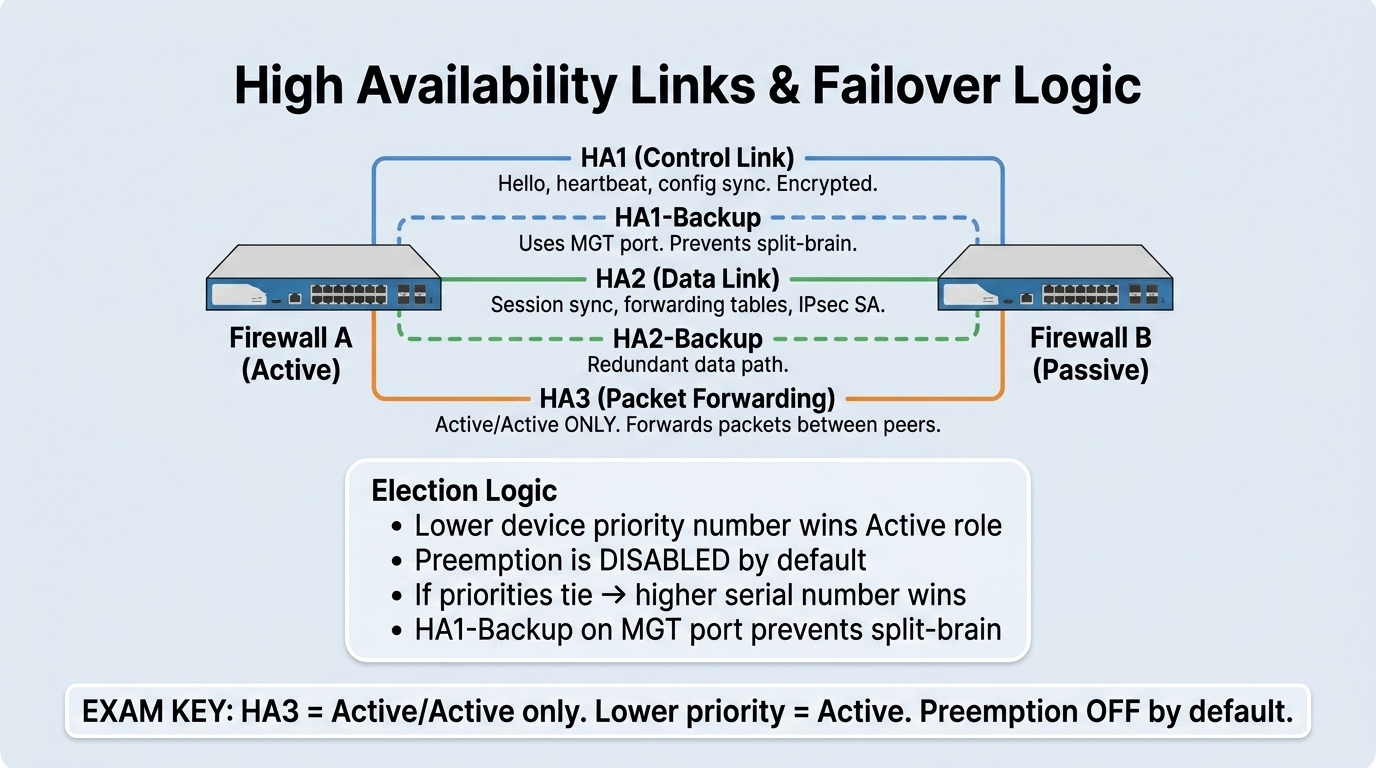
Visual Takeaway: HA1 handles control signals and config sync; HA2 synchronizes active TCP/UDP sessions; HA3 forwards transit packets in Active/Active. Lower Device Priority wins election.
📋 HA Modes Comparison & Links Matrix
Cheat Sheet pg. 3–4
| Mode | Description | Use Case | Session Sync | Failover Speed |
|---|---|---|---|---|
| Active/Passive | One firewall passes traffic, one standby | Most common standard production mode | Yes (via HA2) | Sub-second (Fast) |
| Active/Active | Both firewalls actively process traffic | High throughput, asymmetric routing networks | Yes (HA2 + HA3) | Fast (with sync overhead) |
| HA Link | Function | Transport / Ports | Backup Option |
|---|---|---|---|
| HA1 (Control) | Hellos, heartbeats, HA state, config sync | TCP 28769, 28260 | HA1 Backup (can use MGT interface) to prevent split-brain |
| HA2 (Data) | Session-state synchronization (TCP/UDP, ARP, IPsec) | EtherType 0x7261 or IP/UDP port 28770 | HA2 Backup (dedicated data port recommended) |
| HA3 (Packet Fwd) | Forwards transit packets in Active/Active to resolve asymmetric flows | Raw Ethernet / hardware link | Active/Active ONLY. No session sync on HA3. |
Election & Failover Exam Rules:
- Device Priority: A LOWER number wins the election (Priority 10 beats Priority 20).
- Preemption: Disabled by default. If enabled, the device with the better priority will take back the active role once recovered.
- Failover Triggers: Heartbeat loss, Link Monitoring failure (downed physical ports), Path Monitoring failure (ICMP ping to remote gateway fails), or critical software process failure. High CPU does not trigger failover.
HA Verification CLI
admin@PA-NGFW> show high-availability all
Inspects overall HA state, peer reachability, link/path monitoring, and heartbeat status.
admin@PA-NGFW> show high-availability state
Checks current local operational role (active, passive, suspended).
admin@PA-NGFW> request high-availability state suspend
Manually suspends local firewall to force failover for testing or maintenance.
1.4 Configure Routing
Domain 1 · 40% Weight
Blueprint 1.4
📋 Routing & Administrative Distance Matrix
Cheat Sheet pg. 4
PAN-OS route selection follows: Longest Prefix Match > Administrative Distance > Metric.
| Route Source | Default Administrative Distance |
|---|---|
| Connected / Direct | 0 |
| Static Route | 10 |
| eBGP | 20 |
| OSPF Internal | 30 |
| OSPF External | 110 |
| RIP | 120 |
| iBGP | 200 |
Key Routing Exam Points:
- Policy-Based Forwarding (PBF): Bypasses the virtual router routing table, but never bypasses Security Policy.
- Advanced Routing Engine: Modern modular routing engine running separate protocol daemons (OSPF, BGP, RIP) feeding logical routers.
- Route Monitoring: Pings destination IPs via ICMP; disables the static route if next-hop reachability fails.
admin@PA-NGFW# set network virtual-router default routing-table ip static-route MyDefault destination 0.0.0.0/0 nexthop ip-address 192.168.1.1
Configures a default static route pointing out to upstream gateway 192.168.1.1.
1.5 Configure GlobalProtect
Domain 1 · 40% Weight
Blueprint 1.5
📋 Portal vs. Gateway & HIP Features
Cheat Sheet pg. 4–5
| Component | Role & Responsibilities | Key Exam Facts |
|---|---|---|
| GlobalProtect Portal | Entry point for clients; authenticates user, delivers client configuration, agent updates, and gateway lists | Does not process tunnel data traffic. Client talks to portal only during initial connect/refresh. |
| GlobalProtect Gateway | VPN termination endpoint; enforces encryption, assigns virtual IPs, evaluates HIP posture, and applies Security Policy | Can be External (remote access VPN) or Internal (provides User-ID mapping without an encrypted tunnel). |
High-Yield Rules:
- Split Tunneling: Routes corporate traffic into VPN tunnel while sending general internet traffic out local ISP, saving gateway bandwidth.
- Host Information Profile (HIP): Inspects endpoint compliance (OS patch level, disk encryption, antivirus). Requires a paid GlobalProtect Gateway license.
1.6 Configure Tunnels
Domain 1 · 40% Weight
Blueprint 1.6
📋 IPsec vs. GRE Tunnels
Cheat Sheet pg. 6–7
| Tunnel Type | Use Case | Security & Protocols | Troubleshooting Distinction |
|---|---|---|---|
| IPSec Tunnel | Site-to-site & remote user encryption | Confidentiality & integrity via ESP/AH. Supports IKEv1/IKEv2 and Quantum-Resistant PSK (RFC 8784). | Phase 1 mismatch = tunnel down (NO-PROPOSAL-CHOSEN). Phase 2 mismatch = Proxy ID error. |
| GRE Tunnel | Routing & multiprotocol transport | Encapsulation only; NO encryption. Supports multicast routing protocols (OSPF, BGP). | Wrap inside IPsec (GRE-over-IPSec) when dynamic routing must be encrypted. |
Tunnel Verification CLI
admin@PA-NGFW> show vpn ike-sa
Verifies IKE Phase 1 security association (peers, proposals, DH group, lifetime).
admin@PA-NGFW> show vpn ipsec-sa
Verifies IKE Phase 2 IPsec tunnel, active SPIs, encryption counters, and Proxy IDs.
2.1 Administrative Roles & Authentication
Domain 2 · 40% Weight
Blueprint 2.1
📋 Administrative Roles & Sequences
Cheat Sheet pg. 7–8
| Role Type | Role Name | Privileges & Blueprint Distinctions |
|---|---|---|
| Dynamic Role | Superuser | Full Read-Write access across all functions, including managing administrators. |
| Dynamic Role | Panorama Administrator | EXAM FACT: Full access EXCEPT creating/modifying administrators and config export/import! |
| Custom Role | Admin Role Profile | Granular per-tab privileges. Does not automatically inherit access to new features upon PAN-OS upgrade! |
Authentication Sequences:
An authentication sequence is a ranked fallback list of authentication profiles. PAN-OS queries profiles in descending order until authentication succeeds or explicitly fails.
2.2 Virtual Systems (VSYS)
Domain 2 · 40% Weight
Blueprint 2.2
Mental Model: Inter-VSYS Routing & Dual Session Architecture
Domain 2.2 Architecture
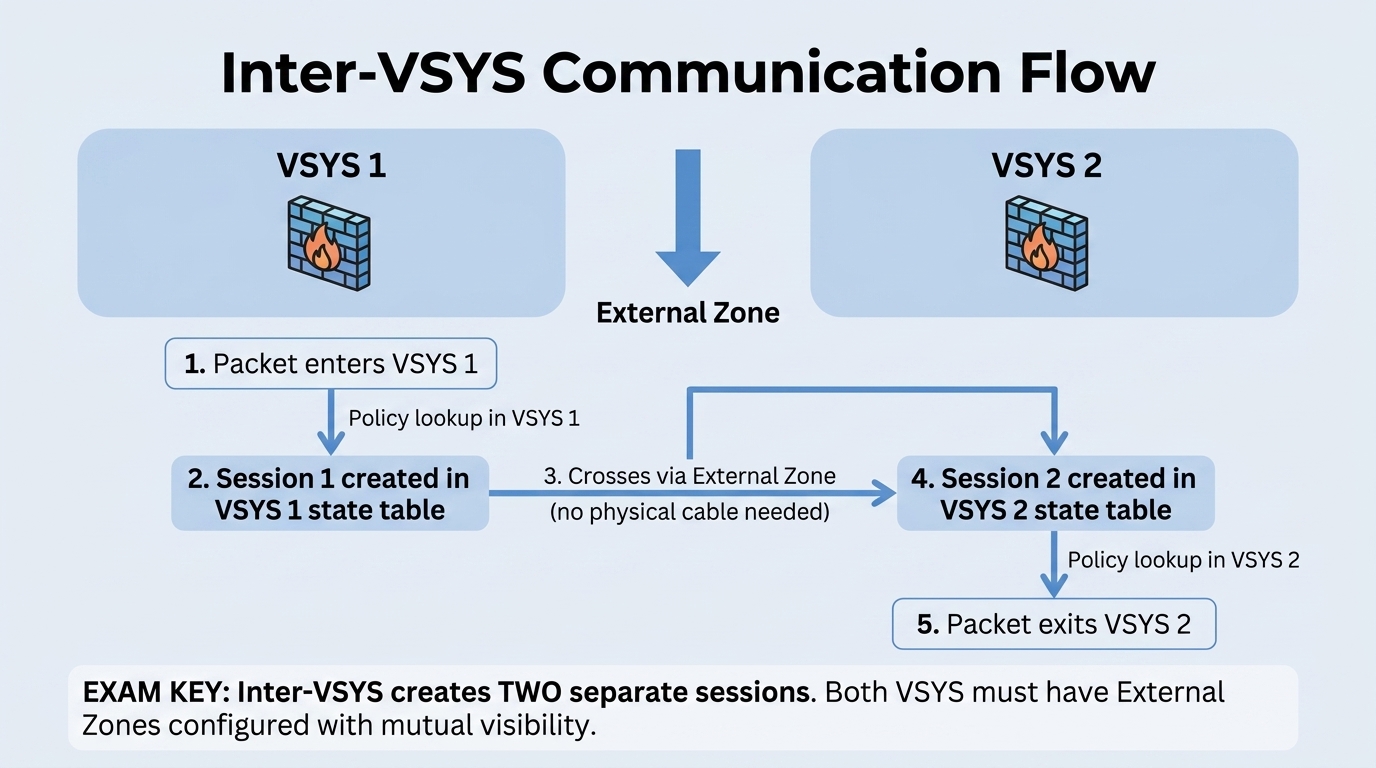
Visual Takeaway: Inter-VSYS communication without external cabling requires configuring External Zones and setting mutual visibility. PAN-OS creates TWO separate sessions in the dataplane session table (Session 1 in VSYS 1, Session 2 in VSYS 2).
📋 Master Cheat Sheet: Inter-VSYS 3-Step Blueprint
Cheat Sheet pg. 8–9
- Step 1: Configure an External Zone for each VSYS:
Network > Zones > Type = External. - Step 2: In the VSYS configuration, check the peer VSYS under
Visible Virtual System. - Step 3: Configure Two Security Policies:
- Policy 1 (Source VSYS): Source Zone (Internal) → Destination Zone (External).
- Policy 2 (Dest VSYS): Source Zone (External) → Destination Zone (Internal).
- Default VSYS:
vsys1is created by default and cannot be deleted. Multi-vsys requires enabling underDevice > Setup > Managementand a reboot. - CRITICAL EXAM TRAP: Inter-VSYS communication creates TWO separate sessions in the session table! Intra-VSYS creates only one.
admin@PA-NGFW> show session all filter vsys vsys1
Inspects active session state in VSYS 1.
2.3 Strata Logging Service & Log Forwarding
Domain 2 · 40% Weight
Blueprint 2.3
📋 Strata Logging Service (Cortex Data Lake)
Cheat Sheet pg. 9–11
- Configuration:
Device > Setup > Management > Cloud Logging. - NO-DECRYPT RULE: Allow outbound access to required FQDNs (e.g.
api.paloaltonetworks.com) — DO NOT DECRYPT this traffic! - Log Record Size: Maximum log record size is 4,096 bytes (truncated if larger).
- Duplicate Logging: Forwards logs to both Strata Logging Service and on-premises Panorama Log Collectors simultaneously.
admin@PA-NGFW> request logging-service-forwarding status
Checks live connection status to Strata Logging Service.
admin@PA-NGFW> request logging-service-forwarding certificate fetch
Manually fetches client certificate if auto-enrollment fails.
2.4 Software Updates & Dynamic Content
Domain 2 · 40% Weight
Blueprint 2.4
📋 PAN-OS Software & Content Updates
Cheat Sheet pg. 12
- Upgrade Process: Download image from support portal / CDN → upload to firewall → install → delayed reboot.
- HA Upgrade Order (Zero Downtime): Upgrade the passive firewall first → verify → suspend active firewall → failover to upgraded peer → upgrade second firewall → restore.
- Dynamic Updates: WildFire (real-time / 1 min), Antivirus (hourly), Applications and Threats (daily/weekly with threshold hold timers).
2.5 Certificates & SSL/TLS Decryption
Domain 2 · 40% Weight
Blueprint 2.5
Mental Model: SSL Forward Proxy & Trust Branching
Domain 2.5 Architecture
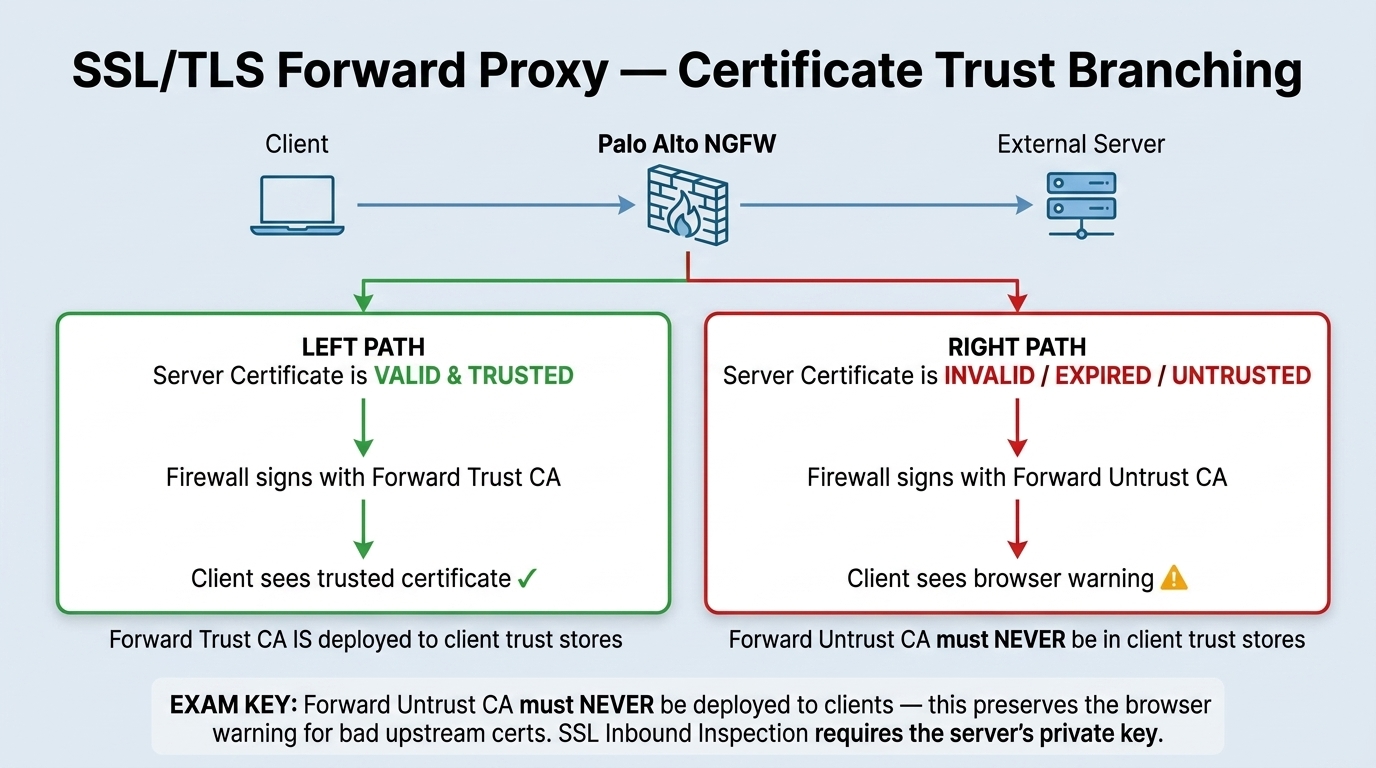
Visual Takeaway: Valid external sites are dynamically re-signed using the Forward Trust CA (trusted by clients → green padlock). Invalid or expired sites are re-signed with the Forward Untrust CA (untrusted → browser security warning).
📋 Certificate Types & Decryption Roles
Cheat Sheet pg. 12–13
- Forward Trust CA: Trusted by client endpoints (deployed via AD GPO/MDM); generates on-the-fly server certificates for valid external destinations.
- Forward Untrust CA: Never trusted by clients; forces client browser to alert user when an untrusted/expired site is accessed.
- SSL Inbound Inspection: Protects internal servers. Requires importing the server's real certificate AND private key. No client-side CA needed.
- Decryption Profiles: Controls protocol enforcement: drop expired certificates, drop untrusted issuers, restrict cipher suites and minimum TLS version.
2.6 User-ID & Cloud Identity Engine (CIE)
Domain 2 · 40% Weight
Blueprint 2.6
Mental Model: User-ID Identity Pipeline & Group Resolution
Domain 2.6 Architecture
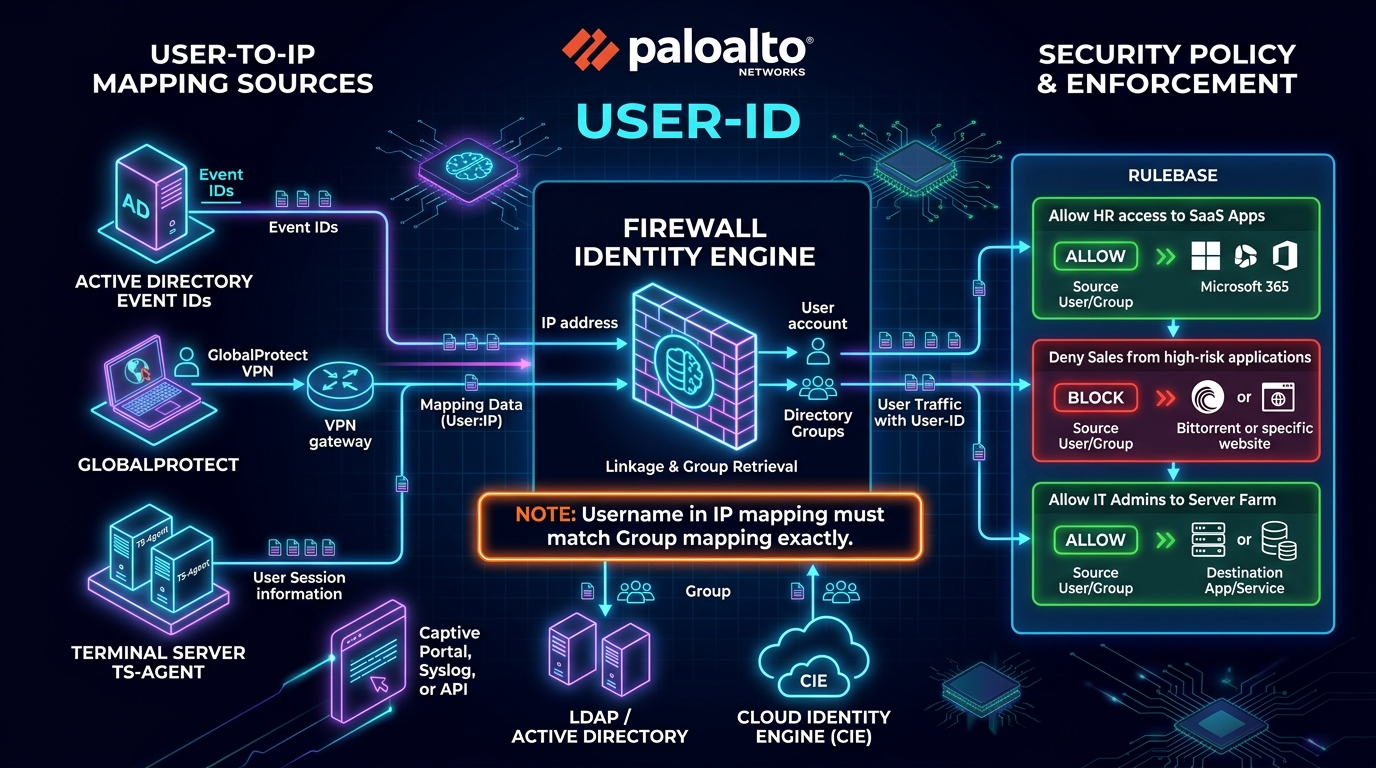
Visual Takeaway: PAN-OS combines User-to-IP mapping (from AD event logs, GlobalProtect, TS-Agent) with Group Mapping (from LDAP or CIE) to evaluate zero-trust security policies.
📋 User-ID Blueprint & Case-Sensitivity Rule
Cheat Sheet pg. 13–15
- CRITICAL EXAM RULE: The username resolved in the IP mapping must match the username format in the group mapping EXACTLY (case-sensitive). E.g.,
corp\jdoevsjdoewill fail policy evaluation! - Server Monitoring Event IDs: Windows User-ID Agent checks Security Event IDs: 4624 (successful logon), 4625 (failed logon), and 4768 (Kerberos TGT).
- Terminal Server (TS) Agent: Maps multiple concurrent users sharing one IP (Citrix/RDP) by allocating unique source port ranges to each user.
- Cloud Identity Engine (CIE): Cloud service that synchronizes with Entra ID, Okta, and Google Workspace, eliminating multiple on-prem LDAP connections.
admin@PA-NGFW> show user ip-user-mapping all
Displays all active IP-to-user mappings in the firewall cache.
admin@PA-NGFW> show user group list
Displays all synchronized security groups available for policy.
2.7 Web Proxy on PAN-OS
Domain 2 · 40% Weight
Blueprint 2.7
📋 Web Proxy Modes & Outbound Services
Cheat Sheet pg. 15–16
- Explicit Proxy: Client browser configured to point to proxy IP and port. Requires Layer 3 listening interface and a DNS proxy object. Supports SAML and Kerberos authentication.
- Transparent Proxy: Intercepts web traffic invisibly. Hard prerequisite: Requires a Destination NAT (DNAT) rule redirecting port 80/443 traffic to the proxy.
- Outbound Service Proxy: Configured under
Device > Setup > Servicesto forward management logs to Strata Logging Service and download updates via an upstream proxy. - CRITICAL RULE: Never decrypt traffic destined for Palo Alto Networks cloud services when routed through a proxy.
3.1 Deployment Options
Domain 3 · 20% Weight
Blueprint 3.1
📋 NGFW Form Factors Comparison
Cheat Sheet pg. 17–18
| Form Factor | Description & Architecture | Primary Use Case |
|---|---|---|
| PA-Series | Physical hardware appliances with dedicated control & dataplane silicon | On-premises enterprise perimeter, data centers, branch offices |
| VM-Series | Virtualized NGFW for hypervisors (ESXi, KVM) and public cloud (AWS, Azure, GCP, OCI) | Securing virtualized data centers and cloud IaaS workloads |
| CN-Series | Containerized NGFW deployed as a Kubernetes DaemonSet/CNI plugin | Securing container pod-to-pod east-west traffic in Kubernetes |
| Cloud NGFW | Fully managed, cloud-native firewall service operated by Palo Alto Networks | Native cloud VPC/VNet security without managing VM infrastructure |
| AI Runtime Security | Secures AI/ML models, training data pipelines, and agent tool execution | Defending enterprise generative AI applications against prompt injection and data leaks |
3.2 Automation & APIs
Domain 3 · 20% Weight
Blueprint 3.2
📋 PAN-OS Automation & Bootstrapping
Cheat Sheet pg. 18–19
- API Keys: Obtained via
type=keygenrequest. Required for all subsequent XML and REST API calls. - Bootstrapping: Automates initial Day-0 firewall provisioning via storage volume or cloud bucket.
/config/init-cfg.txt— Management IP, gateway, Panorama server IP, DNS, auth codes./config/bootstrap.xml— Complete initial configuration file./content/— Dynamic content update packages (App & Threat, Antivirus)./software/— PAN-OS software base and maintenance images./license/— VM-Series auth codes or license keys.
3.3 Third-Party DevOps Integration
Domain 3 · 20% Weight
Blueprint 3.3
📋 Terraform vs. Ansible Distinction
Cheat Sheet pg. 19
- Terraform (Day 0 Provisioning): Infrastructure as Code (IaC) tool used to spin up cloud infrastructure, create VPCs, subnets, route tables, and launch VM-Series instances.
- Ansible (Day 1 / Day 2 Config Management): Configuration automation tool used to manage security policies, objects, and configurations on existing, running firewalls.
- EXAM TIP: Terraform is for provisioning infrastructure; Ansible is for configuring firewall rules on existing devices.
3.4 Centralized Management (Panorama)
Domain 3 · 20% Weight
Blueprint 3.4
Mental Model: Panorama Centralized Policy & Management Architecture
Domain 3.4 Architecture
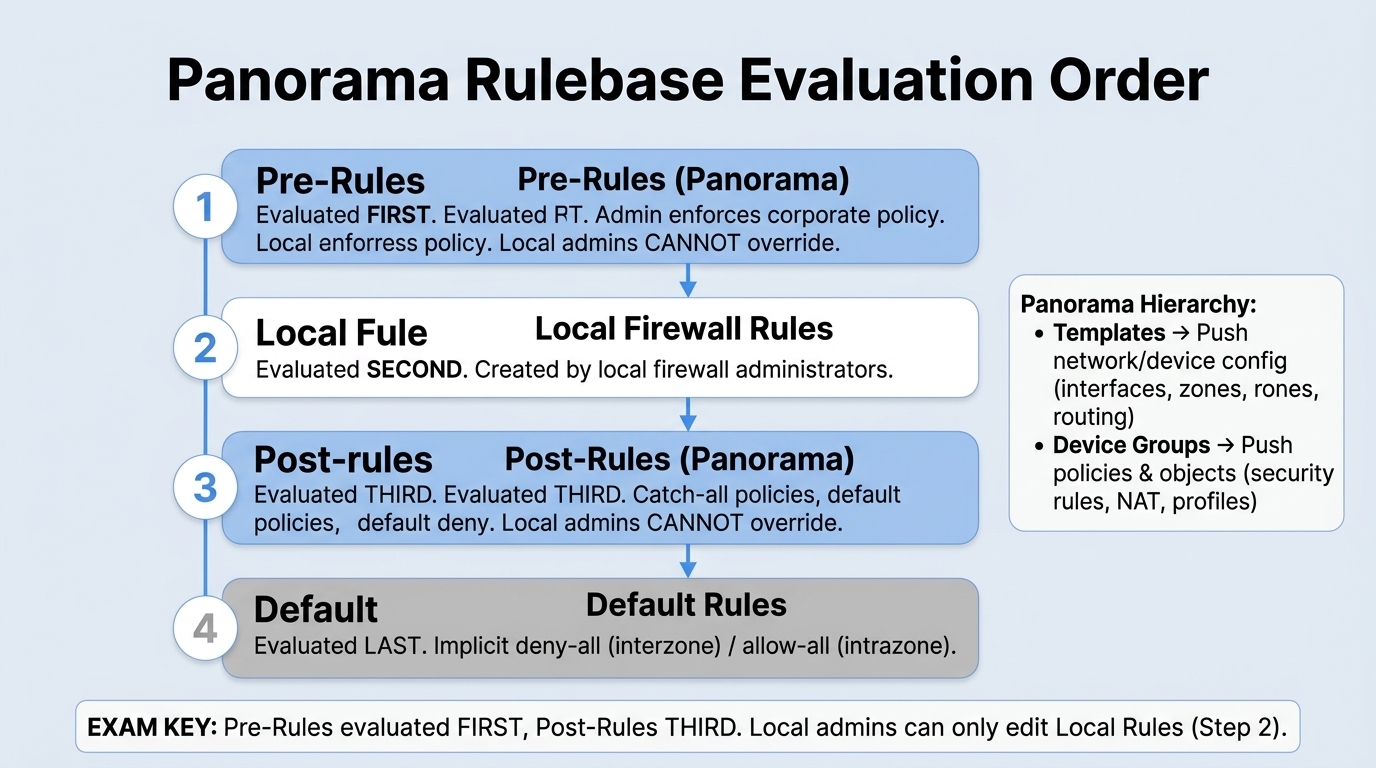
Visual Takeaway: Panorama organizes configuration into Templates (Network & Device) and Device Groups (Security Policies & Objects). Security rules are evaluated top-to-bottom: Tier 1 Pre-Rules → Tier 2 Local Rules → Tier 3 Post-Rules → Default Rules.
📋 Panorama Rule Hierarchy & Constructs
Cheat Sheet pg. 20–21
| Policy Type | Evaluation Order | Definition & Purpose | Core Use Case |
|---|---|---|---|
| Pre-Rules | 1st (Top of rulebase) | Pushed from Panorama; placed above local rules. Evaluated first. | Global corporate compliance, blocking malicious IPs/threat feeds. Cannot be overridden locally. |
| Local Rules | 2nd (Middle of rulebase) | Created directly on the firewall by local administrators. | Branch-specific rules, local applications, site routing exceptions. |
| Post-Rules | 3rd (Bottom of rulebase) | Pushed from Panorama; placed below local rules. Evaluated last. | Default cleanup rules, explicit default-deny logging, catch-all policy. |
admin@PA-NGFW> show running security-policy
Displays full rulebase on the firewall in live evaluation order.
3.5 Reporting & Application Command Center (ACC)
Domain 3 · 20% Weight
Blueprint 3.5
📋 Application Command Center (ACC) & Reports
Cheat Sheet pg. 21–23
- Application Command Center (ACC): Interactive visual interface summarizing applications, threats, and users. Includes predefined tabs: Network Activity, Threat Activity, Blocked Activity, User Activity.
- Risk Meter (1–5): Visual meter indicating overall network risk based on application risk profiles and threat severity.
- CRITICAL ACC EXAM TRAP: The ACC relies exclusively on traffic logs recorded at "Log at Session End". If metrics are missing in ACC widgets, verify that
Log at Session Endis enabled in the Security Policies! - Custom Reports: Query either Summary databases (fast aggregated trend reports) or Detailed logs (raw event records). Scheduled automatic PDF delivery.