Encrypted Traffic
SSL/TLS & SSH Decryption 06
Learning objectives
- Explain why decryption is required for App-ID, Content-ID, and Threat Prevention to be effective against HTTPS/SSH traffic
- Distinguish SSL Forward Proxy, SSL Inbound Inspection, and SSH Proxy by direction of traffic and certificate requirements
- Identify why HA does not preserve decrypted sessions across a failover
Most traffic today is encrypted, and "you can't block what you don't inspect." Decryption lets the NGFW briefly turn ciphertext back into plaintext, inspect it, then re-encrypt it before it leaves the box.
Why
Attackers hide malware delivery and C2 inside HTTPS; without decryption, App-ID/Content-ID/Threat Prevention are effectively blind to most modern traffic.How
There are three modes, and which one applies depends entirely on whose traffic you're decrypting and in which direction — mixing them up is the single most common source of confusion here:
- SSL Forward Proxy — internal users going out to the internet, where you don't own the far end. The firewall becomes what's literally called a "meddler in the middle": it splits one connection into two separate TLS sessions — client-to-firewall, and firewall-to-server — and each side believes it's talking directly to the other. Step by step: the client tries to start a TLS session with the real server; the firewall intercepts that and, to the client, is the server; the firewall separately opens its own session to the real server, which sees the firewall and believes it's the real client; the real server sends back its actual certificate; the firewall checks whether that certificate is signed by a CA it trusts. If it is, the firewall generates a copy of that certificate — an SSL Forward Trust impersonation cert — signed by its own internal CA, and hands that copy to the client. If the real server's cert isn't trusted, the firewall instead issues an SSL Forward Untrust copy, which makes the client's browser show a warning — which is actually the point: it means the firewall correctly detected an untrusted destination and is telling the user, rather than silently passing bad traffic through. For the client to trust the Forward Trust copy without a browser warning every time, its issuing CA has to already be trusted by the client — which is exactly why that CA should chain to your enterprise root (covered in the next section) rather than being a random self-signed cert nobody's endpoint trusts.
- SSL Inbound Inspection — outside traffic coming in to a server you own. Here the firewall doesn't need to impersonate anything, because it isn't trying to fool either side — it holds an actual copy of your server's real private key, so it can decrypt the session using the server's genuine certificate and re-encrypt it the same way, completely transparent to the connecting client. No substitute certificate, no impersonation, no trust warning possible — the tradeoff is that this only works for traffic to servers where you legitimately control (and can hand over) the private key.
- SSH Proxy — for SSH sessions specifically. This decrypts SSH traffic to check what's actually being tunneled inside it (SSH is commonly abused to smuggle other traffic through an otherwise-allowed session) — and unlike the SSL modes, there's no certificate involved at all, because SSH's own key exchange mechanism is what's being intercepted, not a PKI trust chain.
All three modes re-encrypt the traffic before it leaves the firewall — decryption is never a permanent, in-the-clear pass-through, only a brief window for inspection. And crucially, decryption itself runs off its own separate policy layer — decryption policy rules and decryption profiles — evaluated independently of Security Policy, much like NAT is its own layer. That separation is what makes it practical to exempt specific categories (banking, healthcare) from decryption for legal/regulatory reasons without touching your actual security rulebase at all.
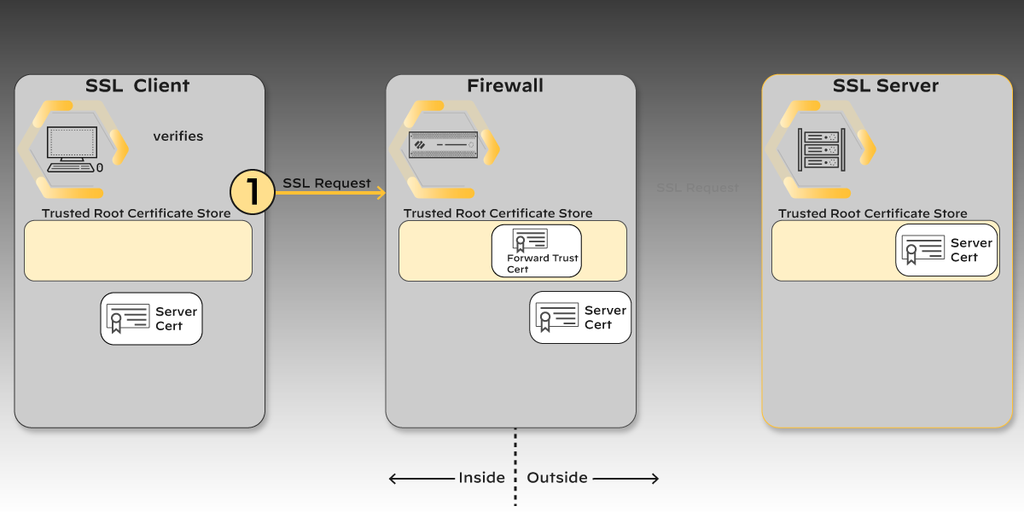
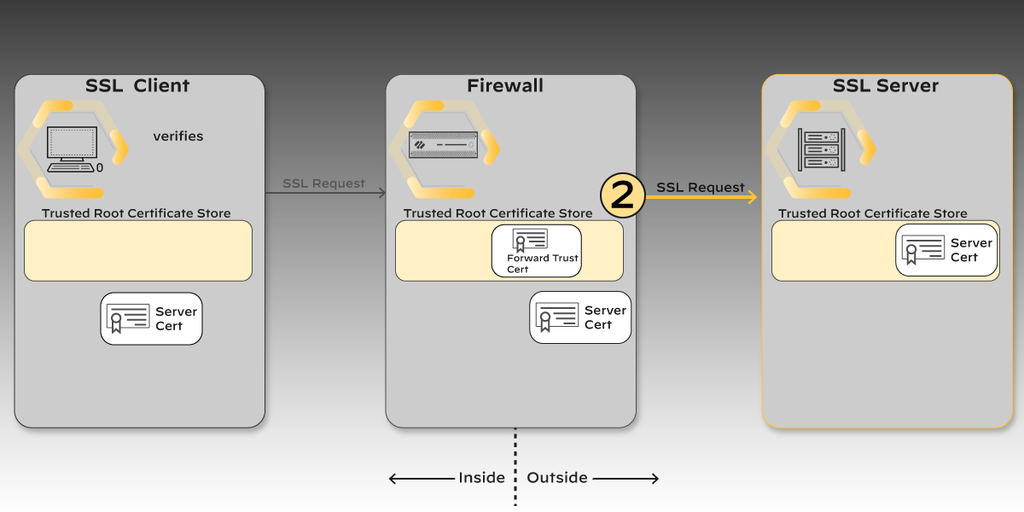
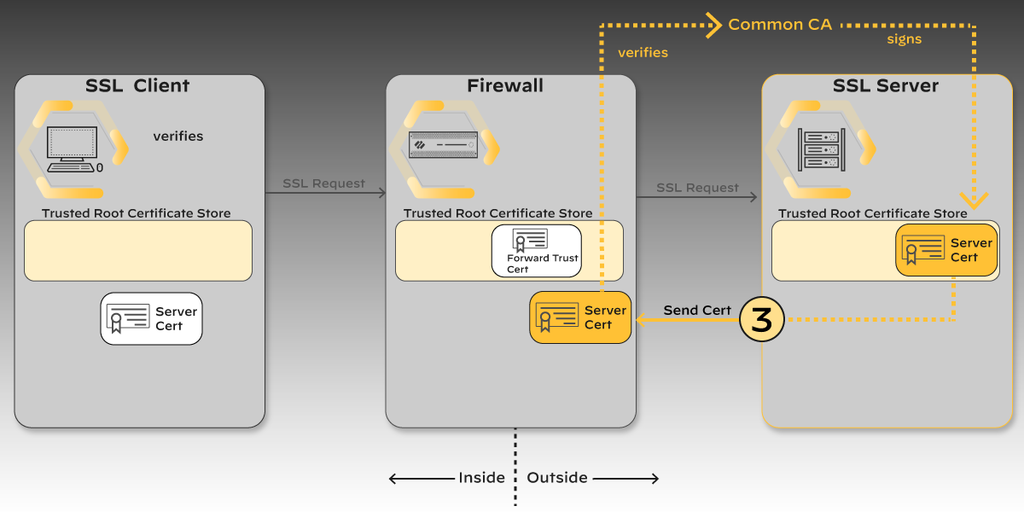
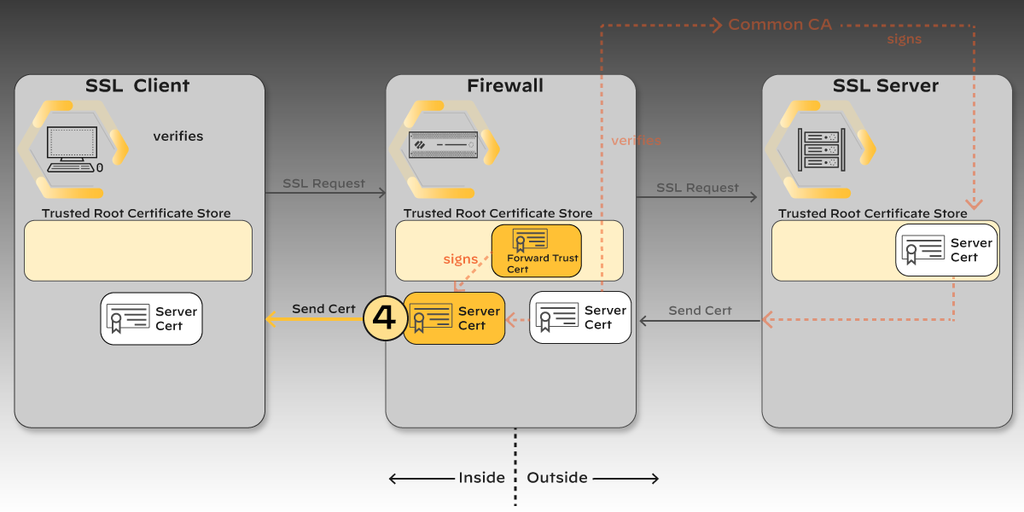
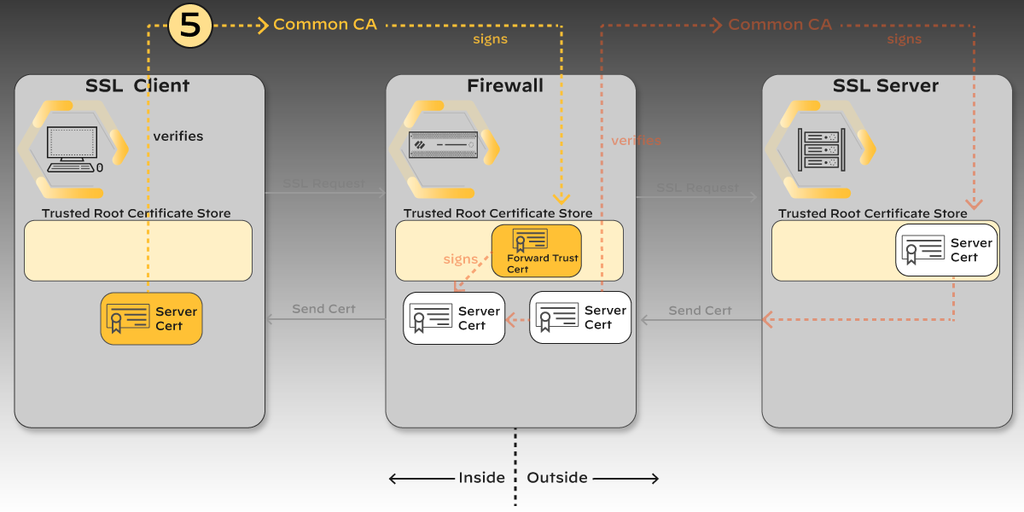
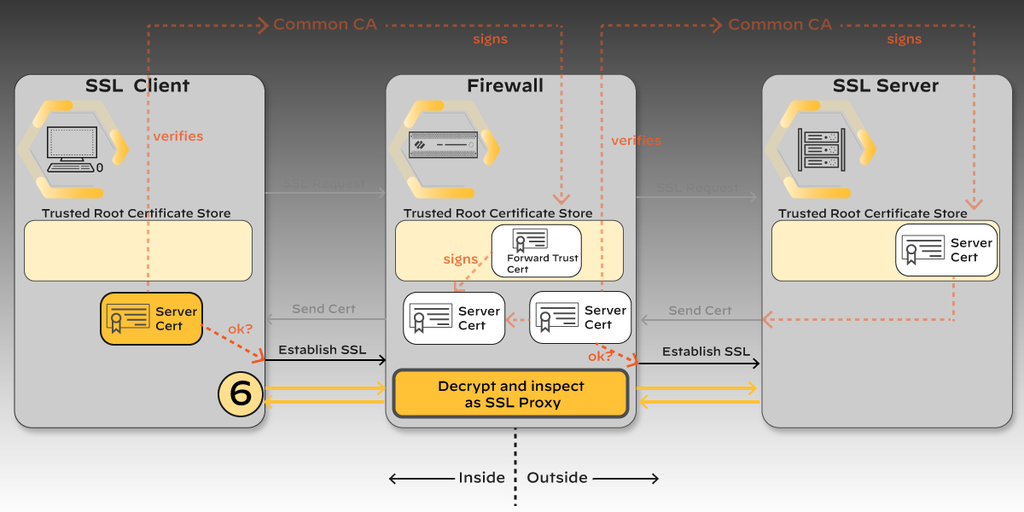
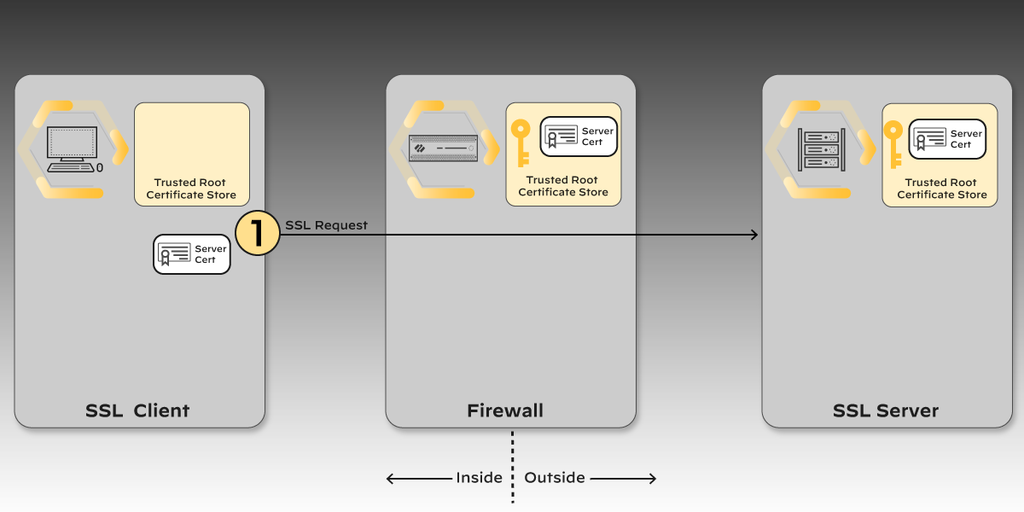
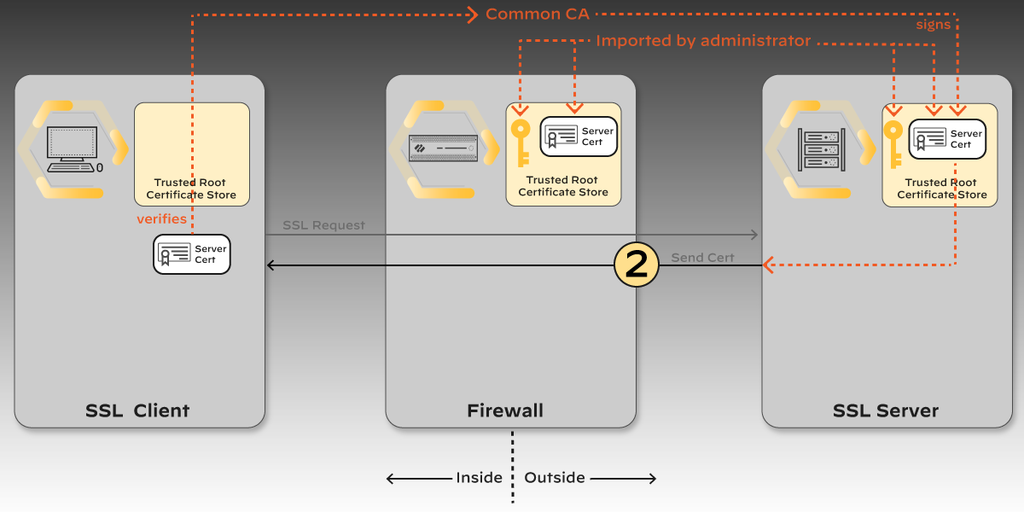
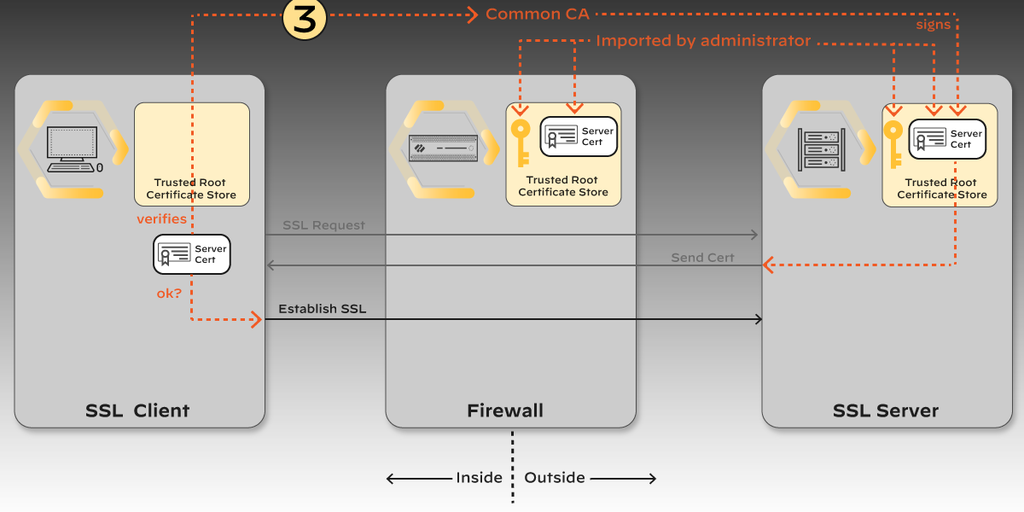
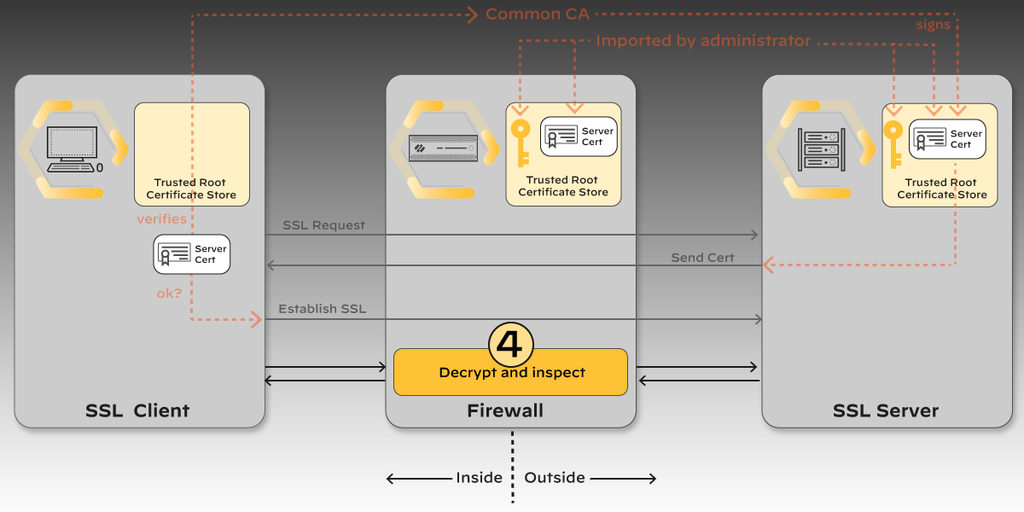
Diagrams: Palo Alto Networks Learning Center, PAN-OS course: Purpose and value of decryption. Click an image to enlarge.
Pros
- Only way to make Threat Prevention, Advanced URL Filtering, and file inspection actually see HTTPS content
- Supports Perfect Forward Secrecy (DHE/ECDHE) and HSM-backed private keys
- Selective decryption by URL category/risk lets you balance privacy vs. inspection
Cons
- CPU/resource intensive — decrypting everything indiscriminately can be a major performance hit
- Legal/regulatory limits in some jurisdictions and for some traffic types (banking, healthcare)
- Certificate trust must be deployed to every endpoint or users get browser warnings
- HA does not sync decrypted sessions — a failover drops and restarts those sessions under the new node's policy
- Pinned-certificate apps can break under forward proxy
Watch: short GUI walkthroughs
Clips from the Palo Alto Networks Learning Center. They load only when you press play.
Exam Trap
Candidates often assume decryption is "set it and forget it." In reality decryption policy is evaluated separately from Security policy (much like NAT), exemptions must be maintained for legally-restricted categories, and — critically — an HA failover does not preserve decrypted session state, so those sessions restart under the new active node's policy rather than continuing transparently.
Self-check: SSL/TLS & SSH Decryption
Decryption certificate requirements & exclusions — exam drill
| Mode | Certificate on the firewall | Client trust |
|---|---|---|
| SSL Forward Proxy | A CA certificate marked Forward Trust (valid destinations) and one marked Forward Untrust (invalid destinations). Best practice: a subordinate CA issued by your internal enterprise PKI root, or a self-signed root CA generated on the firewall. | Clients must trust the Forward Trust CA (its root). Subordinate-from-enterprise-root = already trusted via GPO, no distribution needed. A self-signed root CA must be marked "Trusted Root CA" on the firewall and pushed to every client's trusted-root store. |
| SSL Inbound Inspection | Import the protected server's actual certificate and private key; assign it in the decryption policy/rule. Optionally a Certificate Profile to validate the chain. | Unchanged — the firewall uses the server's real cert, so no client-side trust changes and no warnings. |
| SSH Proxy | None — SSH has no PKI; the firewall regenerates host keys. | Clients may see a host-key change on first use. |
Excluding sites from decryption (privacy/legal — banking, healthcare, or
apps that break): a Decryption policy rule with action "No Decrypt", and/or the
predefined SSL Decryption Exclusion list (Device > Certificate
Management > SSL Decryption Exclusion) for known incompatible sites, and/or matching by
custom URL category / server certificate.
Decryption Broker (forward decrypted traffic to a third-party inspection chain): requires dedicated Layer 3 interfaces configured as Decryption Broker (a pair for two-arm, or one for one-arm) — the firewall decrypts once and shares plaintext with the chain.
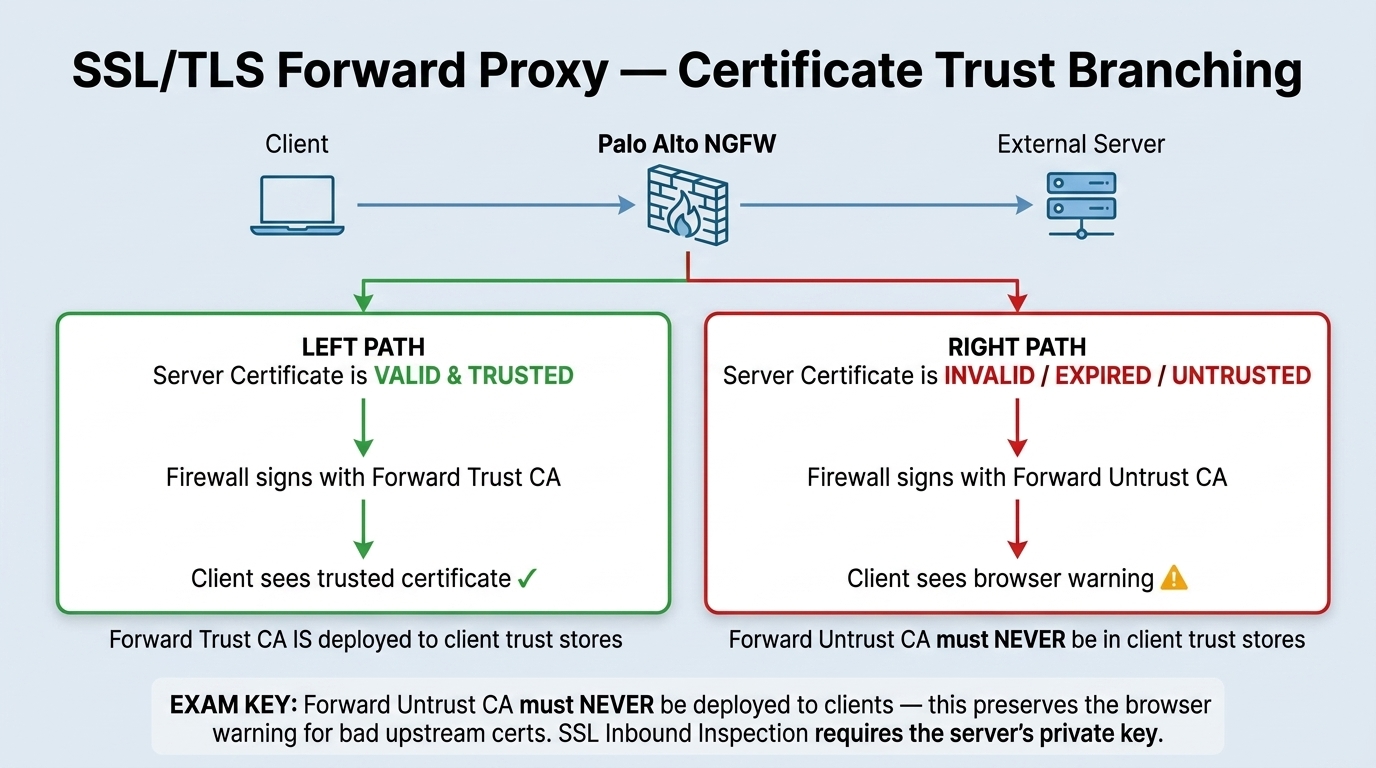
Master Cheat Sheet Certificate Rules (Domain 2.5):
- Subordinate CA: Best practice is generating a CSR from PAN-OS and having it signed by the enterprise Root CA as an intermediate/subordinate CA. Private key never leaves the firewall.
- Forward Trust CA: Must be trusted by all client browsers (via Active Directory GPO, MDM, or cert push).
- Forward Untrust CA: Must never be pushed to client trust stores. Its explicit purpose is to force the client browser to warn the user when the destination server's certificate is invalid!
- SSL/TLS Service Profile: Controls inbound TLS versions and ciphers when the firewall acts as a server (e.g., Admin UI, GlobalProtect Portal/Gateway, Captive Portal).
- Decryption Profile: Defines granular inspection controls (drop expired certs, drop untrusted issuers, block unsupported cipher suites).
| Decryption Mode | Certificates Required | Private Key Required? | Client Impact & Behavior |
|---|---|---|---|
| SSL Forward Proxy | Forward Trust CA + Forward Untrust CA (Subordinate CAs) | Yes (firewall CA private key stored locally/HSM) | Transparent if Forward Trust CA is deployed. Browser warning displayed if site is untrusted via Forward Untrust CA. |
| SSL Inbound Inspection | Target internal server's real certificate + private key | Yes (server's private key mandatory) | Completely transparent to external clients. No client cert deployment needed. |
| SSH Proxy | None (uses internal SSH key generation) | No | Intercepts SSH tunnels; client may receive host-key change notification on first connection. |
Decryption CLI Inspection
Exam traps (decryption)
- "Users get 'Your connection is not private' for every external site after enabling forward proxy" → clients don't trust the firewall's CA. Fix the trust chain / distribute the CA — it is not a decryption failure.
- Forward Untrust certificate is used specifically when the real server's certificate is invalid/untrusted, so the user still gets a warning.
- Inbound inspection needs the private key — "the profile auto-generates a cert" or "use a public CA cert as Forward Trust for inbound" are wrong.
Source: pan-os/11-1/pan-os-admin/decryption/decryption-overview; Palo Alto Next-Gen Firewall (NGFW) Master Cheat Sheet Domain 2.5
Certificate Management 07
Learning objectives
- Describe what the forward-trust CA certificate does and why it should chain to an enterprise root CA
- Explain the operational risk of expired certificates or missing OCSP/CRL checks
- Identify which firewall functions depend on certificate trust chains (decryption, GlobalProtect, Authentication Portal, admin/API access)
Centralized handling of the keys and certificates that secure decryption, GlobalProtect, the Authentication Portal, and admin/API access, across their full lifecycle.
Why
Decryption, VPN, and admin access all depend on trust chains; an expired or mismanaged certificate silently breaks decryption or locks out VPN users.How
Certificate Management is one admin interface covering the full lifecycle a certificate goes through: generate or import certificates, add trusted CAs, configure OCSP responders (services that answer "has this certificate been revoked?" in real time), and set which certificate checks are enforced. It's centralized because the alternative — juggling certificate expiry and trust separately for decryption, GlobalProtect, Authentication Portal, and admin/API access — is exactly how a certificate silently expires unnoticed until something breaks in production.
The forward-trust CA, specifically — why it exists and why the chain matters. Recall from SSL Forward Proxy: when the firewall decrypts outbound traffic to a trusted destination, it doesn't hand the client the real server certificate — it generates its own impersonation copy and signs that copy with a CA certificate it holds, called the forward-trust CA certificate. The client's browser only trusts that generated copy if it already trusts the CA that signed it. Two ways to get there: import that specific CA cert as trusted on every single endpoint manually (a real operational burden that scales badly), or — the better path — have the forward-trust CA itself chained to your enterprise root CA, the same root that's presumably already pushed out and trusted fleet-wide via something like AD group policy. Chain it correctly, and every managed endpoint trusts decrypted sites silently with zero extra per-device work; leave it self-signed and unchained, and users see a certificate warning on every single decrypted site, even though decryption itself is functioning correctly — a very common source of "is decryption broken?" tickets that are actually just a trust-chain gap.
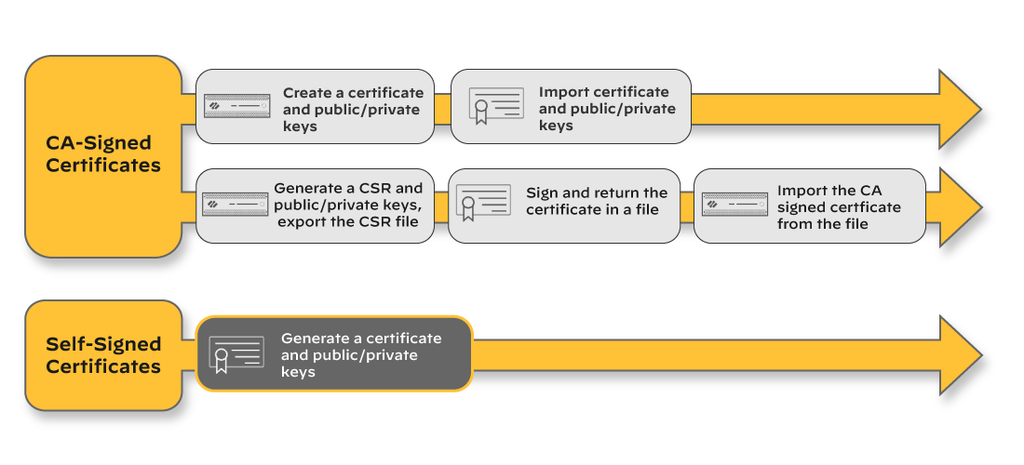
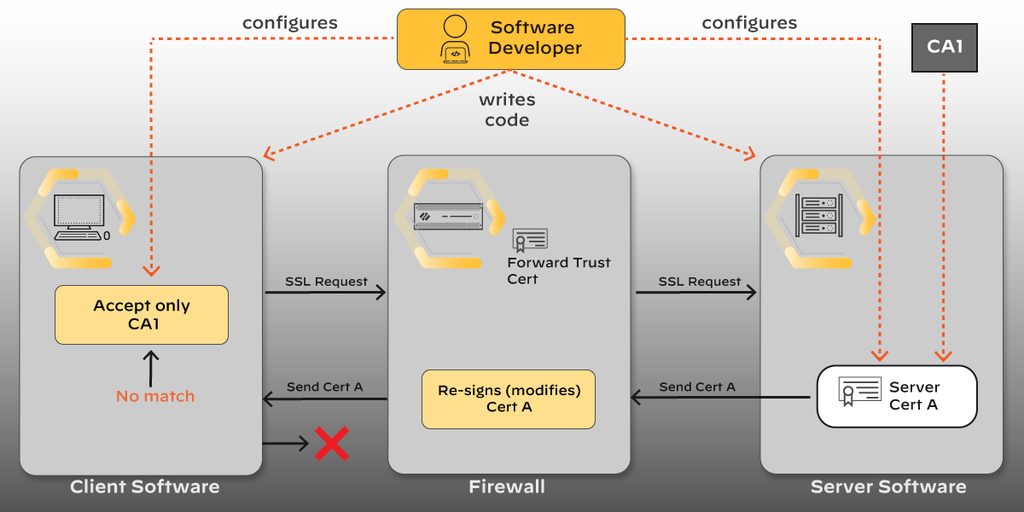
Diagrams: Palo Alto Networks Learning Center, PAN-OS course: Purpose and value of decryption. Click an image to enlarge.
Pros
- Single pane for cert lifecycle across decryption, VPN, and admin auth
- Chaining the forward-trust CA to an enterprise root avoids per-endpoint trust errors
- Supports HSM integration for protecting private keys
Cons
- Mismanagement (expired certs, missing CRL/OCSP checks) causes major outages, not just warnings
- Deploying trusted forward-proxy CA certs to every managed and unmanaged endpoint is an ongoing operational burden
Watch: short GUI walkthroughs
Clips from the Palo Alto Networks Learning Center. They load only when you press play.
Exam Trap
Don't confuse the forward-trust CA certificate (used to sign the firewall's substitute certs during SSL Forward Proxy) with the certificate presented during SSL Inbound Inspection — inbound inspection uses the real server's own key/cert, no forward-trust CA involved. Also remember: if the forward-trust CA isn't chained to (or imported as) a trusted root on client endpoints, every decrypted site throws a browser trust warning even though decryption itself is working correctly.
Self-check: Certificate Management
Source: ngfw/administration/certificate-management
Certificate Profiles & SSL/TLS Service Profiles 08
Learning objectives
- Explain what a Certificate Profile validates and which services reference it
- Explain what an SSL/TLS Service Profile controls, its exact field list, and how it differs in direction from a Certificate Profile
- Correctly separate both from the Decryption Profile — a commonly confused third object
Certificate management above covers obtaining and trusting certificates generally; two specific configuration objects — the Certificate Profile and the SSL/TLS Service Profile — are where those certificates actually get plugged into device-facing authentication and service behavior, and the exam blueprint calls them out as distinct configuration surfaces.
Why
The firewall needs two structurally different certificate questions answered: "when someone presents a certificate to authenticate to me, how do I decide whether to trust it" (an incoming-trust question) versus "when I present myself as a TLS endpoint to someone else, which identity and TLS version do I offer" (an outgoing-identity question). Conflating these is a common real-world misconfiguration, which is exactly why the exam blueprint calls out certificate profiles and SSL/TLS service profiles as separate named items.How
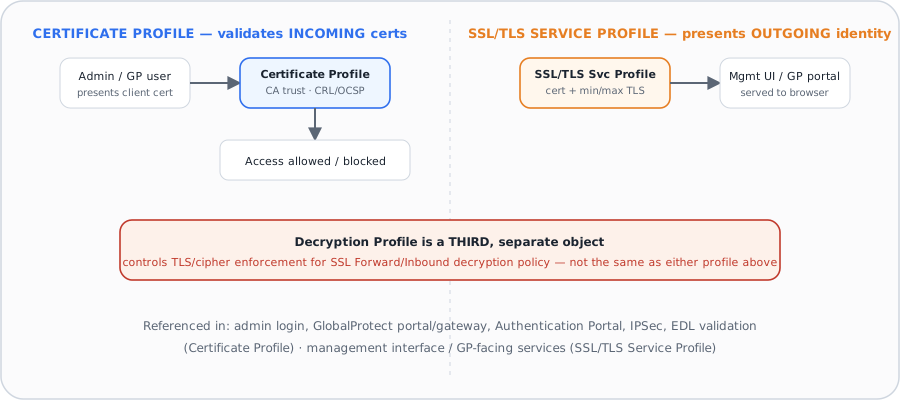
Certificate Profile — validates certificates presented TO the firewall. A Certificate Profile defines user and device authentication settings referenced by Authentication Portal, multi-factor authentication, GlobalProtect, site-to-site IPSec VPN, external dynamic list validation, dynamic DNS, User-ID/TS agent access, and admin web interface access. Configuring one means: assigning one or more trusted CA certificates (the chain the presented cert must validate against), and defining revocation checking — CRL, OCSP, or both (if both are enabled, OCSP is tried first and CRL is the fallback only if the OCSP responder is unreachable). You then choose the specific blocking behavior: block if status comes back unknown, block if status can't be retrieved within a timeout, block expired certificates, and — GlobalProtect-specific — block if the certificate's serial number doesn't match the endpoint's reported host ID. Each of these is an independent checkbox, meaning a profile can be configured to fail open on some conditions and fail closed on others, which is a deliberate design choice admins have to make explicitly rather than getting a single "strict/lenient" toggle.
SSL/TLS Service Profile — controls what the firewall presents to inbound connections. Where the Certificate Profile is about validating someone else's certificate, an SSL/TLS Service Profile defines the server certificate, minimum/maximum TLS protocol version, and cipher settings a firewall service presents outward — referenced by the management interface, GlobalProtect portals and gateways, the Authentication Portal, the "URL Admin Override" password-protected HTTPS page, and the User-ID syslog listening service. Configuring one means setting a Name; a Location (vsys or Shared, on multi-vsys firewalls); a Certificate (must be a signed certificate — a CA certificate cannot be selected here); and Min Version / Max Version (TLSv1.0/1.1/1.2/1.3). Palo Alto's own documented recommendation is TLSv1.3 for both Min and Max on profiles serving Administrative Access, GlobalProtect, and Authentication Portal, and TLSv1.2 for both Min and Max on profiles serving every other referencing service — because TLSv1.3 support is restricted specifically to those three service types; other services referencing an SSL/TLS Service Profile don't support it. An optional Key Exchange Algorithm setting controls RSA/DHE/ECDHE (all enabled by default), and PAN-OS 12.1.2+ adds post-quantum ML-KEM key exchange (security levels 1, 3, or 5) for TLSv1.3 only — though a post-quantum certificate itself still cannot be selected as the profile's certificate. If an incoming connection's protocol version falls outside the profile's configured Min/Max range, the firewall automatically negotiates down or up to the nearest version it does support, rather than simply dropping the connection — a detail worth remembering since "outside the range" doesn't automatically mean "connection refused."
The Decryption Profile is a third, separate object — the most common source of confusion. Neither of the above two objects control SSL Forward Proxy or SSL Inbound Inspection decryption policy behavior (minimum TLS version to allow, which cipher suites are permitted, certificate validation failure handling for decrypted sessions) — that's the job of a Decryption Profile, attached to a Decryption policy rule, and it's a distinct configuration object from both the Certificate Profile and the SSL/TLS Service Profile even though all three deal with "certificates and TLS." An exam question naming a decryption-specific TLS setting and asking which profile controls it is testing exactly this three-way distinction.
Pros
- Independent blocking checkboxes in a Certificate Profile let admins tune fail-open/fail-closed behavior per failure mode rather than one blunt setting
- OCSP-with-CRL-fallback gives revocation checking resilience if one responder type is briefly unreachable
- A connection whose TLS version falls outside an SSL/TLS Service Profile's range auto-negotiates rather than hard-failing, reducing needless outages from a slightly stale client
Cons
- Three similarly-named cert/TLS objects (Certificate Profile, SSL/TLS Service Profile, Decryption Profile) create real confusion about which one governs a given behavior
- TLSv1.3 only works for management/GlobalProtect/Authentication-Portal services — setting Min/Max to TLSv1.3 on a profile serving anything else silently breaks that other service
- GlobalProtect's host-ID-matching block option in a Certificate Profile only applies to GlobalProtect, so reusing the same profile for a different service silently drops that protection
Exam Trap
A question about minimum TLS version for SSL Forward Proxy decryption is testing the Decryption Profile, not the SSL/TLS Service Profile — the SSL/TLS Service Profile's min/max TLS version applies to the firewall's own management/GlobalProtect-facing services, a completely different traffic path from decrypted user sessions. Also: don't assume a client outside the configured Min/Max range simply fails — PAN-OS negotiates to the nearest supported version instead.
Self-check: Certificate Profiles & SSL/TLS Service Profiles
Source: ngfw_administration_certificate-management_configure-certificate-profile.md; docs.paloaltonetworks.com/ngfw/administration/certificate-management/configure-ssl-tls-service-profile (live KB — local scrape of this page was near-empty)
Module Quiz
1. An engineer needs to decrypt and inspect inbound traffic to an internally-hosted web server, without the firewall substituting its own certificate to clients. Which decryption mode should be configured?
2. A user's outbound HTTPS session to an external site is decrypted via SSL Forward Proxy. What certificate does the client's browser actually see presented?
3. After enabling SSL Forward Proxy decryption, a mobile banking app on employee devices begins failing to connect while browser traffic decrypts normally. What is the most likely explanation?
4. An HA active/passive pair is running SSL Forward Proxy decryption on production traffic. An HA failover event occurs. What happens to sessions that were actively decrypted on the formerly-active node?
5. Which of the three primary decryption modes requires no certificates at all to operate?
6. Which cryptographic capability does the firewall support specifically to preserve forward secrecy on sessions it re-encrypts after decryption?
7. Why is a forward-trust CA certificate typically chained to an existing enterprise root CA rather than deployed as a standalone self-signed certificate?
8. A firewall's forward-trust CA certificate silently expires without anyone noticing. What is the most likely resulting symptom reported by users?
9. Which configuration object controls the minimum and maximum TLS protocol version the firewall's management web interface presents to browsers connecting to it?
10. A new self-signed root CA certificate is generated on the firewall for Forward Trust decryption. What configuration step is still required before client devices will trust the decrypted sessions?