Threat & Content Services
Threat Prevention & Advanced Threat Prevention 14
Learning objectives
- Explain what each Threat Prevention component (antivirus, anti-spyware, vulnerability protection) actually inspects for
- Describe how vulnerability signature severity maps to a profile's default action
- Identify what Advanced Threat Prevention adds beyond signature-based Threat Prevention
The IPS/IDS layer of the NGFW: antivirus, anti-spyware/command-and-control detection, and vulnerability protection, layered with an optional cloud-based deep-learning engine for evasive threats.
Why
App-ID tells you what an application is; Threat Prevention tells you whether the traffic inside it is malicious — exploits, malware, or a compromised host phoning home.How
Base Threat Prevention is really four different questions asked at once, each targeting a different stage of an attack:
- Antivirus — "is this file itself known malware?" Signature matching against files in the stream.
- Anti-spyware — "is an already-compromised host talking to its controller?" This is aimed downstream of initial infection: even if malware got in some other way, anti-spyware watches for the traffic pattern of a host phoning home to a command-and-control server.
- Vulnerability protection (IPS) — "is this traffic trying to exploit a known bug?" Pattern-matches exploit attempts against known vulnerabilities, catching the actual attack attempt rather than a malicious file.
- Built-in external dynamic lists + DNS-query analysis — ready-made, continuously updated lists of known-bad hosts/domains, so you get baseline coverage against known-malicious infrastructure without building your own blocklist.
What Advanced Threat Prevention adds, and why it needs a different technique entirely. All four base capabilities above ultimately rely on known patterns — a signature, a listed bad domain. That's a structural blind spot against C2 traffic that's deliberately novel or evasive enough to have no matching signature yet. Advanced Threat Prevention closes that gap with an inline, cloud-based deep-learning engine trained on Palo Alto's threat intelligence — instead of matching a known pattern, it's inferring "does this traffic behave like C2" from characteristics of the traffic itself, in real time, which is what lets it catch genuinely unknown C2 rather than just previously catalogued C2.
How severity actually turns into an action — the part that trips people up. Every vulnerability/spyware signature is tagged with a severity (critical, high, medium, low, informational) — but severity alone doesn't decide what happens to the traffic. The security profile's rule maps each severity to an action (alert, allow, reset, block, drop), and different predefined profiles (e.g. "strict" vs. "default") make different choices for the same severity. This means "Threat Prevention is enabled" tells you nothing about whether a given signature actually blocks anything — you have to check what action that profile maps the relevant severity to, and a custom profile inherits none of a predefined profile's choices until you explicitly set them.

Pros
- Inline prevention, not just after-the-fact detection/alerting
- Advanced tier catches zero-day/evasive C2 that static signatures miss
- Built-in EDLs give instant coverage against known-malicious infrastructure
Cons
- Requires decryption to be effective against HTTPS-borne threats
- Subscription cost, and Advanced Threat Prevention is a separate, higher tier
- Inline cloud lookups add a (small) latency dependency on cloud availability
Exam trap
The default action for a given severity is not "block" for every profile — the predefined strict and default profiles differ in their per-severity actions, and a custom profile inherits none of that until you set it explicitly. Don't assume "enabled" means "blocking."Self-check
- Block file uploads to cloud storage (Dropbox, Google Drive, etc.): a security rule using App-ID to match the cloud-storage apps + a File Blocking profile (direction = upload, or block file types). URL Filtering categories alone, or App-ID "web-browsing", are wrong answers.
- Sensitive files leaving the network: Data Filtering profile with data patterns.
- Dynamic content updates — best practice for a mission-critical network: schedule Applications-and-Threats updates with a threshold / wait time (~24–48 h) before install and stagger install times, so a bad content release is caught before it reaches production. New App-IDs in a content release can shift traffic to a different rule — review before installing.
Source: pan-os/11-1/pan-os-admin/subscriptions; pan-os-admin/policy/security-profiles; pan-os-admin/software-and-content-updates/best-practices-for-applications-and-threats-content-updates
📋 Cheat Sheet — Threat Prevention Profiles Domain 1
Threat Prevention features rely on security profiles attached to rules:
- Antivirus: Detects known malware in files.
- Anti-Spyware: Detects C2 callbacks and compromised host traffic.
- Vulnerability Protection: IPS signatures for exploits and vulnerabilities.
- File Blocking: Blocks specified file types.
- WildFire Analysis: Forwards unknown files for sandbox detonation.
- Data Filtering: Controls transfer of sensitive data patterns.
⌨️ CLI Verification
| Command | Purpose |
|---|---|
show threat id <id> | View details about a specific threat ID |
show running security-policy | View the active security policy and attached profiles |
WildFire & Advanced WildFire 15
Learning objectives
- Explain why behavioral sandboxing catches malware that signature-based AV misses
- Describe the WildFire verdict lifecycle from unknown file to global signature
- Identify what Advanced WildFire's Intelligent Run-time Memory Analysis specifically targets
Palo Alto's cloud-based malware sandbox. Unknown files are detonated in a virtual environment to observe real behavior, rather than relying only on static signatures.
Why
Signature-based AV can't catch malware nobody has seen before. Sandboxing observes what a file actually does, closing the gap for novel and targeted threats.How
The core idea — why "detonate it and watch" beats "compare it to a known-bad list." A signature can only ever catch malware someone has already seen and catalogued. WildFire sidesteps that limit entirely: an unknown file crossing the firewall gets forwarded to the WildFire cloud (or an on-prem WF-500 appliance for organizations that can't send files off-site), actually detonated — run for real — inside multiple OS/application environments, and observed through both static analysis (examining the file's structure without running it) and dynamic analysis (watching what it actually does once executed: what it writes to disk, what it connects to, what it modifies). This is what lets WildFire flag malware on its very first appearance anywhere, rather than only after someone has manually reverse-engineered a signature for it.
A subscription is what turns "detonate occasionally" into a genuinely fast pipeline: it unlocks faster signature turnaround (so a verdict from one detonation becomes a protective signature for everyone else sooner), coverage of more file types (APK, PDF, Office documents, Java — the formats attackers actually favor for delivery), and API-based uploads for integrating WildFire into other tooling.
Advanced WildFire — closing the gap malware itself tries to exploit. Sophisticated malware doesn't just try to look benign — some samples actively detect that they're running inside a sandbox (checking for virtualization artifacts, unusual timing, absence of real user activity) and simply behave innocently while watched, only doing anything malicious once they believe they're on a real machine. Standard detonation-based analysis can be fooled by this. Intelligent Run-time Memory Analysis is built specifically to counter it: a cloud engine that inspects in-memory behavior during execution rather than relying purely on observed file-system/network actions, catching malware that's actively trying to hide from the sandbox it's running in.
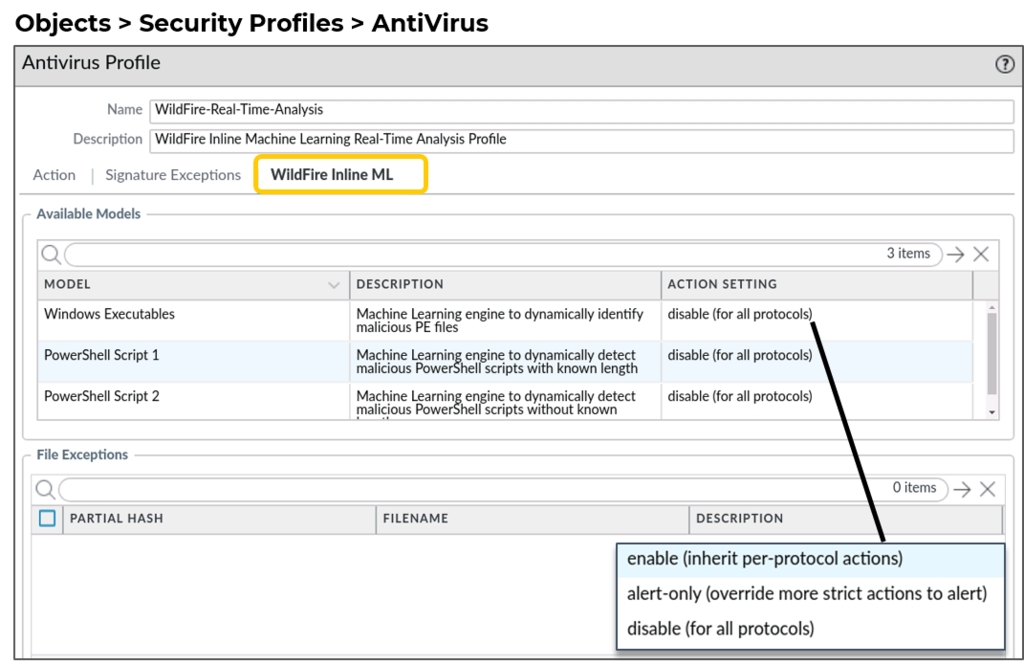

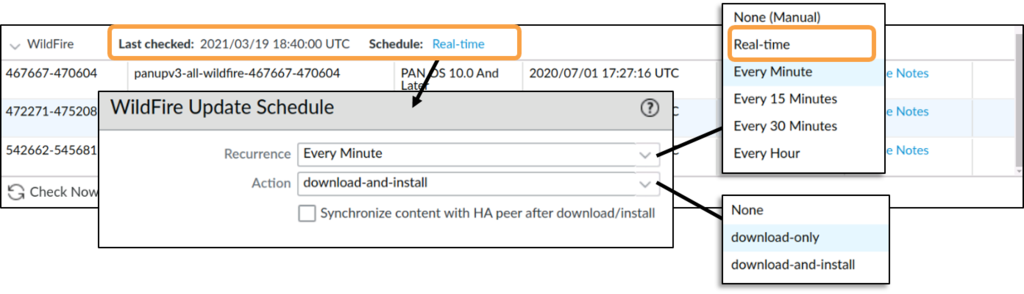
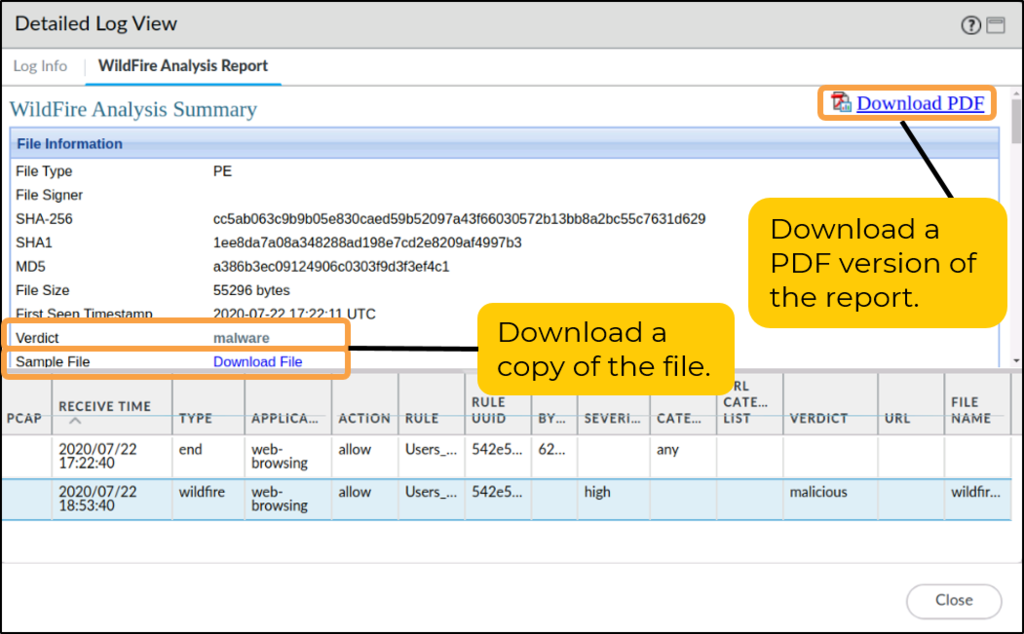
Diagrams: Palo Alto Networks Learning Center, wildfire-versus-malware: Block unknown threats with wildfire; wildfire-versus-malware: Wildfire configuration and reporting. Click an image to enlarge.
Pros
- Behavioral detonation catches genuinely new malware, not just known signatures
- Verdicts propagate globally — one customer's detonation protects the whole community quickly
- Advanced tier's memory analysis targets sandbox-evasive malware specifically
Cons
- Cloud detonation isn't instant — first-seen files may pass before a verdict returns (mitigated by "hold mode," at a latency cost)
- Requires decryption + forwarding config to see files inside HTTPS/other encrypted channels
- Full feature set (advanced file types, on-prem appliance, API) needs the paid subscription
Watch: short GUI walkthroughs
Clips from the Palo Alto Networks Learning Center. They load only when you press play.
Exam trap
"Hold mode" (block until verdict) is not the default forwarding behavior — by default, first-seen files are allowed to pass while WildFire analyzes them in the background, and only a later verdict updates future sessions. Don't assume unknown files are blocked pending analysis unless hold mode is explicitly configured.Self-check
Source: pan-os/11-1/pan-os-admin/subscriptions; pan-os_11-0_pan-os-new-features_wildfire-features
📋 Cheat Sheet — WildFire Domain 1
WildFire is a cloud-based sandbox for zero-day detection. Key features include:
- Verdicts: Files are classified as benign, malware, grayware, or phishing.
- Signature Generation: New signatures for discovered threats are generated in 5 minutes.
- Control: The WildFire Analysis profile controls which file types are forwarded for detonation.
URL Filtering & Advanced URL Filtering 16
Learning objectives
- Explain how PAN-DB category lookups work and how local caching affects them
- Describe the URL category override/appeal workflow when a site is misclassified
- Identify what Advanced URL Filtering's inline ML adds beyond category-based control
Controls not just whether users can reach a site, but how they interact with it — category-based access control plus real-time ML inspection of web content and credential submissions. PAN-DB is Palo Alto's own cloud-hosted URL categorization database: the firewall keeps a local cache of recently-seen URLs and queries the cloud in real time for anything not cached, then caches that verdict locally to keep steady-state lookups fast.
Why
The web is the biggest delivery channel for phishing and drive-by malware; static category databases alone lag behind newly-registered malicious domains and single-use phishing pages.How
The base layer: category-based control. A URL Filtering security profile doesn't work site-by-site — it enforces an action against each PAN-DB category (e.g. "malware," "gambling," "social-media"), which is what makes policy scale: you write one rule per category instead of maintaining a list of millions of individual domains yourself. Beyond simple allow/block, the profile also detects corporate credential submissions (feeding into the Credential Phishing Prevention mechanism covered on the Identity page) and restricts which categories are allowed to receive them, and can log HTTP headers or enforce SafeSearch so users can't quietly turn off content filtering on search engines.
Why a crawled database alone structurally can't keep up. PAN-DB is built by crawling and categorizing the web ahead of time — which means there's an inherent lag between a domain being newly registered for a phishing campaign and PAN-DB having crawled and categorized it. A single-use phishing page might exist for hours before anyone crawls it.
Advanced URL Filtering — inspecting the page itself, not a pre-built record about the page. Instead of only checking which category a URL was assigned in the past, Advanced URL Filtering layers in a cloud-based ML engine that inspects the actual page content and behavior in real time, at the moment of the request — which is what lets it flag a phishing or exploit page that's brand new and has no crawl history at all.
When PAN-DB gets a category wrong. Misclassification happens — a legitimate business site landing in "malware," say. There's a two-track fix: submit a category-change request to Palo Alto for permanent review, and in the meantime, apply a custom URL category locally to override the classification immediately, without waiting on that review to complete.

Pros
- Credential-phishing prevention is enforced at the category level, not just block/allow
- ML inline inspection catches brand-new malicious pages a crawled database hasn't seen yet
- Custom URL categories and External Dynamic Lists give fine-grained overrides
Cons
- URL Filtering is no longer sold standalone — full functionality requires Advanced URL Filtering
- Category misclassification happens and requires an appeal/override workflow
- Effectiveness against HTTPS sites again depends on decryption being enabled
Exam trap
A URL Filtering security profile only takes effect once it's attached to a Security Policy rule — creating the profile alone enforces nothing. This mirrors a common mistake with other content-inspection profiles (antivirus, vulnerability protection): the object must be referenced by a rule to apply.Self-check
Source: ngfw/help/11-1/objects/objects-security-profiles-url-filtering; pan-os/11-1/pan-os-admin/subscriptions
📋 Cheat Sheet — URL Filtering Domain 1
URL Filtering uses PAN-DB to categorize URLs. The 5 available actions per category are:
- Allow: Permits the traffic silently.
- Alert: Permits the traffic and generates a log entry.
- Block: Drops the traffic and shows a block page.
- Continue: Displays a response page requiring user click-through to proceed.
- Override: Requires a valid password to bypass the block page.
DNS Security & Advanced DNS Security 17
Learning objectives
- Explain how DNS sinkholing redirects malicious lookups and why that reveals infected hosts
- Describe how the DNS Security cloud service builds its threat verdicts from passive DNS data
- Identify what Advanced DNS Security adds beyond sinkholing known-bad domains
Extends DNS sinkholing with a cloud service that generates DNS-threat signatures using predictive analytics/ML, and (Advanced tier) inspects DNS responses in real time to catch domain hijacking.
Why
Malware overwhelmingly uses DNS for C2 and exfiltration (fast-flux, DGA domains) — DNS is a high-leverage choke point most attacks must pass through, even encrypted ones.How
Why DNS specifically is worth its own dedicated inspection layer. Almost every piece of malware needs to resolve a domain name at some point — to reach its C2 server, to exfiltrate data, or as part of fast-flux/DGA (domain-generation-algorithm) evasion techniques that cycle through many auto-generated domains to dodge static blocklists. That makes DNS a genuine choke point: it's small, cheap to inspect compared to full payload analysis, and hard for malware to route around entirely since it still needs names resolved to actually connect anywhere.
Sinkholing, mechanically — and why it does double duty as detection. When a lookup for a known-malicious domain is detected, the firewall doesn't just drop the query — it returns a firewall-controlled IP address instead of the real (malicious) answer. The infected host, none the wiser, then tries to actually connect to that fake IP — and because that connection attempt lands in ordinary traffic logs, it instantly tells you exactly which internal host queried the bad domain. This is often faster and more certain than waiting for Threat Prevention to separately notice that host's C2 traffic pattern — sinkholing catches the DNS lookup itself, the very first step of the attack chain.
Where the verdicts actually come from. The DNS Security cloud service isn't working off a static list someone manually curates — it continuously analyzes passive DNS telemetry (query patterns, how recently a domain was registered, whether its name structure looks algorithmically generated rather than human-chosen) aggregated across Palo Alto's entire global customer base, which is what lets it flag freshly-weaponized infrastructure quickly rather than only after it's been manually catalogued.
Advanced DNS Security — catching hijacking, not just known-bad domains. Sinkholing a known-bad domain doesn't help against domain hijacking — a legitimate, previously-trusted domain whose DNS records get silently altered to point somewhere malicious. The Advanced tier adds cloud-based engines that inspect DNS responses themselves in real time, watching for exactly that kind of unexpected change happening to a domain's records, rather than only checking the domain's name against a reputation list.

Pros
- DNS is a small, high-value inspection point — cheap to enforce, hard for malware to avoid entirely
- Sinkholing quickly reveals which internal hosts are already infected
- Advanced tier's real-time response inspection catches hijacking, not just known-bad domains
Cons
- Gated behind an existing Threat Prevention license — not standalone
- DNS-over-HTTPS/TLS from endpoints can bypass firewall-level DNS visibility unless separately controlled
Exam trap
Sinkholing only works for DNS the firewall can actually see — if endpoints are configured (or malware forces them) to use DNS-over-HTTPS/TLS straight to an external resolver, firewall-level DNS Security is bypassed entirely unless that encrypted DNS traffic is itself blocked or decrypted.Self-check
Source: pan-os/11-1/pan-os-admin/subscriptions
📋 Cheat Sheet — DNS Security Domain 1
DNS Security detects DNS-based threats using cloud-based signatures, including:
- DGA domains: Identifies algorithmically generated domains used for C2.
- DNS tunneling: Detects data exfiltration or C2 over DNS protocols.
- Known bad domains: Blocks access to known malicious infrastructure.
Module Quiz
1. A Vulnerability Protection profile is attached to a Security policy rule, and traffic matches signature severity "critical" for an exploit attempt. What ultimately determines whether that session is reset, blocked, or merely logged?
2. A SOC lead reports that standard Threat Prevention keeps missing command-and-control traffic that changes its beacon pattern to evade signature matching. Which subscription upgrade specifically addresses this gap?
3. A previously unseen executable crosses the firewall with WildFire licensed but WildFire hold mode not enabled. What happens to the file on this first encounter?
4. A sample repeatedly behaves benignly under standard sandbox detonation, yet endpoint telemetry shows it is actively malicious in production. Which Advanced WildFire capability is designed to catch exactly this class of sample?
5. A user browses to a site that has never been categorized by this firewall before and is not present in the local URL cache. What happens next under PAN-DB?
6. A newly registered phishing domain that mimics a corporate login page goes live and is reached by a user within hours of registration, before any crawler has categorized it. Which subscription is most likely to still catch it?
7. An administrator configures a URL Filtering profile to block the "malware" and "phishing" categories, but testing shows a known-malicious matching site still loads without being blocked. What should the administrator check first?
8. An engineer enables DNS sinkholing in the Anti-Spyware profile to help locate internally infected hosts. Which two statements accurately describe how this actually helps identify the infected endpoint? (Choose two.)
9. Standard DNS Security already blocks resolution to known-malicious domains via cloud-delivered signatures. What does Advanced DNS Security add on top of that?
10. During licensing review, an administrator finds DNS Security cannot be purchased or activated on its own. What explains this?
11. A customer has fully licensed Threat Prevention, WildFire, and URL Filtering, yet still reports missed detections on HTTPS-borne threats. What is the most common root cause across all three services in this scenario?