Policy & Segmentation
Security Policy & Zone-Based Architecture 08
Learning objectives
- Explain how zones express trust boundaries and why that scales better than per-interface ACLs
- Describe the rulebase evaluation order, including the role of Authentication Policy and the implicit intrazone-allow/interzone-deny defaults
- Use Policy Optimizer to identify port-based rules that can be safely migrated to App-ID-based rules
Security rules decide whether to allow or block a session using attributes like source/ destination zone, IP, application, user, and service — evaluated top-to-bottom, first match wins.
Why
Zones let you express "trust boundaries" (e.g. Trust, DMZ, Untrust) instead of writing rules per interface/subnet, and they keep the rulebase readable as the network grows.How
The evaluation order, and why each stage happens where it does. Every packet first gets matched to a session (so the firewall is always reasoning about a session, not individual packets in isolation), and every session then gets matched against the rulebase. Authentication Policy, if configured, runs before Security Policy — the firewall has to know who's making the request before it can apply a rule that might depend on user identity. Once identity (if any) is settled, rules are checked top-to-bottom, and the very first rule that matches wins and stops evaluation entirely — nothing below it is even considered for that session. This single fact is what makes rule order just as important as rule content: a broad, permissive rule sitting above a narrow, restrictive one will silently swallow the traffic the narrow rule was written to catch, because evaluation never reaches the narrow rule at all.
The default rules at the very bottom — what they mean in practice. If nothing above matches, two implicit defaults apply: intrazone traffic (same zone to same zone) is allowed, interzone traffic (different zones) is denied. This reflects an assumption baked into the zone model itself — that everything inside one zone shares a similar trust level, so traffic between two hosts in the same zone is assumed benign by default, while traffic crossing a trust boundary is assumed risky until a rule says otherwise. The practical trap: if you lump hosts of genuinely different trust levels into one zone (say, servers and workstations both in "Trust"), that default intrazone-allow quietly permits traffic between them that you probably didn't intend to allow — the fix is finer-grained zone design, not just remembering the default exists.
Policy Optimizer — closing the loop on rule hygiene. Over time, rulebases built on ports/IPs accumulate rules nobody's sure are still needed, and broad "allow any app" rules hide what traffic is actually flowing. Policy Optimizer analyzes real traffic against existing rules and highlights which specific apps and ports are actually being used by a given rule, which lets you tighten a broad port-based rule into a precise App-ID-based one (or retire it entirely if nothing's actually using it) — without guessing.
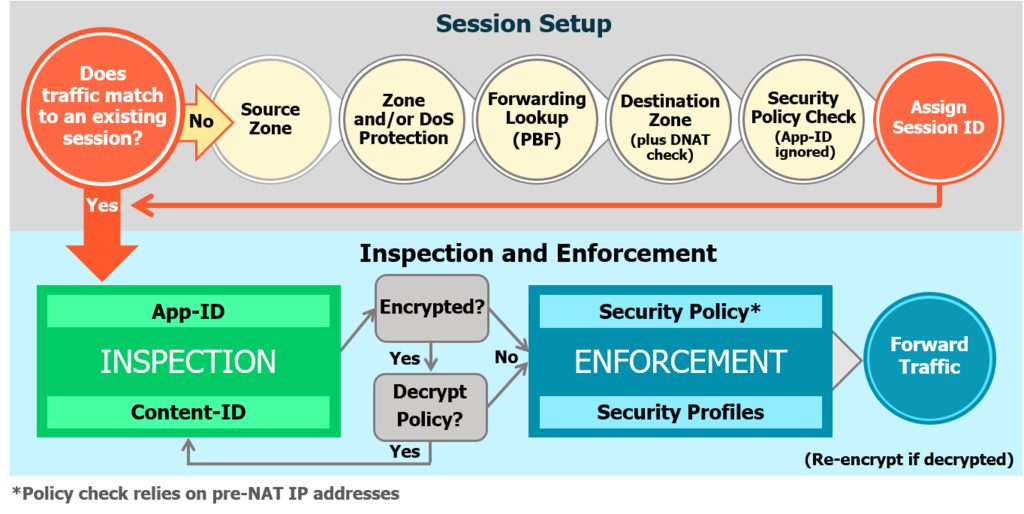
Diagrams: Palo Alto Networks Learning Center, PAN-OS course: Security policy rules. Click an image to enlarge.
Pros
- Zone model scales far better than per-IP/interface ACLs
- Single rule can combine zone + app + user + content-inspection profile
- Policy Optimizer actively helps shrink an overgrown, insecure rulebase
Cons
- Rule order matters — a broad rule placed too high silently shadows more specific ones below it
- Default intrazone-allow can be a blind spot if a zone spans multiple trust levels
- Rulebases that grow organically without audit comments/tags become hard to safely change later
Watch: short GUI walkthroughs
Clips from the Palo Alto Networks Learning Center. They load only when you press play.
Exam Trap
A broad rule placed too high in the rulebase silently "shadows" more specific rules below it — traffic matches the first rule top-to-bottom and stops evaluating, so the more specific rule underneath never fires even though it looks correct in isolation. Always check rule order, not just rule content.
Self-check: Security Policy & Zone-Based Architecture
Zones, PBF, custom App-ID & EDLs — exam drill
- Zone rules: a zone groups interfaces of the same type (all Layer 3, all Layer 2, or all virtual wire); an interface belongs to exactly one zone; an interface with no zone passes no traffic. Zone types: Layer 3, Layer 2, Virtual Wire, Tap, External (inter-VSYS, stays on the box), and Tunnel. "Which two zone types are valid" answers come from that list.
- Best-practice zone design: dedicated Trust / Untrust / DMZ (and a dedicated Management zone), internet-facing interfaces in Untrust, then policy between zones. Overlapping subnets across zones and "all interfaces in one zone" are wrong answers.
- Policy-Based Forwarding (PBF): overrides the routing table for matched traffic. A valid PBF rule needs match criteria (source zone, source address, optionally user/application/service/destination) and an action defining the egress/forwarding path — an egress interface and next hop (or "discard" / "no PBF"). Egress interface is the field the exam highlights as required.
- Custom application on a proprietary protocol / non-standard port (e.g. an
in-house app on TCP 8443 not in App-ID): create a custom application
(
Objects > Applications) with the port and, ideally, a signature, then allow it in policy. Application Override is the alternative — it forces the traffic to a named app and skips L7/App-ID inspection (use for performance or truly opaque internal traffic), so it's the weaker answer when identification/inspection is wanted. - Block a dynamically-changing set of malicious domains/URLs (IPs change often): an External Dynamic List (EDL) of type URL/domain, refreshed on a schedule and referenced in Security policy or a URL Filtering profile. EDLs also come in IP and domain types. A Dynamic Address Group is tag-driven and IP-based, so it's the wrong pick when the identifier is a URL/domain.
Source: pan-os/11-1/pan-os-admin/policy/security-policy; pan-os-admin/policy/policy-based-forwarding; pan-os-admin/app-id/create-a-custom-application; pan-os-admin/policy/use-an-external-dynamic-list-in-policy; practice-set synthesis
📋 Cheat Sheet — Zones Domain 1.2
Every data interface must belong to a zone. Zone types: L3, L2, Virtual Wire, Tunnel. Traffic between zones requires explicit policy. Best practice: least privilege zones, avoiding "any".
⌨️ CLI Verification
| Command | Purpose |
|---|---|
set zone Trust network layer3 ethernet1/2 | Assign interface to zone |
NAT (Network Address Translation) 09
Learning objectives
- Distinguish static, dynamic-IP, and dynamic-IP-and-port (DIPP) source NAT
- Explain how destination NAT rules map to internal servers, one-to-one or one-to-many
- Describe NAT rule evaluation order and how it relates to Security Policy evaluation
NAT translates private, non-routable addresses to routable ones — and, on PAN-OS, also handles IPv4/IPv6 interop (NAT64) and IPv6 prefix translation (NPTv6). Like Security Policy, NAT rules are evaluated top-to-bottom with first-match-wins, but against a separate rulebase evaluated before the security rule lookup — the firewall determines the translation first, then matches Security Policy against the resulting (post-NAT for destination, pre-NAT for source) addresses.
Why
Conserves public IPv4 space, hides internal addressing from the outside world, resolves overlapping-subnet conflicts, and provides a migration path to IPv6.How
Source NAT — three flavors, each solving a different constraint:
- Static IP — a fixed one-to-one, bidirectional mapping with no port translation. Used when a host needs a consistent, predictable public identity — a server that partners connect to by a known address, where the public IP itself is effectively part of the service's identity.
- Dynamic IP — draws from a pool of public IPs, still one internal host per public IP per session (no port sharing). This solves "I have more internal hosts than one public IP can represent," but only up to the size of the pool — run more concurrent sessions than you have pool addresses, and new sessions fail until one frees up.
- Dynamic IP and Port (DIPP) — the same pool idea, but now also translates the source port, which is what actually solves the scaling problem: because a single public IP has roughly 64,000 possible source ports, many, many internal hosts can share just one or a few public IPs simultaneously, each session distinguished by its unique port rather than needing its own IP. This is why DIPP is the default choice for ordinary outbound internet access — it's the only one of the three designed to scale hosts-to-IPs at a large ratio.
Destination NAT — the inbound direction, for traffic reaching your own servers. A static mapping forwards one external IP/port to one specific internal host — a public-facing web server, say. A dynamic destination NAT mapping (with a translated port range) instead spreads incoming connections across several internal hosts, a one-to-many pattern useful for simple load distribution without a dedicated load balancer.
NAT is supported on Layer 3 and virtual-wire interfaces, and DIPP oversubscription pushes the port-sharing idea further still — multiplying how many source ports are available per translated IP so an even larger ratio of internal hosts can share the same small public IP pool, at the cost of exhausting that larger port pool faster under genuinely heavy concurrent load.

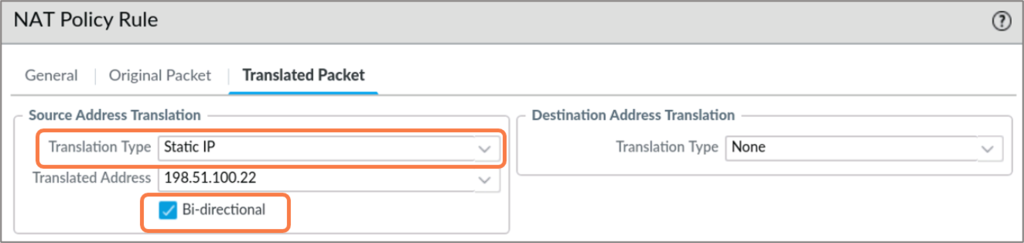
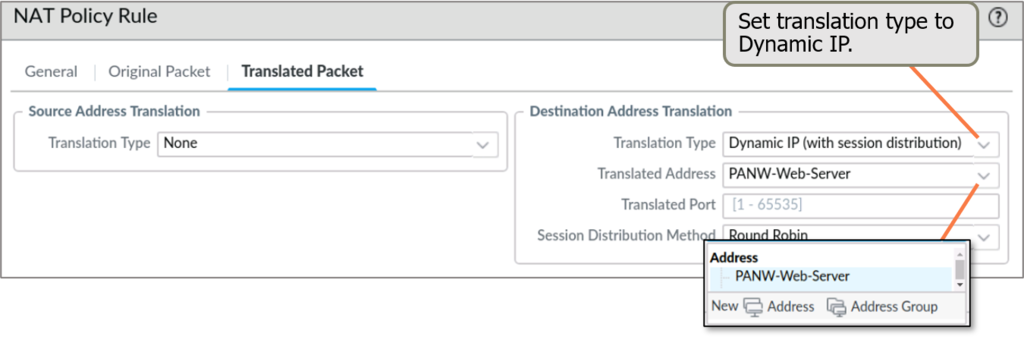
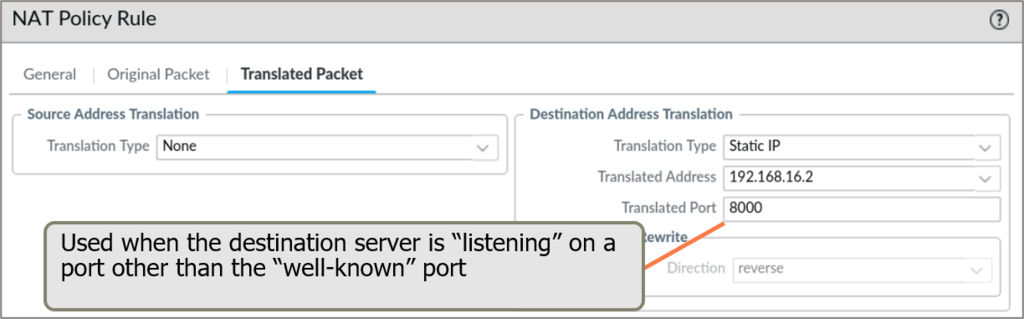
Diagrams: Palo Alto Networks Learning Center, zone-security-security-and-nat-policies: Nat policy rules. Click an image to enlarge.
Pros
- Conserves public IPs and obscures internal topology
- Solves duplicate-subnet conflicts during mergers/acquisitions
- NAT64/NPTv6 support smooths IPv6 migration
Cons
- NAT and Security Policy are evaluated separately — rules must be written against the correct (pre- or post-NAT) address, a common source of misconfiguration
- DIPP oversubscription, if pushed too aggressively, can exhaust port pools under heavy load
- Adds a layer of indirection that complicates troubleshooting and logging correlation
Watch: short GUI walkthroughs
Clips from the Palo Alto Networks Learning Center. They load only when you press play.
Exam Trap
NAT and Security Policy are separate rulebases — a classic exam (and real-world) mistake is writing the security rule against the wrong address. Destination NAT rules are matched and applied first, so the Security Policy rule must reference the original (pre-NAT) destination, not the translated internal address, while the source side of a security rule is also always evaluated pre-NAT.
Self-check: NAT
Source: pan-os/11-1/pan-os-networking-admin/nat
📋 Cheat Sheet — NAT Domain 1
NAT order of operations on PAN-OS: destination NAT is applied BEFORE security policy lookup, source NAT is applied AFTER.
Zone Protection & DoS Protection 10
Learning objectives
- Differentiate Zone Protection profiles (whole-zone) from DoS Protection profiles/rules (specific critical systems)
- List the attack categories a Zone Protection profile can defend against
- Explain why default thresholds usually need tuning per environment
Where Security Policy controls which traffic is allowed, Zone/DoS Protection guards against volumetric and reconnaissance attacks that try to overwhelm the network or specific hosts before policy even matters.
Why
Segmenting a network into zones reduces attack surface, but the zone boundaries themselves (and critical servers behind them) still need defense against floods, port scans, and non-IP protocol abuse.How
These two features are easy to conflate because they sound similar and both defend against similar attack types, but they operate at genuinely different scopes — that difference is the whole point of having both rather than just one:
- Zone Protection profiles — "defend the boundary itself, broadly." Attached to an entire zone, these defend against flood attacks (SYN floods, UDP/ICMP floods), reconnaissance (port scans, host sweeps — attackers mapping out what's alive before attacking it), packet-based attacks (malformed packets designed to exploit parsing bugs), and non-IP-protocol abuse. One profile can be reused across multiple zones with similar exposure (e.g. every internet-facing zone), which is efficient when you have several zones that face the same class of threat.
- DoS Protection profiles/rules — "defend one specific, high-value system, precisely." Attached via a DoS Protection Policy rule to a specific address — an internet-facing database server, for instance — rather than to a whole zone. This exists because a zone-wide profile can't express "this one server matters more than everything else in the zone and needs tighter, dedicated flood/session-exhaustion thresholds" — DoS Protection is the mechanism for exactly that finer granularity.
Both operate before Security Policy is ever consulted — they're a first line of defense against volumetric/reconnaissance abuse that doesn't need App-ID or user context to recognize, so there's no reason to wait for the rest of the classification pipeline to run first.
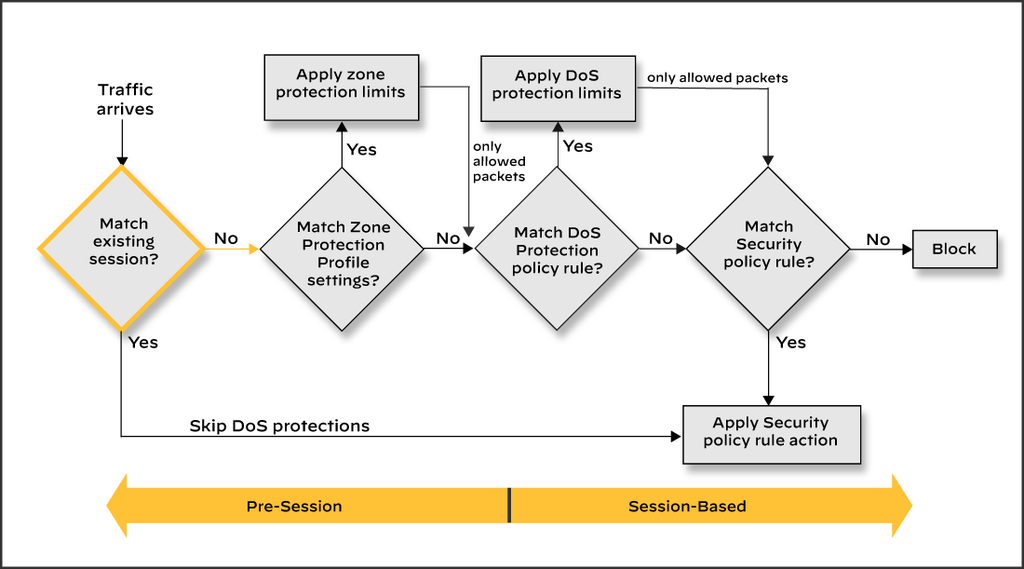
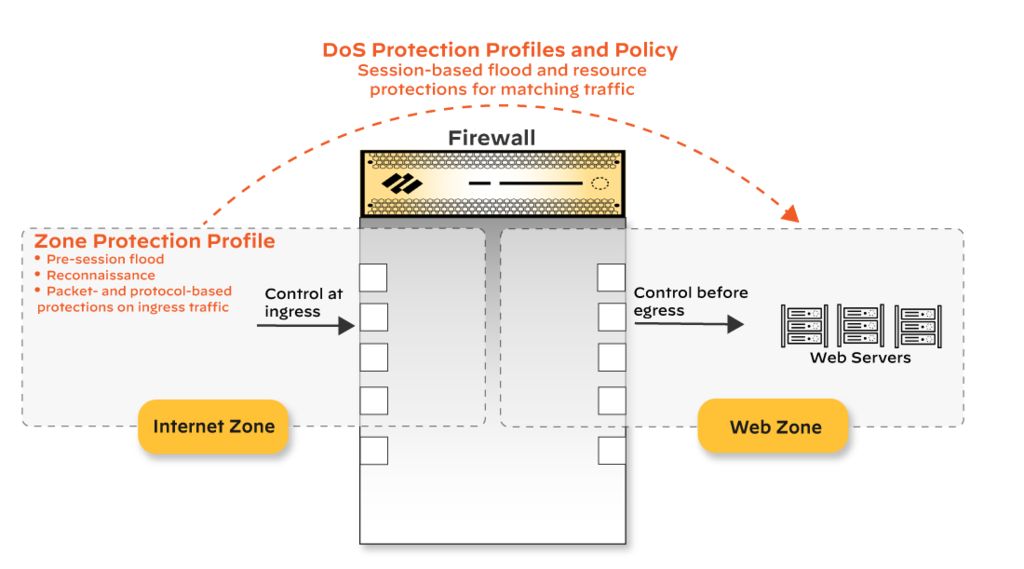
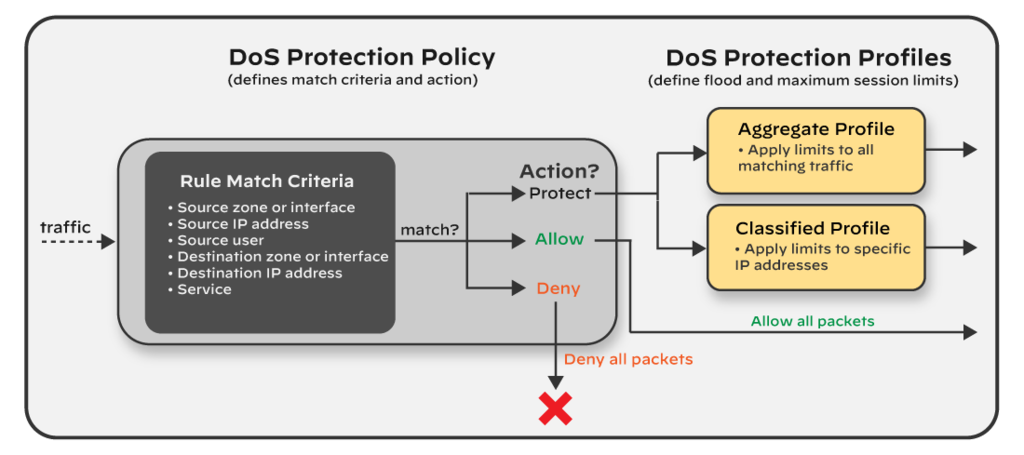
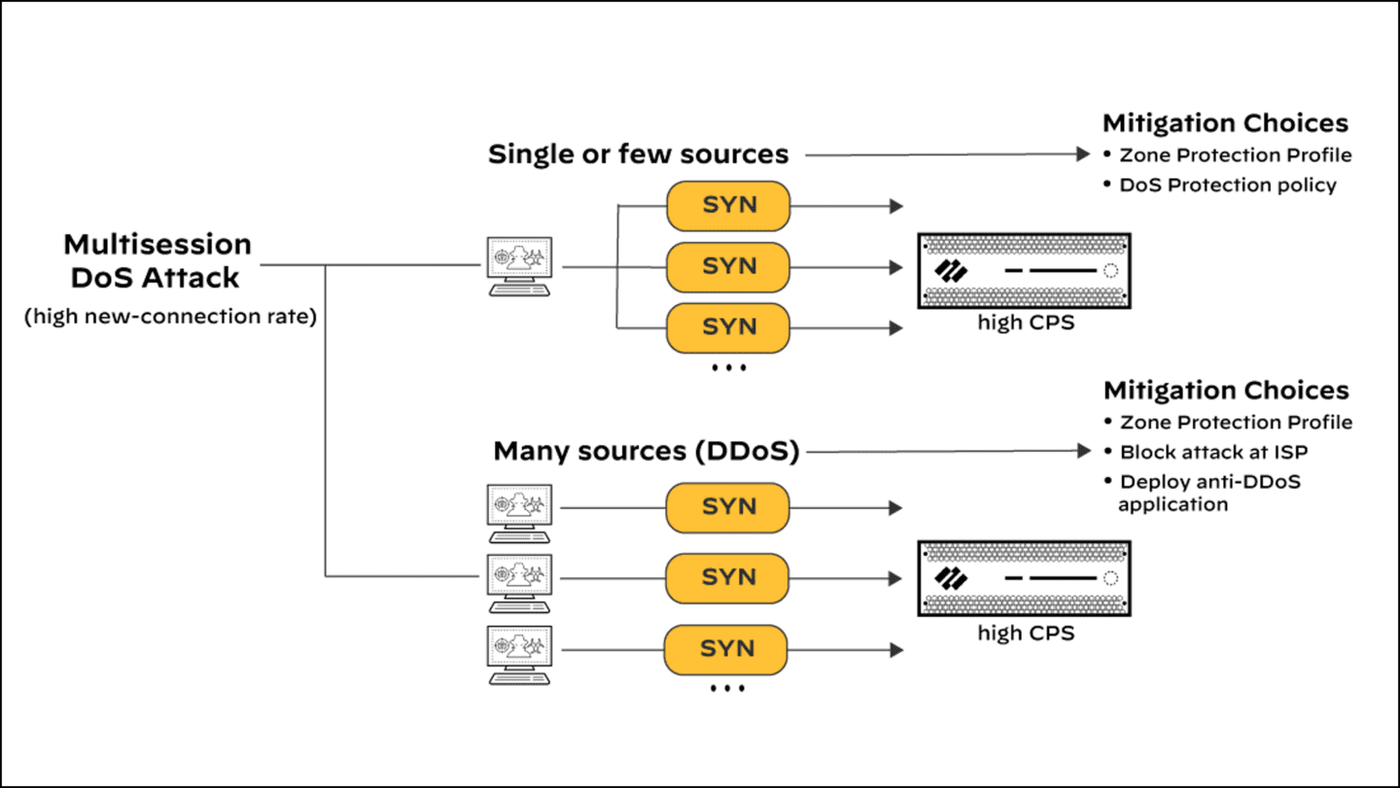
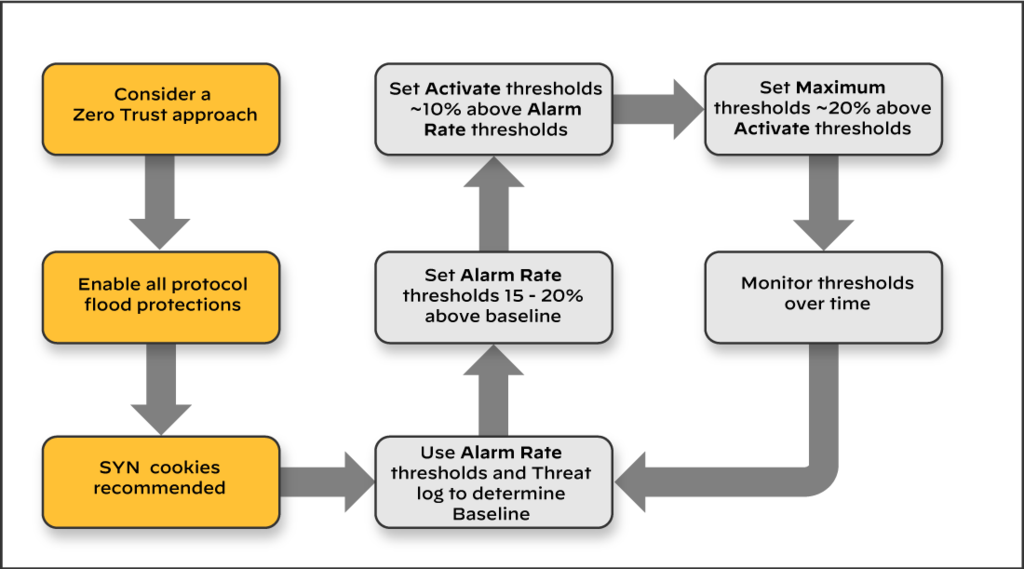
Diagrams: Palo Alto Networks Learning Center, protection-profiles-for-zones-and-dos-attacks: Zone protection profiles; protection-profiles-for-zones-and-dos-attacks: Dos protection profiles. Click an image to enlarge.
Pros
- Included at no extra license cost
- Granular: whole-zone profiles plus per-critical-device DoS rules
- Stops reconnaissance and floods before they reach application-layer inspection
Cons
- Consumes dataplane CPU alongside decryption and other services — undersized hardware needs active monitoring
- Thresholds need tuning per environment; defaults can be too loose or too aggressive
Watch: short GUI walkthroughs
Clips from the Palo Alto Networks Learning Center. They load only when you press play.
Exam Traps
- Zone Protection and DoS Protection are commonly confused: Zone Protection profiles attach to a zone and defend the network broadly (floods, recon, packet-based, non-IP attacks); DoS Protection profiles/rules attach to specific addresses (e.g. one internet-facing server) via a DoS Protection Policy rule. Enabling one does not enable the other, and both operate before Security Policy is ever consulted.
- Zone Protection profile has five sections: Flood Protection, Reconnaissance Protection, Packet-Based Attack Protection, Protocol Protection (non-IP), and Ethernet SGT Protection. Options for spoofed IP addresses and split-handshake session attempts live in the Packet-Based Attack Protection section (IP Drop / TCP Drop).
Self-check: Zone Protection & DoS Protection
Source: ngfw/administration/zone-protection-and-dos-protection
📋 Cheat Sheet — Zone Protection Domain 1
Zone Protection profiles protect the zone itself from floods (SYN, UDP, ICMP), reconnaissance (port scans), and packet-based attacks.
Module Quiz
1. Two Security policy rules could both match a session: a broad "allow any" rule near the top of the rulebase, and a specific deny rule several positions below it. Which rule actually applies to matching traffic?
2. A newly stood-up zone has no explicit intrazone or interzone Security policy rules configured yet. By default, how does PAN-OS handle traffic between hosts in the same zone versus traffic crossing zones?
3. An engineer inherits a rulebase full of legacy port-based rules and wants to identify which ones can be safely converted to App-ID-based rules without breaking production traffic. Which built-in tool should they use?
4. Fifty internal hosts need simultaneous outbound internet access, but the organization owns only two public IP addresses. Which NAT type should be configured?
5. A Security policy rule needs to match inbound traffic destined for an internal server that sits behind a destination NAT rule translating a public IP to the server's private IP. Which destination address should the Security policy rule reference?
6. An engineer configures DIPP with an aggressive oversubscription ratio to conserve public IPs. Under heavy concurrent load, what risk does this introduce?
7. While investigating a SYN flood attack, an administrator discovers legitimate client traffic is also being dropped by an existing DoS/Zone Protection configuration set to Random Early Drop. Which two actions would specifically limit drops to only the attacking sessions? (Choose two.)
8. A customer asks whether enabling Zone Protection and DoS Protection profiles requires a separate paid subscription like Threat Prevention. What is the accurate answer?
9. An organization is migrating a legacy IPv4-only application environment and needs traffic between IPv6-only clients and IPv4-only servers to interoperate. Which PAN-OS feature addresses this?
10. In a Zone Protection profile, under which protection type would you configure defenses against spoofed IP addresses (IP Drop) and split-handshake TCP session establishment (TCP Drop)?