Resilience & Scale
High Availability (HA) 47
Learning objectives
- Explain what an HA pair synchronizes vs. what stays local to each peer
- Distinguish active/passive from active/active deployment and when to choose each
- List the failure-detection mechanisms that can trigger a failover
Pairs (or up to 16-member clusters) of firewalls synchronize configuration and session state so a single device failure doesn't take down the network.
Why
A firewall is a mandatory choke point — if it goes down, traffic either stops or (worse) bypasses inspection. HA removes that single point of failure.How
What actually gets synchronized, and why that specific scope. Two firewalls form an HA pair (or up to 16 as HA-cluster peers), continuously synchronizing network/object/policy configuration and live session state over dedicated HA links. The reasoning behind syncing exactly this and nothing more: config/policy has to match so the passive peer would enforce identical rules if it took over, and session state has to match so an in-progress connection doesn't just vanish the instant a failover happens.
How the peers actually know when to fail over — several independent tripwires, not just one. A dedicated heartbeat connection is the most obvious signal (peer stops responding), but relying on heartbeat alone would miss failures where the firewall is technically alive but functionally broken. So failover can also trigger on:
- Link monitoring — a monitored interface itself goes down
- Path monitoring — a specific destination the firewall is supposed to be able to reach becomes unreachable, even if the firewall's own interfaces look fine
- Missed heartbeats — the peer stops responding on the heartbeat connection itself
- Critical hardware/software component failure — an internal health check on the box itself fails
Having multiple independent detection mechanisms means a failure mode that one method might miss (e.g. the firewall process is technically running but a critical component died) still gets caught by another.
What deliberately stays local, and why that's not an oversight. Firewall-local settings — management IP, admin profiles, logs, ACC data — are not synced. Syncing these would actually be counterproductive: the management IP has to stay distinct so you can reach each physical box individually for troubleshooting even after a failover, and logs/ACC data are historical records of what that specific box actually did, which syncing would just conflate between peers. The tradeoff is that you lose a unified view without extra tooling — which is exactly why Panorama exists as the consolidated, cross-pair operational view.
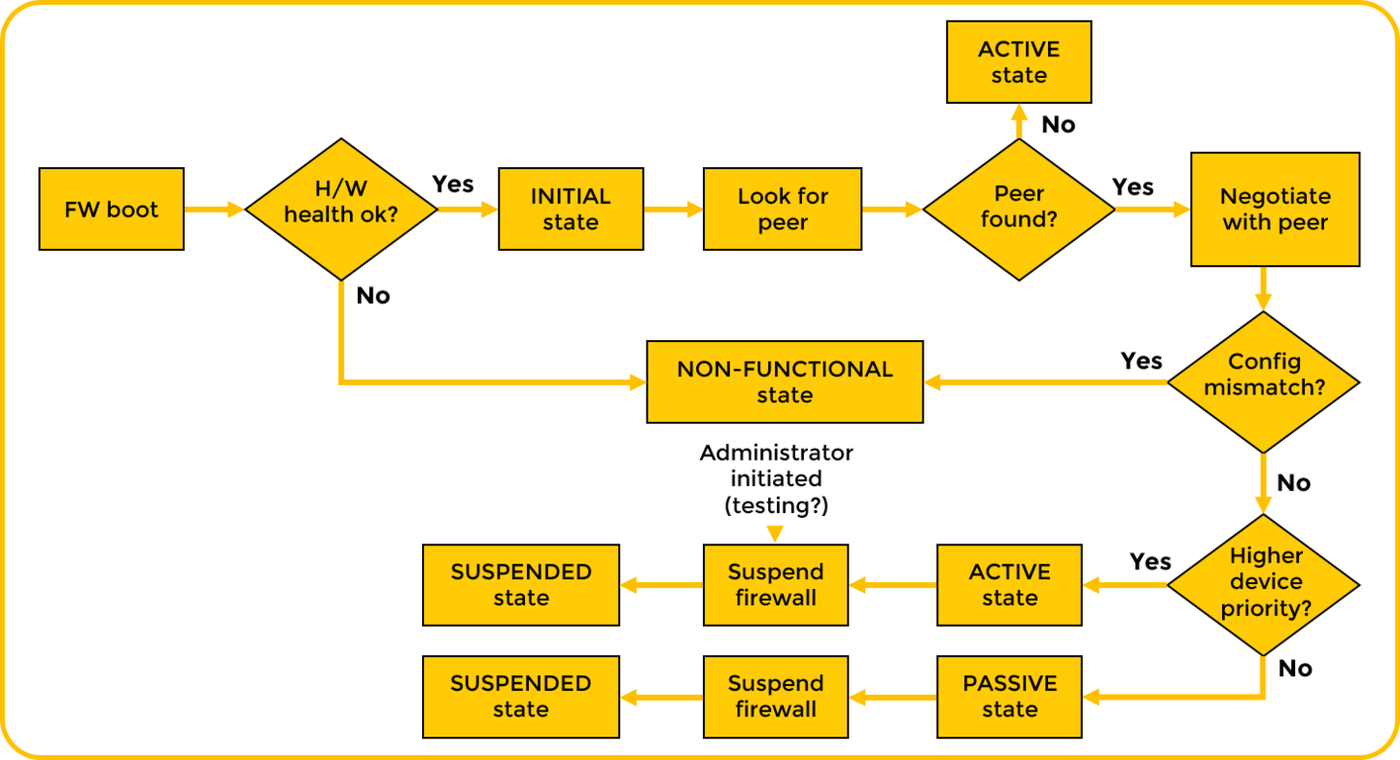
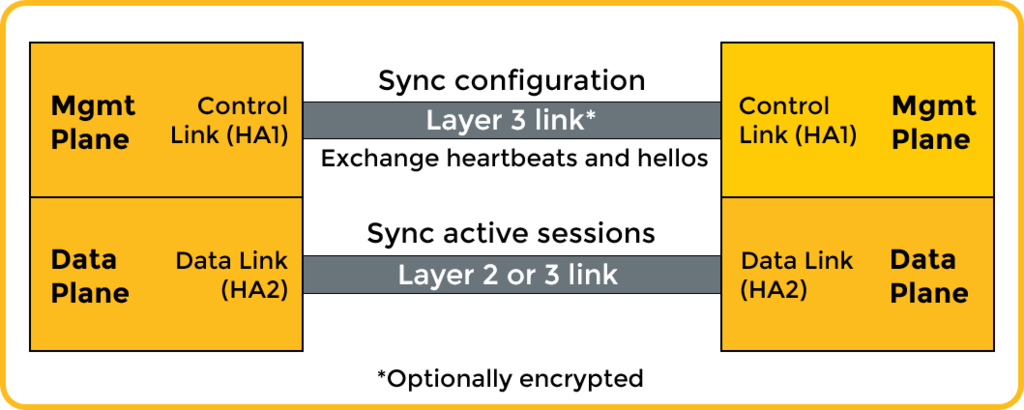
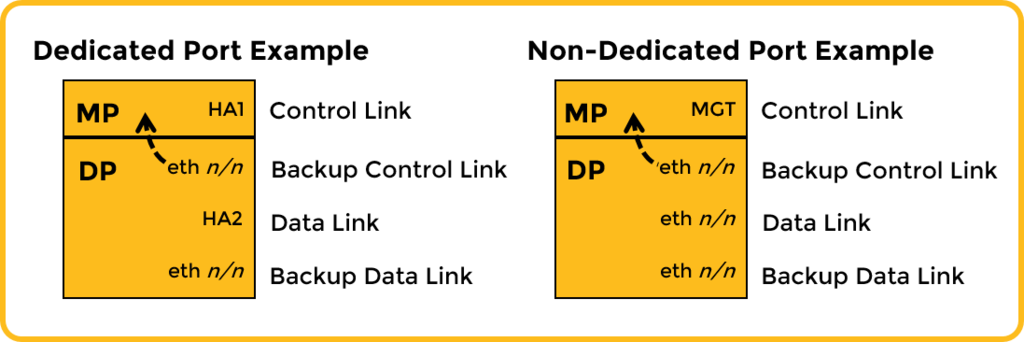
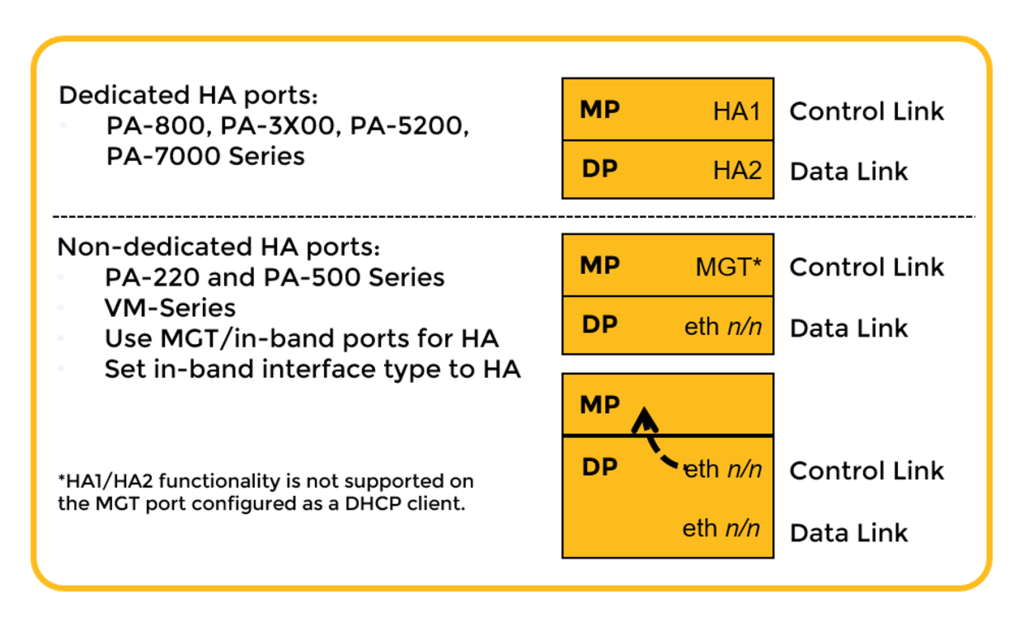
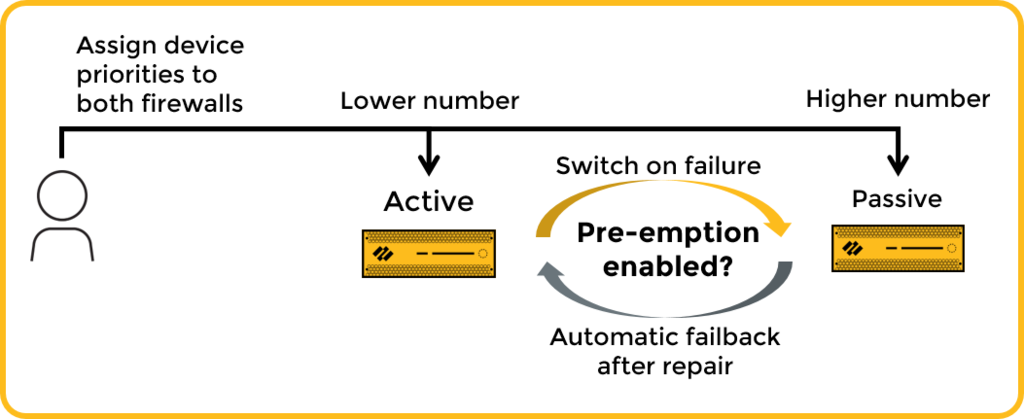
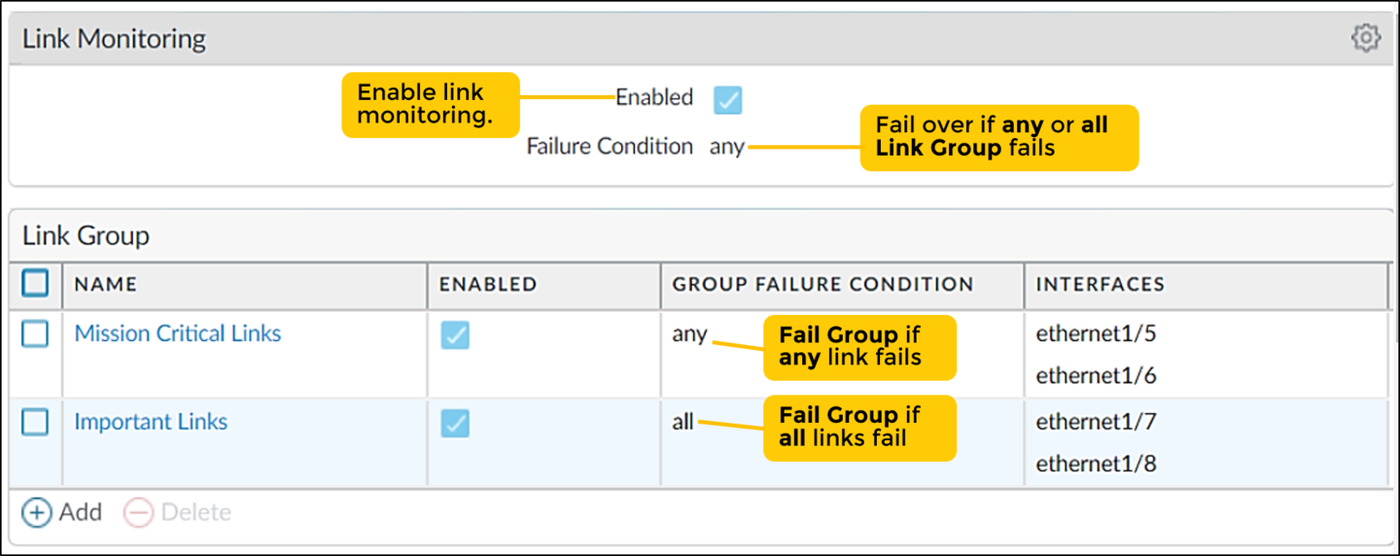
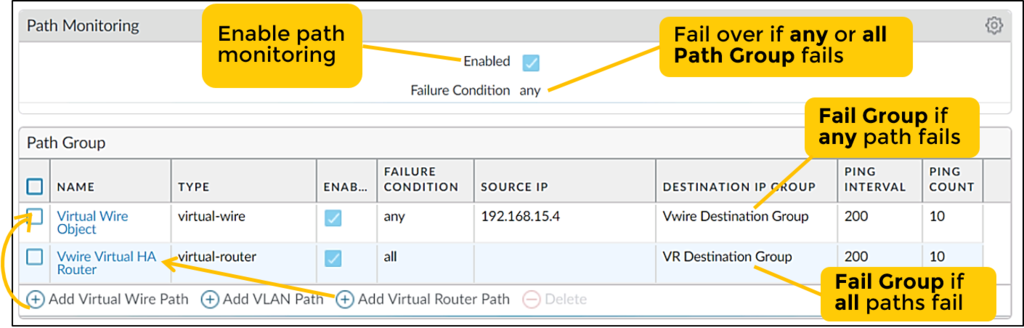
Diagrams: Palo Alto Networks Learning Center, PAN-OS course: Firewall high availability. Click an image to enlarge.
Pros
- Sub-second-to-seconds failover keeps traffic flowing through hardware/software failures
- Active/active or active/passive modes fit different throughput and design needs
- Multiple failure-detection mechanisms (link, path, heartbeat, packet-path health) catch different failure modes
Cons
- Decrypted SSL sessions are not synced — they drop and must re-establish after failover
- Not supported (or limited to active/passive) on some cloud platforms (e.g. no HA on GCP VM-Series; AWS ELB deployments skip firewall HA entirely)
- Local-only data (logs, ACC, mgmt IP) means Panorama is effectively required for a unified operational view
- Doubles hardware/licensing cost per protected segment
Watch: short GUI walkthroughs
Clips from the Palo Alto Networks Learning Center. They load only when you press play.
Exam Traps & Video Insights (Video 3)
- Session Synchronization (HA2) Requirement: HA1 handles control signals and heartbeats, but HA2 synchronizes active TCP/UDP sessions. Omitting HA2 causes all active user connections to drop upon failover!
- Active/Active Throughput Overhead: Active/Active HA does not double overall throughput. Due to HA3 packet forwarding and session ownership sync overhead, average throughput is slightly lower than active/passive.
- Split-Brain Avoidance: If the primary HA1 control link fails while data links remain up, the passive firewall uses management network backup heartbeats to verify peer status before attempting takeover.
- Preemption Risks: Disabling
Preemptiveis recommended in production so that a failed firewall stays in a passive/standby state upon recovery, allowing administrators to troubleshoot hardware or power flaps. - AWS VM-Series HA: AWS does not support active/active or link/path monitoring. HA1 must use the Management interface and HA2 must use
ethernet1/1(HA interface type). An IAM role must be attached to the VM.
Self-check: High Availability Deep Dive
Q1. An HA pair fails over mid-session. Users report their encrypted sessions dropped while plaintext sessions continued. Why?
Q2. What happens if the physical HA1 control link fails but the management backup heartbeat is active?
HA links, prerequisites & failover — exam drill
HA is one of the three highest-frequency dump topics. Almost every question reduces to the facts below.
| Link | Carries | Notes |
|---|---|---|
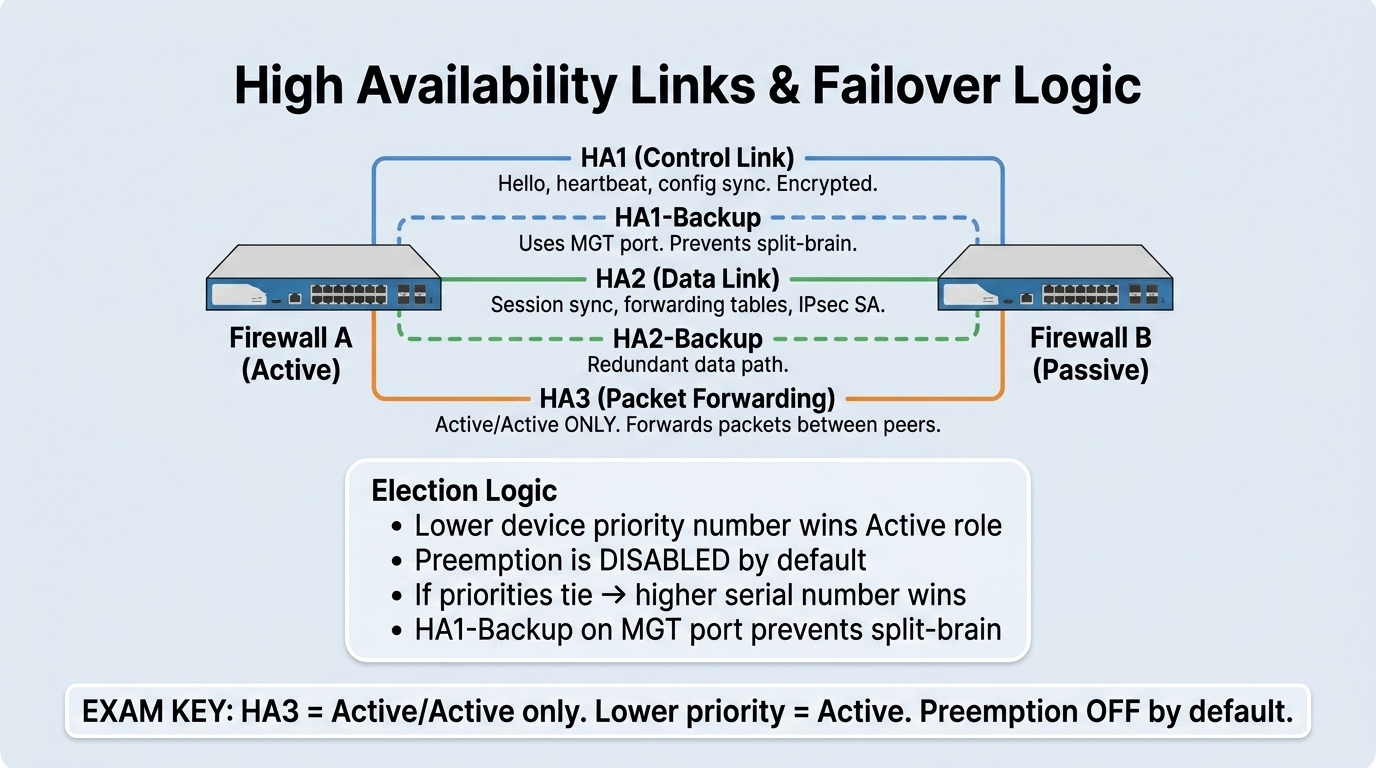
| HA1 — control link | Hellos, heartbeats, HA state, configuration sync, management-plane sync | Loss of HA1 heartbeat directly triggers failover. Add an HA1 backup link. Can run over dedicated HA ports, the MGT port, or an in-band port. |
| HA2 — data link | Session-state synchronization (TCP/UDP sessions, ARP, IPSec SAs, forwarding tables) | Required for stateful failover — without HA2 every active connection drops on failover. Add an HA2 backup. HA2 keep-alive is optional. Unidirectional by default. |
| HA3 — packet-forwarding link | Forwards packets between peers when the receiving firewall isn't the session owner | Active/Active ONLY. Does not exist in Active/Passive. Needed for asymmetric-flow handling. |
HA pair prerequisites (both peers must match): same hardware model, same PAN-OS version, same content/App-ID/Threat versions, the same set of licenses/subscriptions, and the same interface/slot layout and (for VM-Series) the same instance capacity. Mismatched software or content is a classic "HA won't sync / suspended state" cause.
Active/Passive: only the active firewall passes traffic; the passive peer keeps a fully synchronized session table and can forward existing sessions immediately on failover. Preemption is disabled by default — if disabled, a recovered original-active firewall stays passive (best practice, so you can inspect the fault). If a passive firewall "won't take back over after the active recovers", the cause is preemption disabled.
Active/Active: both firewalls process traffic. The session owner is whichever firewall received the first packet of the session (it runs App-ID / Content-ID and owns logging); the session-setup device can be distributed by source-IP hash / primary. Requires HA2 + HA3. Use floating IP addresses (with virtual MAC) or ARP load-sharing for symmetric flow and seamless failover. Both peers still run identical policy and config.
Link vs Path monitoring: Link monitoring watches the physical up/down state of specified data interfaces (L2, L3, virtual wire, or AE) — a monitored link down can trigger failover. Path monitoring sends ICMP pings to destination IPs beyond the firewall (ISP gateway, upstream router, external DNS) — use it when interfaces stay up but external connectivity is lost. Neither is required for HA to function.
HA upgrade order (A/P, minimal downtime): upgrade the passive firewall first → suspend the active so it fails over to the now-upgraded peer → upgrade the old active → return it to functional (fail back if preemption is on).
Slow failover with a downstream LACP switch (30–45 s): enable LACP pre-negotiation in the AE interface's LACP tab so the passive firewall pre-negotiates LACP with the switch before it becomes active.
Exam Rules of Thumb:
- Priority Rule: Lower numerical priority value wins (Priority 10 beats Priority 20).
- Preemption: Must be explicitly enabled on both peers for the preferred active box to reclaim active role after reboot. Recommended disabled during maintenance flaps.
- Split-Brain Guard: HA1 Backup link (typically MGT interface) prevents dual-active split brain if physical HA1 fails.
| HA Mode | Description | Use Case | Session Sync | Failover Speed |
|---|---|---|---|---|
| Active/Passive | One firewall passes traffic, one remains standby | Most common production standard | Yes (via HA2) | Sub-second (fast) |
| Active/Active | Both firewalls actively process traffic | High throughput, asymmetric routing environments | Yes (with HA2 + HA3) | Fast (with session transfer overhead) |
CLI Verification Commands
More exam traps
- High CPU on the active firewall does not trigger failover. Triggers are: HA1 heartbeat loss, link-monitor failure, path-monitor failure, and critical hardware/software (process) failure.
- "Same virtual MAC / floating IP" is an Active/Active concept — an answer offering it as an Active/Passive requirement is wrong (A/P uses the actual active-peer MAC and gratuitous ARP on failover).
- Session sync = HA2. Config sync = HA1. Don't put session sync on HA1 or the management interface.
- HA1 and HA2 IPs must be different on each peer (they're a point-to-point link), not identical.
Source: ngfw/administration/high-availability; Palo Alto Next-Gen Firewall (NGFW) Master Cheat Sheet Domain 1.3
NGFW Clustering 48
Learning objectives
- Explain how clustering differs architecturally from legacy active/active HA
- Identify what HSCI replaces and why that simplifies cabling and failover
- Recognize that clustering buys redundancy, not additive throughput
A newer alternative to legacy HA for data-center-scale deployments: two firewalls run a dual-active dataplane behind a single active control plane, appearing to the network as one device.
Why
Data centers need very high bandwidth/reliability, and legacy active/active HA's three separate links (HA1/HA2/HA3) and floating IPs add complexity that slows failover and complicates multi-chassis link aggregation.How
Why replacing three links with one actually matters, not just cabling convenience. Legacy active/active HA runs three separate links — HA1 for control traffic, HA2 for session/state sync, HA3 for packet forwarding between peers — plus floating IPs for failover. Every one of those links is a thing that can be individually misconfigured or fail, and coordinating state across three separate channels adds real latency to failover decisions. Clustering collapses all of that into a single High-Speed Chassis Interconnect (HSCI) link, which is why cluster failover lands under one second — there's simply less to coordinate across when everything travels one high-speed path instead of being split across three.
What "the pair blends active/active and active/passive" actually means operationally. Both chassis run active dataplanes (like active/active HA), but there's a single active control plane governing them (like active/passive HA) — this hybrid is what lets neighboring network devices see the whole cluster as one single L2/L3 device rather than two separate firewalls they need separate adjacency/routing logic for. It natively supports multichassis link aggregation (MC-LAG) and integrates with existing switch-vendor multi-chassis technologies (Cisco VPC, Arista MLAG, Juniper QFX) specifically because "look like one device to the network" only actually works if the surrounding network gear's own link-aggregation model agrees with that fiction.
Why capacity doesn't double — the tradeoff this design deliberately makes. Because both chassis are actively processing traffic as one coordinated system rather than one node sitting idle as a standby, you might expect combined throughput. But the whole point of clustering is redundancy and fast failover, not additive scale-out — total usable capacity stays that of one node's worth, with the second chassis providing resilience rather than extra headroom. Confusing this with a scale-out architecture is the single most common mistake made about this feature.

Pros
- Failover in under one second — faster than legacy HA
- Single HSCI connection instead of three separate HA links — simpler cabling/config
- No floating IPs required; fewer IP addresses consumed overall
- Configured through Panorama for ease of deployment
Cons
- Hardware-specific — only supported on select high-end chassis platforms (PA-7500, PA-5540/50/60/70/80 on newer PAN-OS)
- Combined capacity is still one node's worth, not additive — it buys resilience, not extra throughput
- Requires a specific, fairly recent Panorama + Clustering Plugin version combination
Exam trap
Clustering combines active/active and active/passive concepts over a single HSCI link — don't confuse it with legacy HA's three separate HA1/HA2/HA3 links. And remember capacity is that of one node, not doubled: clustering is for resilience and fast failover, not scale-out throughput.Self-check
Q1. A design team wants to double their effective firewall throughput by deploying two chassis in an NGFW cluster. Is this a valid expectation?
Q2. What single link replaces the HA1/HA2/HA3 links used by legacy active/active HA in an NGFW cluster deployment?
Source: ngfw/administration/ngfw-clustering
Virtual Systems (vsys) 49
Learning objectives
- Explain what a vsys isolates and what it still shares with other vsys on the same box
- Describe the admin role hierarchy for vsys (Superuser, Device admin, vsysadmin, vsysreader)
- Identify the network objects a vsysadmin cannot configure
Separate, logically-independent firewall instances running inside one physical (or VM) firewall — each with its own policy, admins, and traffic separation.
Why
MSSPs need to serve multiple customers, and large enterprises need to separate business units, without buying a physical firewall per tenant.How
What actually gets isolated versus what's structurally shared, and why the split falls where it does. Each vsys is independently managed with its own policy and its traffic kept separate from every other vsys on the same box — from a tenant's perspective, it behaves like its own dedicated firewall. But the underlying physical hardware — interfaces, VLANs, virtual routers, IPSec/GRE tunnels, DHCP, DNS proxy, QoS — is genuinely one shared resource pool underneath all the vsys, because there's only one actual box with one actual set of physical interfaces. Splitting that hardware layer per-tenant would defeat the entire point of vsys, which is letting many logical firewalls share one physical investment.
Why the admin role hierarchy exists as four distinct tiers, not one "admin" role. Because network-level objects are genuinely shared infrastructure that no single tenant should be able to unilaterally reconfigure (changing a shared virtual router could break every other tenant on the box), admin roles are scoped in a hierarchy: Superuser and Device administrator can touch the shared network layer; vsysadmin and vsysreader are scoped strictly to their own vsys's policy and objects, with no path to the shared network-level configuration at all — not a permissions bug, a structural boundary matching who's actually allowed to affect shared infrastructure.
The one deliberate exception — why User-ID specifically gets a cross-vsys sharing mechanism. Identity mapping is exactly the kind of data that's genuinely useful shared across tenants sitting on the same box (the same user might traverse traffic handled by different vsys), so one vsys can be designated a "User-ID hub" to share IP-to-username mappings across all vsys on the device — a narrow, purpose-built exception to the otherwise strict per-vsys isolation, rather than a general data-sharing mechanism.

Pros
- One HA pair can serve many tenants/business units — big capex/opex savings vs. one firewall each
- Segmented administration: each tenant controls its own policy without touching others'
- Enables per-department/customer billing or chargeback for firewall services
Cons
- Base vsys count varies by platform; scaling beyond it needs a paid Virtual Systems license
- Not supported on every platform (e.g. PA-220 and PA-800 don't support vsys at all)
- HA pairs must match vsys capability on both peers, adding a design constraint
- All vsys still share the same physical dataplane capacity — noisy-neighbor performance impact is possible
Exam trap
A vsysadmin/vsysreader role cannot touch shared network-level objects — interfaces, VLANs, virtual routers, IPSec/GRE tunnels, DHCP, DNS proxy, QoS — those stay under Device administrator control. Also remember vsys is not universal: platforms like the PA-220 and PA-800 don't support it at all.Self-check
Q1. A vsysadmin for "Tenant A" complains they cannot modify a VLAN interface shared with "Tenant B". Is this a misconfiguration?
Q2. An MSSP wants to onboard a new customer on a PA-220 using a dedicated vsys for isolation. Will this work?
VSYS setup & inter-VSYS routing — exam drill
- Enable multi-vsys mode first:
Device > Setup > Management >
      General Settings > Multi Virtual System Capability
— requires a reboot. - A new vsys is a blank slate — no interfaces, zones, virtual routers, or policies are inherited or copied from another vsys or from shared. You build everything from scratch. It does not get its own management interface (MGT is global).
- Assign an interface to a vsys in
Network > Interfaces(select the vsys), then bind it to a security zone within that vsys. Each vsys normally gets its own dedicated virtual/logical router for full routing isolation — routing isolation comes from the router assignment, not the vsys boundary itself. - Resource quotas can be set per vsys: sessions, security/NAT/decryption/QoS rules, security zones, address objects, VPN tunnels, SSL-decrypt sessions, etc.
- The management plane is shared across all vsys; the data plane (interfaces, zones, routing) is segmented per vsys.
- Inter-VSYS traffic that stays inside the box uses the External
zone type as the logical source/destination. To make it work you need: an External
zone in each vsys, routing between the vsys' routers (inter-VR static routes or a shared
router), Security policy permitting the flow, and each vsys made
visible to the other (
Device > Setup > ... Visible Virtual
      Systems
/ vsys import list). If routing + policy look correct and traffic still fails, the missing "visible virtual systems" step is the usual answer. - Shared Gateway (SG) = a shared external interface that lets multiple vsys reach the internet through a single public IP (shared upstream egress), with security policy still enforced. Different purpose from an External zone.
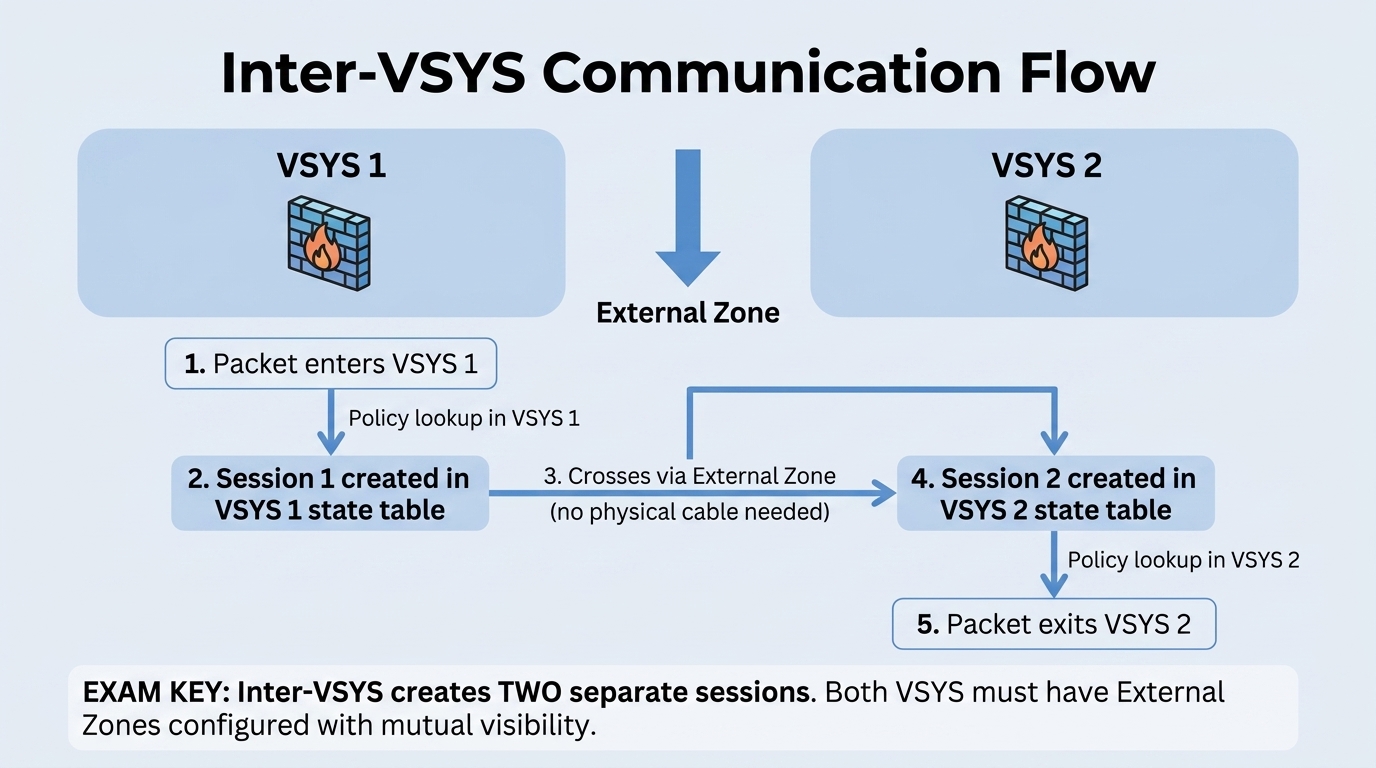
Master Cheat Sheet Inter-VSYS Blueprint (Domain 2.2):
- Step 1 (External Zone): Under
Network > Zones, setType = Externalin each communicating VSYS. - Step 2 (Mutual Visibility): In each VSYS configuration, check the peer VSYS under
Visible Virtual System. - Step 3 (Dual Security Policies): Policy 1 in VSYS 1 (Internal → External Zone); Policy 2 in VSYS 2 (External → Internal Zone). Both must allow the flow!
- Session Table Exam Trap: Intra-VSYS traffic creates one session; Inter-VSYS creates two sessions.
- Default VSYS:
vsys1is created by default and cannot be deleted. Multi-vsys requires enabling underDevice > Setup > Managementand a firewall reboot.
Exam trap
Inter-VSYS communication is never automatic and is not enabled by "putting both vsys interfaces in the same zone" or a global "allow cross-VSYS" toggle. It needs External zones + inter-VR routing + Security policy + mutual vsys visibility. The dumps give inconsistent "correct" answers here (shared VR / Shared Gateway / inter-VSYS links) — the blueprint-accurate mechanism is the External zone with the pieces above; Shared Gateway is specifically for shared internet egress.Source: ngfw/administration/virtual-systems; Palo Alto Next-Gen Firewall (NGFW) Master Cheat Sheet Domain 2.2
Module Quiz
1. After an active/passive HA failover, an admin logs into the new active firewall and needs to know what carried over automatically. Which data is synchronized between HA peers by default?
2. During a scheduled maintenance failover on an active/passive pair, users report their HTTPS sessions (which were being decrypted for inspection) disconnected and had to reconnect, while unencrypted sessions kept flowing. Is this expected?
3. An engineer is configuring failure-detection for a new HA pair and needs mechanisms that trigger a failover for reasons other than a missed peer heartbeat. Which two mechanisms fit? (Choose two.)
4. A data-center team running legacy active/active HA across HA1/HA2/HA3 links wants faster, simpler failover and asks whether NGFW Clustering is worth migrating to. What's the accurate pitch for Clustering?
5. A capacity-planning team assumes deploying an NGFW cluster across two chassis doubles their effective dataplane throughput versus a single chassis. Is this assumption correct?
6. Which single link does NGFW Clustering use in place of the separate HA1, HA2, and HA3 links required by legacy active/active HA?
7. An MSSP wants to serve five separate customers on one physical firewall, with each customer administering only their own policy and objects, without buying a firewall per customer. Which capability directly addresses this requirement?
8. A vsysadmin scoped to "Tenant A" opens a support ticket complaining they cannot modify a VLAN interface shared with "Tenant B." Which objects remain outside a vsysadmin's control by design, requiring a Device administrator instead?
9. An MSSP is scoping hardware for a new customer that needs dedicated vsys-based isolation. Which platform in this list does NOT support Virtual Systems at all, regardless of licensing?
10. Which configuration option enables LACP pre-negotiation on an Aggregate Ethernet interface in an active/passive HA pair?
11. In an active/active HA pair, what is the specific purpose of the HA3 link?
12. What resource can be explicitly assigned/limited when configuring a new firewall virtual system (VSYS)?
13. Two VSYS on the same firewall each have their own virtual router, inter-VR static routes, and a correctly configured external zone with permitting Security policy rules — but traffic still can't pass between the two VSYS. What's missing?
14. What is the recommended upgrade process for an active/passive HA pair when downtime must be minimized?
15. Which two statements correctly describe the "external zone" concept used with virtual systems (VSYS)? (Choose two.)
16. Which zone type is required for two zones in different VSYS to exchange traffic without that traffic leaving the firewall chassis?
17. Which two interface types are supported for HA link monitoring? (Choose two.)