Firewall Fundamentals & Admin
PA-Series: Install, Initial Setup & Onboarding 11a
Learning objectives
- Recall the factory defaults and what must change on first login
- Order the initial setup steps: management, DNS, NTP, commit, connectivity, registration
- Explain when a data port with service routes replaces Internet access on the MGT port
- Know the requirements and traps of zero touch provisioning (ZTP)
The PA-Series is the hardware form factor. Every hardware install starts the same way: reach the firewall on its dedicated management (MGT) port or the serial console, make it manageable, then give it the connectivity it needs for licenses and content updates.
Why
A new firewall ships with a well-known address and password. Until the management plane is secured and reachable, nothing else (licenses, updates, Panorama, policy) can happen, so the order of the first steps matters.How
Factory defaults: MGT address 192.168.1.1, login admin/admin. All initial
configuration through the web interface must be done from the MGT port, even if you plan to manage the firewall from a
data port later. A direct serial connection to the console port works too (9600-8-N-1).
| # | Step | Key detail |
|---|---|---|
| 1 | Install and power | Connect the second power supply on dual-PSU models |
| 2 | Gather management details | MGT IP address, netmask, default gateway, DNS server |
| 3 | Connect | Console cable, or laptop to MGT and browse to https://192.168.1.1 (put the laptop on 192.168.1.0/24) |
| 4 | Change the default password | Forced on first login since PAN-OS 9.0.4. At least 8 characters, one lowercase, one uppercase, and one number or special character |
| 5 | Configure the MGT interface | Static IP or DHCP client. Restrict permitted IP addresses. Leave Telnet and HTTP off because they are plaintext |
| 6 | DNS and NTP | Device > Setup > Services. You must configure at least one DNS server manually, the firewall will not learn DNS from another source. NTP such as pool.ntp.org |
| 7 | General settings | Hostname, domain (a label only), login banner without welcoming wording |
| 8 | Commit | Can take up to 90 seconds. If you changed the MGT IP you lose the session |
| 9 | Cable to the management network | MGT to a switch port set to auto-negotiate. PA-5450 needs a Palo Alto Networks certified SFP/SFP+ instead of RJ-45 |
| 10 | Verify connectivity | Device > Troubleshooting > Update Server Connectivity |
| 11 | Register, license, update | Register in the Customer Support Portal, activate subscriptions, download content and software |
Onboarding after the first boot
- Panorama or Strata Cloud Manager. Both can manage the firewall centrally after onboarding.
- ZTP (zero touch provisioning). Ship the firewall to a branch and it joins Strata Cloud Manager on its own after it reaches the Palo Alto Networks ZTP service. Needs PAN-OS 10.2.3 or later on a supported model (PA-415 and PA-445, PA-1400, PA-3400, PA-5410, PA-5420, PA-5430, PA-5440), the serial number and claim key, and a DHCP server on the network. ZTP needs a direct Internet path, since an explicit web proxy is not supported. A tenant-to-tenant migration is not possible.
Pros
- Dedicated MGT port keeps management separate from the data plane
- Serial console works even when the network is misconfigured
- ZTP removes manual staging for branch rollouts
Cons
- Well-known defaults are a risk if the first steps are delayed
- DNS is not inherited from anywhere, so a missing DNS entry breaks license and update retrieval
- ZTP has strict prerequisites (model, PAN-OS version, DHCP, no proxy)
Watch: short GUI walkthroughs
Clips from the Palo Alto Networks Learning Center. They load only when you press play.
Exam trap
Do not commit on a ZTP firewall before it shows up in Strata Cloud Manager. A local commit disables ZTP and onboarding fails. Also, first-time setup must use the MGT port or console even if the plan is to manage the firewall from a data port afterward.
Self-check: PA-Series setup
Curriculum: PAN-OS course, "Connecting to a Firewall" lesson. Sources: NGFW getting-started pages (Perform the Initial Configuration for a NGFW, Onboard ZTP Firewalls) in the local docs mirror.
Connecting & Managing a Firewall 11
Learning objectives
- Identify the management interfaces (Web UI, CLI, XML API, Panorama) and how each is used
- Explain candidate vs. running configuration and the commit workflow
- Describe how to filter, preview, and validate a commit before activating it
Every configuration change on PAN-OS goes through a staging step before it takes effect — understanding that workflow is the first practical skill in running a firewall, before you ever touch a security rule.
Why
A firewall is a live choke point; pushing every keystroke straight to the running network would be dangerous. PAN-OS separates "what you're editing" from "what's actually enforcing traffic" so mistakes can be caught before they go live.How
Four ways in, one underlying config model. Admins can reach the firewall via the Web Interface (HTTPS, the primary day-to-day GUI), the CLI (SSH/console — with distinct operational mode for running/monitoring commands versus configure mode for making changes), the XML API (HTTP/HTTPS, built for scripting and third-party integration rather than a human clicking through screens), or Panorama (centralized management pushing config to many firewalls as a fleet). Whichever door you come in through, every single edit lands in the same place underneath: the candidate configuration.
Why the candidate/running split exists at all. The firewall is sitting inline, actively enforcing traffic in real time — if every keystroke in the Web UI took effect instantly, a half-finished edit or a typo could disrupt live traffic mid-change. So PAN-OS deliberately separates "what you're currently editing" (the candidate config, a working draft that has zero effect on traffic no matter how much you change it) from "what's actually enforcing traffic right now" (the running config). Nothing crosses from one to the other except through an explicit Commit — closing your browser tab, logging out, or even a device reboot doesn't discard or apply a candidate config on its own, it just sits there until someone commits or discards it.
Three distinct things you can do at commit time, each answering a different question:
- Validate — "is this syntactically and semantically correct?" A full check for errors and broken dependencies, with zero traffic impact, because it doesn't actually commit anything — it's a dry run purely for catching mistakes early.
- Preview — "exactly what will change?" A color-coded diff against the current running config, so you can visually confirm the commit does what you think it does before committing for real.
- Commit — actually pushes the candidate config's changes into the running config, at which point (and only at which point) they start enforcing traffic.
Commits can also be scoped — to just your own edits, another specific admin's, or by location (shared objects, one vsys, device/network settings) — which is what lets multiple admins work on the same firewall concurrently without necessarily pushing each other's unfinished changes live. If a commit is already running, new ones queue up rather than colliding, and the Task Manager is where you track or cancel anything pending.

Pros
- Candidate/running separation lets you stage and review large rule changes safely
- Validate-before-commit catches syntax and dependency errors with zero traffic risk
- Partial/filtered commits let multiple admins work concurrently without stepping on each other
Cons
- Partial commits have hidden dependencies — editing an object someone else changed can force their change into your commit
- A large uncommitted candidate config can drift far from what's actually running, confusing troubleshooting
- Never exposing the management interface to untrusted zones is a discipline, not a default — it must be enforced deliberately
Watch: short GUI walkthroughs
Clips from the Palo Alto Networks Learning Center. They load only when you press play.
Exam Trap
A candidate config edit does not affect traffic until commit — questions love to describe a change "made" in the Web UI and ask whether it's enforced yet. It isn't, until Commit completes. Also remember Validate performs a full syntax/dependency check with zero traffic impact — it is not the same as Preview, which only shows a diff.
Self-check: Connecting & Managing a Firewall
Source: pan-os/10-2/pan-os-admin/firewall-administration/management-interfaces; ngfw/help/10-1/web-interface-basics/commit-changes
Securing the Management Interface 11b
Learning objectives
- State what the dedicated MGT interface is for and what it structurally cannot do
- List the required hardening steps: static IP, Permitted IP Addresses, minimal services, out-of-band placement
- Recall the CLI to set the MGT interface as a DHCP client vs. static, and where hostname/NTP/service routes live
The dump questions return to the management interface constantly — almost always testing the same handful of facts about what it is, what it can't be, and how to lock it down.
Why
The MGT interface is the firewall's front door. Recent PAN-OS vulnerabilities were only exploitable where the management interface was reachable from the internet, so "never expose MGT, restrict it to a trusted management network" is now a hard best-practice the exam expects you to pick every time.How
- What it is: a dedicated out-of-band interface for administrative access (Web UI, CLI, XML/REST API) and for fetching dynamic content updates (App-ID, Antivirus, Threat, WildFire, URL, GlobalProtect client) and reaching services like NTP, DNS, Panorama, syslog, and the Palo Alto update servers.
- What it structurally cannot do: it is a management-plane interface — it cannot be assigned to a security zone, a virtual/logical router, or a virtual wire, and it never carries or routes transit user traffic. Security policy does not apply to it. It also can't be a Layer 3 data interface.
- Required hardening (best practice, and the exam's "correct answer" pattern):
assign a static IP (not DHCP) on a dedicated management network /
VLAN; populate Permitted IP Addresses (
Device > Setup
          > Management > Management Interface Settings
) so only trusted admin hosts/subnets can connect; enable only HTTPS and SSH (and SNMP/ping only if needed) — disable HTTP and Telnet; never make MGT internet-facing. - If you can't use the dedicated port (e.g. cloud/VM with limited NICs), you can enable management services on a data-plane interface via an Interface Management Profile — still restrict source IPs, and still never expose it to Untrust.
- Service routes: by default all these services egress the MGT interface.
Device > Setup > Services > Service Route Configurationlets you send specific services (updates, DNS, Panorama, syslog) out a data-plane interface instead — used when MGT has no internet path. - CLI facts the dumps ask verbatim: DHCP client —
set deviceconfig system type dhcp-client; static —set deviceconfig system type static ip-address <x> netmask <y> default-gateway <z>. Hostname is set atDevice > Setup > Management(then commit). NTP is atDevice > Setup > Services.
Exam Traps
- The MGT interface cannot be put in a zone, a virtual router, or a virtual wire — any answer that says "assign the management interface to a security zone / virtual router" is wrong.
- Security policy does not gate management access — you don't "write a security rule to allow HTTPS to MGT". You assign an IP, enable the service, and set Permitted IP Addresses.
- "Best practice to secure MGT" → out-of-band management network + restricted access list (Permitted IP Addresses). Changing the port from 443, adding redundant MGT IPs, or enabling HTTP for speed are all wrong.
- The MGT interface is used for dynamic updates too, not just admin login — a "which statement describes a capability of the management interface" answer that only says "administrative access" and omits updates can still be the best of the offered options, but watch the wording.
Self-check: Securing the Management Interface
Source: ngfw/administration/firewall-administration/manage-firewall-administrators; pan-os-admin/getting-started/manage-firewall-administrators/perform-initial-configuration; pan-os-cli/manage-configuration/set-up-management-interface
Admin Accounts & Role-Based Access 12
Learning objectives
- Distinguish local from externally-authenticated admin accounts
- Explain the built-in Dynamic roles vs. custom Role Based admin profiles
- Describe why every admin should get their own account instead of sharing "admin"
Every firewall ships with a default admin superuser account — real deployments
replace shared use of that account with individually-attributable, least-privilege admin
accounts.
Why
Shared credentials make it impossible to know who made a change, and a superuser account handed to every operator violates least-privilege. Separate, scoped accounts protect the firewall from accidental or malicious misconfiguration and make every change individually auditable.How
Two independent questions get answered separately here — "how does this admin prove who they are" and "what are they allowed to do once they're in" — and PAN-OS lets you mix and match answers to each:
- Local accounts — "everything lives on the firewall itself." Username/password, SSH keys, or client certificates, all stored and checked on the box, with role assignment also done locally. The limitation worth knowing: local accounts don't support access domains, so on a multi-vsys box you can't use a purely local account to scope an admin to just one or two specific vsys the way external authorization can.
- Non-local (external) accounts — "authentication and/or authorization happen off-box." Two different depths of "external" exist here, and mixing them up is an easy mistake: a local admin account can point at an external MFA/SAML/Kerberos/ TACACS+/RADIUS/LDAP service just to check the password — authentication only, with the admin's role still assigned locally on the firewall. Going further, SAML, TACACS+, or RADIUS can own authorization too, via Vendor-Specific Attributes (for TACACS+/RADIUS) or SAML attributes that map directly to a role, access domain, and vsys — meaning the entire admin identity, including what they're allowed to touch, is defined and controlled centrally on the external server, not on the firewall at all.
Then, separately, what "role" actually means:
- Dynamic roles — built-in options (Superuser, Superuser read-only, Device administrator, Device administrator read-only, Virtual system administrator, and its read-only variant). These are maintained by Palo Alto, not you, which means they automatically cover whatever new feature areas ship in a PAN-OS release — an admin with a Dynamic role never "loses" visibility into something new after an upgrade.
- Role Based (custom Admin Role profiles) — you define exactly which web UI/CLI/XML API areas a job function is allowed to see or change, which is what gives genuine least-privilege scoping (a helpdesk admin who can view logs but not touch policy, say). The tradeoff is the mirror image of Dynamic roles' strength: because you defined the scope manually, it does not automatically expand to cover new features added in a later upgrade — someone has to remember to go back and update the profile, or an admin silently loses visibility into something new that shipped.
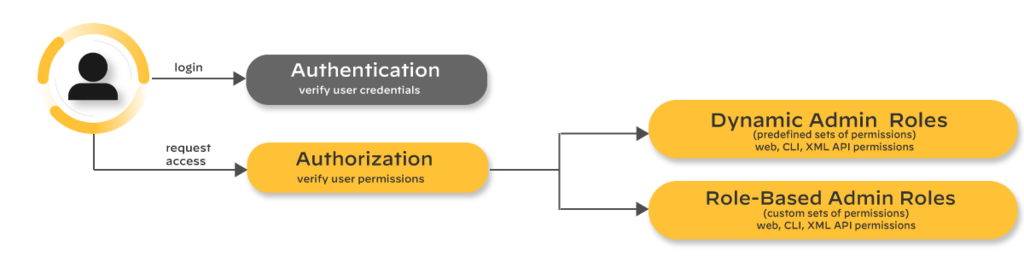
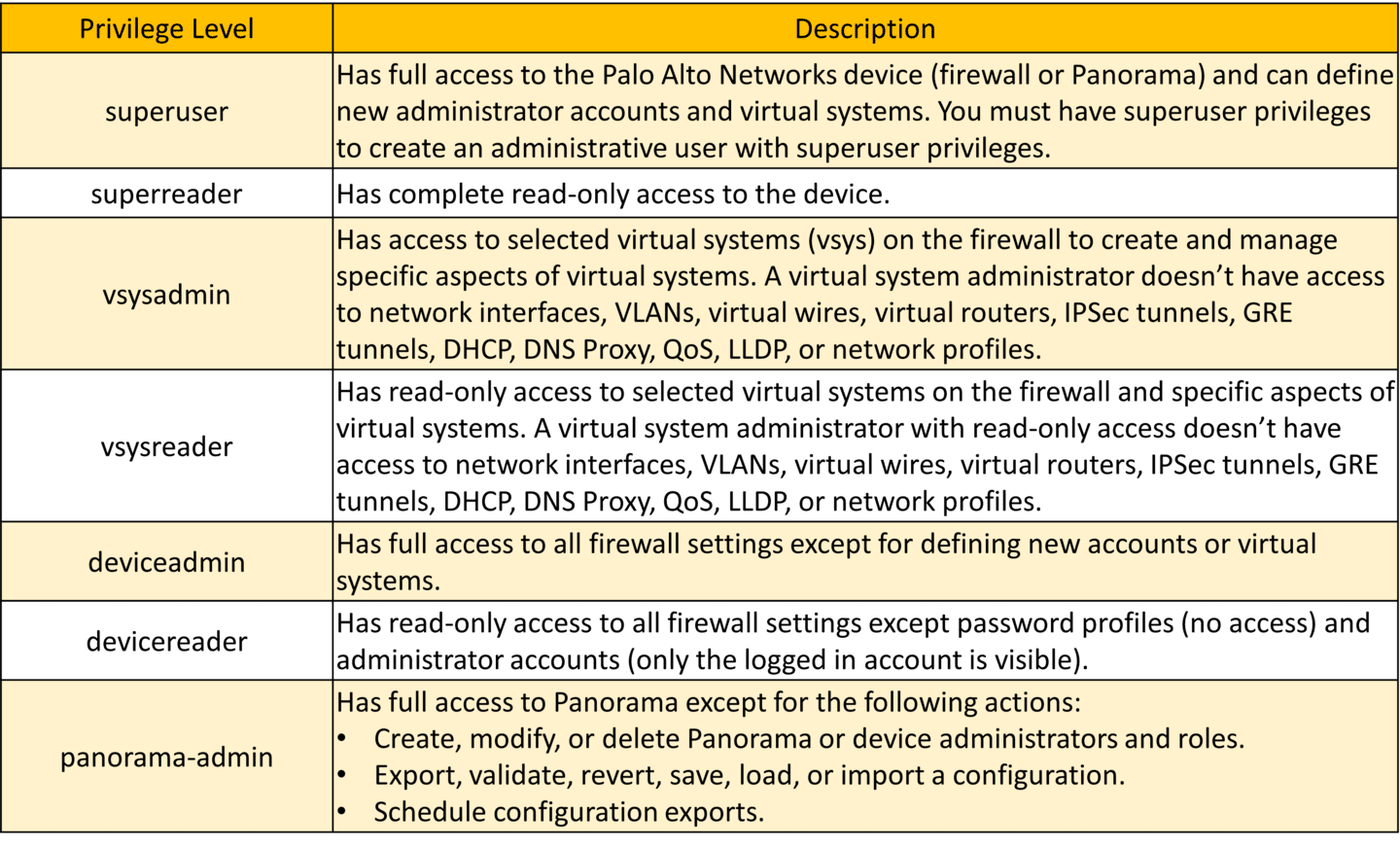
Diagrams: Palo Alto Networks Learning Center, PAN-OS course: Local firewall admin accounts. Click an image to enlarge.
Pros
- Custom Role Based profiles give fine-grained, job-function-scoped access instead of all-or-nothing
- External-authorization mode (SAML/TACACS+/RADIUS VSAs) centralizes admin RBAC alongside your existing identity stack
- Dynamic roles need zero maintenance as PAN-OS adds features
Cons
- Custom Role Based profiles do not auto-inherit access to new features — an admin can silently lose visibility into something new after an upgrade
- Access domains aren't supported for pure-local accounts, limiting granularity on multi-vsys boxes without external auth
- A Virtual system administrator role can't touch shared network objects (interfaces, VLANs, virtual routers, IPSec/GRE tunnels, DHCP, DNS proxy, QoS) — a common source of "why can't I configure this" tickets
| Role Type | Description | Key Privileges & Exam Distinctions |
|---|---|---|
| Superuser | Built-in dynamic role | Full Read-Write access to all firewall settings, including creating/modifying other administrators and managing cryptographic keys. |
| Superuser (read-only) | Built-in dynamic role | Read-only access to all configuration tabs and monitoring data. Cannot commit or modify configurations. |
| Panorama Administrator | Built-in dynamic role | EXAM CRITICAL: Full access to manage device settings EXCEPT creating/modifying administrators and configuration export/import functions. |
| Device Administrator | Built-in dynamic role | Read-Write access to all device features except creating/modifying administrators and managing virtual systems (VSYS). |
| Custom Admin Role Profile | User-defined RBAC profile | Granular per-tab/per-command access (Read-Write, Read-Only, or No Access). Does not auto-inherit new PAN-OS features upon upgrade! |
Authentication Profiles & Sequences
- Authentication Profile: Defines the specific authentication protocol (Local, LDAP, RADIUS, TACACS+, SAML 2.0, Kerberos).
- Authentication Sequence: A ranked list of authentication profiles evaluated in descending order. If the primary service is unreachable, PAN-OS falls back to the next profile in sequence until an affirmative allow or explicit credential failure occurs.
- External Authorization: SAML, TACACS+, and RADIUS can return Vendor-Specific Attributes (VSAs) to enforce role-based authorization directly from the external identity provider rather than mapping locally on the firewall.
Watch: short GUI walkthroughs
Clips from the Palo Alto Networks Learning Center. They load only when you press play.
Exam Trap
Dynamic roles auto-update with new PAN-OS features; custom Role Based profiles do not — an exam question describing an admin who "lost access" to a brand-new feature right after an upgrade is testing whether you know Role Based profiles need manual review post-upgrade. Also: a Virtual system administrator cannot touch shared/global network objects (interfaces, virtual routers, IPSec/GRE tunnels, DHCP, DNS proxy, QoS) — those are device-level, not vsys-level.
Self-check: Admin Accounts & Role-Based Access
Source: ngfw/administration/firewall-administration/manage-firewall-administrators; Palo Alto Next-Gen Firewall (NGFW) Master Cheat Sheet Domain 2.1
Network Interfaces Deep Dive 13
Learning objectives
- List the physical and logical interface types PAN-OS supports
- Explain when to choose tap, virtual wire, Layer 2, or Layer 3 mode
- Connect interface mode to how zones and security policy get built on top of it
Security Policy is built on zones, and zones are built on interfaces — the physical/logical mode you pick for an interface determines what kind of network design and policy you can express on top of it.
Why
Not every rollout looks the same: a POC or IDS-style deployment needs to see traffic without touching it, a bump-in-the-wire migration needs to stay invisible to routing, and a full gateway deployment needs to actually route. One firewall needs to support all of these modes, often simultaneously on different interfaces.How
Each interface mode answers a different question about how much the firewall is allowed to touch the traffic passing through it — from "just let me watch" to "actually route this":
- Tap — "let me see it, but I promise not to touch it." A passive copy fed from a SPAN/mirror port on a switch. Because it's only ever looking at a copy of the traffic, not the traffic itself, it is structurally incapable of blocking anything — it can log and alert, never enforce. This is exactly why it's the zero-risk choice for a proof-of-concept: even a badly misconfigured security profile can't drop production traffic if the interface never had the power to drop anything.
- Virtual Wire — "sit directly in the path, but stay invisible to routing." Two interfaces are bound together transparently — traffic enters one, and if allowed, exits the other, with no IP readdressing or routing changes required anywhere on the network. This is the easiest way to drop a firewall into an existing network for a migration or trial, because from the network's perspective nothing about the topology changed — but unlike Tap, it's genuinely inline and can enforce policy, which is the detail the exam trap below is testing.
- Layer 2 — "switch VLANs between interfaces." The firewall behaves like a switch, forwarding based on VLAN/MAC rather than IP, useful when you need policy enforcement inside an existing L2 domain without introducing routing.
- Layer 3 — "actually route IP traffic." The interface holds its own IP address and genuinely participates in routing — this is the mode for a real gateway deployment where the firewall is a routed hop, not just a transparent pass-through.
- HA, log card, and decrypt mirror — special-purpose roles: HA interfaces carry heartbeat/sync traffic between HA peers, and decrypt mirror sends a plaintext copy of already-decrypted traffic out to external DLP/forensics tooling that has no decryption capability of its own.
- Aggregate Ethernet — bundles multiple physical interfaces together for combined throughput and redundancy, the same underlying idea as LACP link aggregation elsewhere in networking.
Logical interfaces — VLAN, loopback, tunnel, SD-WAN — are layered on top of a physical interface rather than replacing it, and by definition can't be configured until the physical interface underneath already exists. And critically, interface mode is a per-interface setting, not a whole-device setting: one firewall can run Tap monitoring on one segment while simultaneously acting as a full Layer 3 gateway on another, which is exactly what makes a gradual, segment-by-segment rollout possible instead of an all-at-once cutover.

Pros
- Virtual wire mode lets you insert the firewall for a POC or migration with zero re-addressing
- Tap mode gives risk-free "what would this block" visibility before any enforcement
- Mixed-mode interfaces on one box support gradual, segment-by-segment rollout
Cons
- Tap and mirror modes don't enforce anything — they inform, they don't protect, until you switch to inline
- Available interface types and speeds vary by hardware model, complicating like-for-like migrations
- Getting virtual wire, L2, and L3 zones mixed up on the same box is a common source of "traffic just disappears" tickets
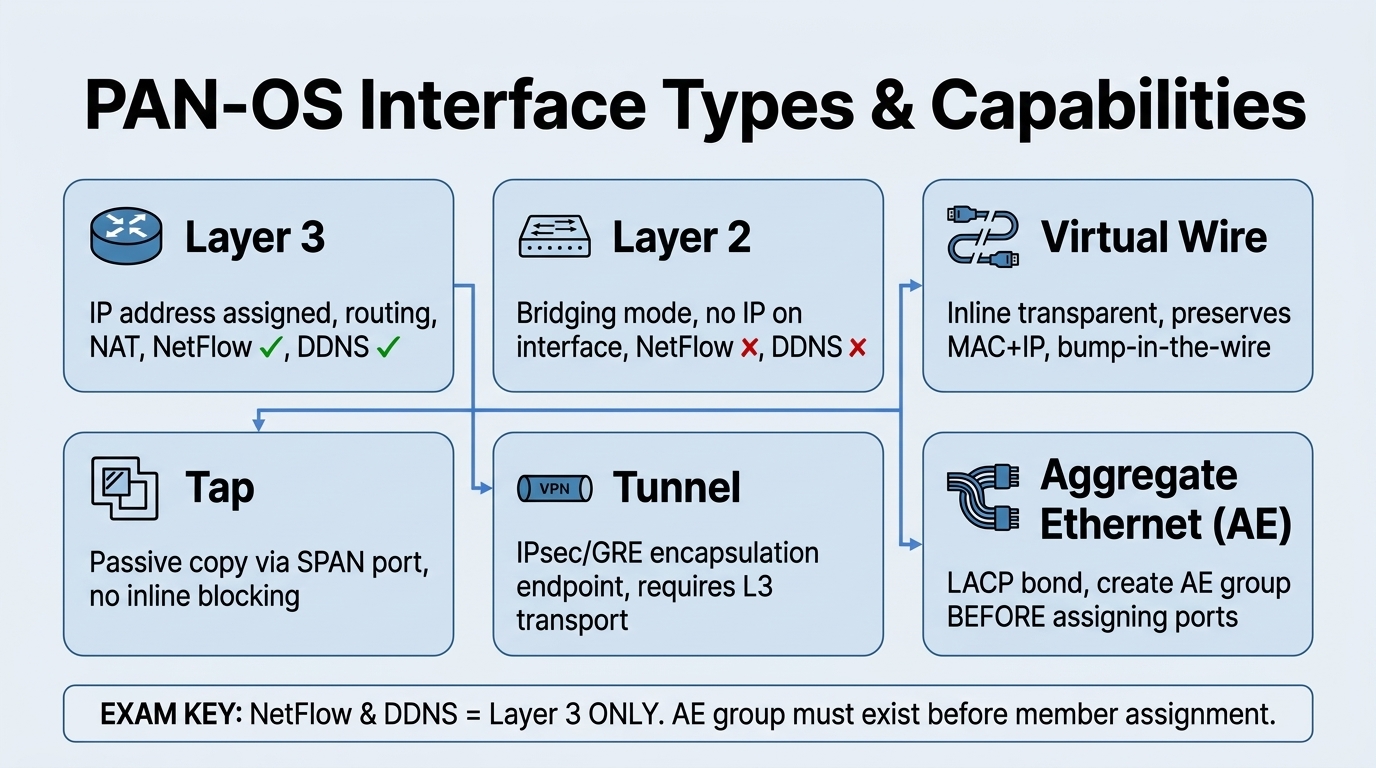
Master Cheat Sheet High-Yield Rules (Domain 1.1):
- NetFlow & DDNS Support: Supported on Layer 3 interfaces, but NOT supported on Layer 2 interfaces (recurring exam question).
- Aggregate Ethernet (AE): You must define the logical AE Interface (e.g.
ae1) before assigning physical member interfaces to it. - Virtual Wire Transparency: Preserves original MAC and IP addresses without routing changes or MAC rewriting, while still enforcing full App-ID, Content-ID, and Security Policies.
- Zone Assignment Rule: Every data interface (L3, L2, VWire, Tap, Tunnel, AE) must be assigned to a Security Zone after creation to pass traffic.
| Interface Type | Use Case | Key Characteristics | Typical Configuration |
|---|---|---|---|
| Layer 3 | Routed networks & internet edge | IP address assigned, participates in routing protocols, supports NetFlow & DDNS | Assigned to Virtual Router + L3 Security Zone |
| Layer 2 | Transparent switching between segments | No IP on interface itself, behaves like a switch port, VLAN bridging | Assigned to VLAN object + L2 Security Zone |
| Virtual Wire (vWire) | Bump-in-the-wire inline deployment | No IP or MAC changes, preserves original frames, full inline security enforcement | Bound to Virtual Wire object + vWire Security Zones |
| Tunnel | VPN termination (IPsec / GRE) | Logical tunnel endpoint for site-to-site or GlobalProtect | Assigned to Tunnel Security Zone + Virtual Router |
| Aggregate Ethernet (AE) | Link aggregation (LACP) | Bundles multiple physical ports (same speed/duplex) for bandwidth & redundancy | Create AE group first, then assign member ports |
| Management (MGT) | Out-of-band management | Dedicated port, no dataplane transit traffic, isolated management plane | Admin Web UI, SSH CLI, Panorama connectivity |
CLI Configuration Examples
Watch: short GUI walkthroughs
Clips from the Palo Alto Networks Learning Center. They load only when you press play.
Exam Traps & Video Insights (Video 1 & 2)
- Packet Buffer Protection & Header Inspection: Must be enabled both globally (
Device > Setup > Session) and inside the specific Security Zone settings. If disabled globally, zone-level protection has no effect during buffer flood attacks. - Reconnaissance Protection Exemptions: To prevent vulnerability scanners (like Nessus or Qualys) from being blocked as host sweeps, add their IP addresses to the Source Address Exclusion list in the Reconnaissance Protection profile.
- User-ID Ingress Zone Scoping: Enable User-ID only on client-facing ingress zones (e.g.
Workstations) using Include Lists. Running User-ID on server zones or IoT subnets wastes CPU cycles. - Aggregate Ethernet (AE) Limits: Hardware models like the PA-440 support up to 4 AE groups (AE1 to AE4), combining physical links for bandwidth scaling and cable redundancy.
- Tap vs. Virtual Wire: Tap is purely passive (off a mirror port, cannot enforce/block anything), while Virtual Wire sits inline and can enforce policy. Don't confuse "no IP changes" with "no enforcement."
Self-check: Network Interfaces & Zones Deep Dive
Device > Setup > Session. If the global setting is disabled, the zone profile setting will not operate.Source: Palo Alto Professional Video Series (VID1, VID2); Palo Alto Next-Gen Firewall (NGFW) Master Cheat Sheet Domain 1.1
Interface Config Requirements — Exam Drill 13c
Roughly one in six dump questions is "which step is required / NOT required to configure interface type X." They all reduce to the table below. Memorise the required column and the NOT required traps.
| Interface type | Required to make it work | Common "NOT required" trap answers |
|---|---|---|
| Layer 3 | IP address (static, DHCP client, or PPPoE) + assign to a security zone + assign to a virtual/logical router | Configuring a VLAN / VLAN interface; enabling a routing protocol; adding it to an aggregate group; setting a default gateway on the interface |
| Layer 3 subinterface (802.1Q) | VLAN ID (tag) + IP address + security zone + virtual router | Virtual wire mode; DHCP relay; putting it in the same zone as the parent; an aggregate group |
| Layer 2 | Assign to a VLAN object + assign to a security zone. For inter-VLAN routing, add a VLAN interface (SVI) and put it in a virtual router. | An IP address on the L2 interface itself; a virtual router on the L2 interface; a default gateway; static ARP entries. L2 subinterfaces carry VLAN trunks. |
| Virtual wire | Bind two interfaces into a vwire object + put each in a security zone; write Security policy by source/destination zone | An IP address; a virtual router; a default gateway; Layer 3 routing; OSPF/BGP. (App-ID, Content-ID, decryption, NAT and QoS do work on vwire; some older dumps wrongly say QoS does not.) |
| Tunnel (GRE / IPSec) | Assign to a security zone + a virtual/logical router + a route pointing into the tunnel. IP address optional — required for tunnel monitoring or dynamic routing over the tunnel. | DHCP; Layer 2 mode; a public IP on the tunnel interface; a unique MAC; NAT for the tunnel |
| Aggregate Ethernet (AE) | ≥2 physical members, all the same speed / duplex / media type; LACP mode (active/passive) must match on both ends; assign the AE interface a mode (L2/L3) + zone (+ VR if L3) | Per-packet load balancing (it's session-based src/dst-IP hash); mixing interface speeds; different LACP modes on each side (that's the #1 cause of an AE staying down) |
| Multiple subnets on one physical port | Add secondary IP addresses to the Layer 3 interface | Multiple zones on one interface; multiple virtual routers on one interface (an interface belongs to exactly one zone and one router) |
Exam Traps
- "Which is NOT required for a Layer 3 interface?" → configuring a VLAN interface. L3 uses IP + zone + virtual router directly; VLAN interfaces belong to Layer 2 inter-VLAN routing.
- An interface can be in exactly one security zone and exactly one virtual/logical router. All interfaces in a zone must be the same type (all L2, all L3, or all vwire).
- AE link-aggregation failing → check that the switch and firewall are set to the same LACP mode (both active, or one active + one passive), same speed, and the switchports are actually in the channel-group.
- Inter-VLAN routing on the firewall = VLAN interfaces (SVIs) assigned to a virtual router, not static routes per VLAN and not putting L2 interfaces in a virtual router.
- LACP "pre-negotiation" (LACP tab) lets the passive HA firewall pre-negotiate LACP so failover is faster — relevant when a downstream LACP switch causes a 30–45 s failover delay.
Self-check: Interface Config Requirements
Source: ngfw/help/11-1/network/network-interfaces; ngfw/help/11-1/network/network-interfaces/pan-os-aggregate-interface-groups; practice-set synthesis
Static Routes, Path Monitoring & OSPF/BGP Essentials 14b
Learning objectives
- Configure a static route correctly (destination, next hop, interface, metric, administrative distance)
- Explain path/route monitoring — ICMP probes, failure interval/count, and preemptive hold time
- Recall the handful of OSPF and BGP facts the exam tests
Why
Static routing with failover is the bread-and-butter routing scenario on the exam: a branch office with a primary path and a backup, where the firewall must withdraw the primary route the moment the path dies.How
Static route fields (Network > Virtual Routers > Static
Routes, or Logical Router under ARE): Destination prefix (e.g.
10.10.10.0/24; 0.0.0.0/0 for a default route), Next Hop
(IP address, or "None" for a directly-connected/discard route), optional Interface
(egress binding), Admin Distance (default 10 for static), and
Metric (default 10, tie-breaker among same-AD routes).
Backup routes via administrative distance: the firewall prefers the route with the lowest administrative distance. Give the primary route a low AD (e.g. 10) and the backup route a higher AD (e.g. 50) to the same destination — only the primary is installed until it fails, then the backup takes over. Across different routing protocols the firewall also chooses by lowest administrative distance (Static 10 < eBGP 20 < OSPF 30 < RIP 120 < iBGP 200, all tunable).
Path monitoring / route monitoring (Monitor profile on a static route): the firewall sends ICMP pings to one or more monitored destination IPs. Failure Condition is Any or All monitored IPs unreachable. Ping Interval (seconds) × Ping Count (consecutive failures) defines how fast the route is declared down — e.g. Interval 1, Count 3 = route removed after 3 consecutive missed pings (~3 s). When it fails, the static route is removed from the RIB/FIB so a lower-priority (higher-AD) backup route can take over. Preemptive Hold Time = minutes to wait after the path recovers before re-installing the primary route; set it to 0 for immediate failback with no delay.
Redistribution profiles (Network > Virtual Routers > Redistribution Profile / Logical Router route-maps) decide which connected/static/OSPF/BGP routes get injected into another protocol, filtered by prefix, next-hop, or route type — then referenced from the OSPF/BGP Export rules. This is the answer whenever a question says "redistribute only specific static routes into OSPF/BGP".
OSPF facts the exam tests: OSPF is configured under the virtual/logical
router; every OSPF interface must be assigned to an area. Route
summarization is only possible on an Area Border Router (ABR), between areas.
Neighbors won't form if hello/dead timers, area ID, area type (stub/NSSA),
authentication, or MTU mismatch. Stub-area config must match on all routers in the
area. Verify with show routing protocol ospf neighbor (ARE:
show advanced-routing ospf neighbor).
BGP facts the exam tests: first step = enable BGP on the virtual router and set the local AS number; then add a neighbor with the correct peer IP and remote AS. Use a loopback interface as the update source so the session survives any single physical link failure (multiple paths to the loopback). Best-path selection: after weight and local preference, the first tie-breaker the exam expects is shortest AS-Path. The Advanced Routing Engine is enabled per virtual/logical router (and device-wide under Device > Setup > Management) and is required for the modern BGP/OSPF feature depth; it is supported on most current PA-Series and VM-Series platforms.
Exam Traps
- Path monitoring uses ICMP, not TCP SYN/ACK, and it acts on the static route — on failure the route is removed (not "kept with an alert", not "blackholed").
- Monitor-profile timing question: "route down only after 3 consecutive failures" → Failure/Ping Interval 1, Count 3.
- Immediate failback when the path restores → Preemptive Hold Time = 0.
- Backup default route → same destination
0.0.0.0/0, higher administrative distance than the primary (not a higher metric alone, not ECMP with equal priority). - "Redistribute static into OSPF" → redistribution profile applied in the OSPF Export rules, not "assign interfaces to the same area", not a static route to the OSPF neighbor.
- OSPF summarization → ABR only. Not DR-dependent, not external-routes-only.
Self-check: Static Routes & Monitoring
show routing protocol ospf neighbor.Source: ngfw/help/11-1/network/network-virtual-routers/configure-static-routes; ngfw/help/11-1/network/network-virtual-routers/static-route-removal-based-on-path-monitoring; networking/advanced-routing; practice-set synthesis
Zone Protection, Packet Buffer & User/Device ID Deep Dive 13b
Learning objectives
- Distinguish RED (Random Early Drop) from SYN Cookies in flood protection
- Configure vulnerability scanner exemptions in Reconnaissance Protection profiles
- Enable Packet Buffer Protection and L3/L4 Strict Header Inspection globally and per-zone
- Deploy User-ID agents efficiently using ingress zone scoping and include subnet lists
Zone Protection Profiles shield the firewall's own dataplane and internal network segments from flood attacks, reconnaissance scans, and malformed packet floods prior to Security Policy evaluation.
Why
Without pre-policy zone protection, distributed Denial-of-Service (DoS) floods and port scans consume dataplane session tables and CPU resources before policy rules can block them.How
Flood Protection & Defense Mechanisms:
- SYN, UDP, ICMP, ICMPv6, Other IP Floods: Triggers Random Early Drop (RED) or SYN Cookies when connection rates exceed configured thresholds (Alarm, Activate, Max Rate).
- Random Early Drop (RED) vs. SYN Cookies: RED drops random incoming TCP SYN packets to force sender backoff. SYN Cookies eliminate firewall session table allocation entirely during SYN floods by encoding connection state in the TCP sequence number.
Reconnaissance Protection & Scanner Exemption:
Detects Port Scans, Host Sweeps, and IP Sweeps based on threshold events per second. Actions include Alert, Drop, or Block IP (for a specified duration). Exemption Gotcha: Enterprise vulnerability scanners (e.g., Nessus, Qualys) will trigger host sweep blocks unless their source IP addresses are explicitly added to the Source Address Exclusion list in the profile.
Packet Buffer Protection (Global + Zone Requirement):
Protects the firewall's packet buffer memory from single-session or single-host packet buffer hogging (e.g. slowloris attacks or unacknowledged TCP streams). Critical Requirement: Packet Buffer Protection must be enabled in two places: globally under Device > Setup > Session > Packet Buffer Protection AND enabled on the individual Zone Protection Profile.
User-ID & Device-ID Deployment Architecture:
- Ingress Zone Scoping: Enable User-ID only on ingress client/workstation zones (e.g.,
Trust-Workstations). Use Include Subnet Lists to scope scanning. Enabling User-ID on server zones, database subnets, or Untrust zones wastes firewall CPU cycles and introduces security risks. - Mapping Methods: AD Domain Controller monitoring (WMI/WinRM), SIEM syslog parsing, GlobalProtect client, Terminal Services Agent (port-range mapping per user), XML API, and Captive Portal fallback.
- Device-ID: Uses PAN-DB IoT signatures and network metadata to identify hardware types (e.g., Apple iPhone, Axis IP Camera, HP Printer).
Pros
- Pre-policy inspection drops malicious flood traffic before session table allocation
- SYN Cookies prevent firewall memory exhaustion under heavy TCP SYN attacks
- User-ID Include Lists prevent unnecessary CPU overhead on server subnets
Cons
- Forgetting to add vulnerability scanners to exclusion lists blocks legitimate audit scans
- Disabling Packet Buffer Protection globally neutralizes zone-level buffer protection
- Enabling User-ID indiscriminately across all zones degrades management CPU performance
Exam Traps (Video 2)
- Dual-Enablement Requirement: Both Packet Buffer Protection and Strict L3/L4 Header Inspection require global enablement under
Device > Setup > Sessionto operate inside Zone Protection profiles. - User-ID Zone Scope: Never enable User-ID on Untrust or server-only zones. Always apply User-ID to client ingress zones using Include Lists.
Self-check
Q1. Why does an admin add a Nessus scanner IP to the Source Address Exclusion list in a Zone Protection profile?
Source: Palo Alto Professional Video Series (VID2); ngfw/administration/zone-protection-profiles
Dynamic Routing & the Advanced Routing Engine 14
Learning objectives
- Distinguish the legacy virtual router's single routing stack from the Advanced Routing Engine's logical router model
- List the dynamic routing protocols each stack supports and how redistribution works in each
- Explain ECMP and route/path monitoring as failover mechanisms independent of the routing protocol itself
Every Layer 3, loopback, and VLAN interface on the firewall must belong to exactly one routing container — historically a virtual router, and since PAN-OS introduced the Advanced Routing Engine, optionally a logical router instead. Which one you're on determines which dynamic routing protocols and redistribution model are available to you.
Why
The legacy virtual router's routing protocols (RIP, OSPF, OSPFv3, BGP) all run inside a single PAN-OS process sharing the same codebase as everything else on the box. As networks leaned harder on BGP/OSPF for multi-cloud and SD-WAN designs, Palo Alto re-implemented routing on a dedicated, FRRouting-based engine — the Advanced Routing Engine — so protocol convergence, scale, and feature velocity aren't bottlenecked by the rest of PAN-OS. Both models still exist because moving is a deliberate, disruptive migration, not a transparent upgrade.How
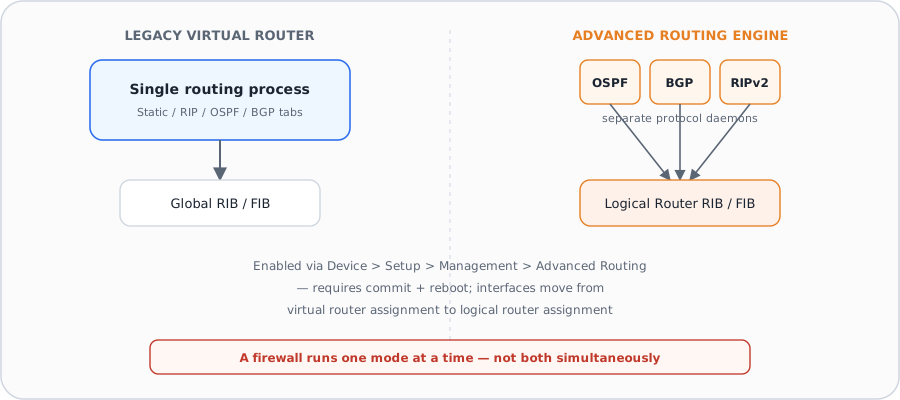
Legacy virtual router — one stack, one place to look. A virtual router obtains routes either from static routes you define manually or by participating in dynamic routing protocols — RIP, OSPF, OSPFv3, and BGP — configured as tabs directly under that virtual router's settings, alongside route redistribution and ECMP (Equal Cost Multiple Path). This is still the default on a fresh firewall and remains fully supported.
Advanced Routing Engine — separate protocol daemons, richer per-protocol
control. Enabling Advanced Routing (Device > Setup > Management,
then commit and reboot) switches the firewall to using logical routers
instead of virtual routers for both static and dynamic routing. Rather than one shared
routing process, each protocol — OSPF, OSPFv3, BGP, RIPv2 — runs as its own component with
substantially deeper configuration surface than the legacy tabs: for example, BGP on a
logical router exposes peer groups, IBGP/EBGP peer types, AFI/SAFI address-family profiles,
dampening profiles, graceful restart tuning, and aggregate-route policies with summary-only
and suppress-map controls — configuration depth the legacy virtual router's BGP tab doesn't
offer. OSPF on a logical router likewise exposes area types (Normal/Stub/NSSA), ABR
import/export lists, virtual links, and BFD integration per interface.
Redistribution is profile-based, not protocol-embedded. On a logical router, a redistribution profile (referenced from the logical router's general settings as an IPv4/IPv6 BGP-, OSPF-, static-, or RIP-route-map) decides which routes from one source get injected into another protocol's routing table and into the global RIB — this is the mechanism an exam question means when it says "redistribute static routes into OSPF" or "redistribute connected routes into BGP." OSPF has its own dedicated Redistribution Profile field for pulling static/connected/BGP routes into the OSPF link-state database.
ECMP and route monitoring are failover mechanisms layered on top, not routing protocols themselves. ECMP lets the firewall install and use up to four equal-cost paths to the same destination instead of picking exactly one — with load balancing done per-session (not per-packet) using IP Modulo, IP Hash, Weighted Round Robin, or Balanced Round Robin. This shifts traffic to a surviving link immediately on failure rather than waiting for the routing protocol to reconverge, which is the specific "why ECMP" answer an exam question is usually fishing for. Separately, BFD (Bidirectional Forwarding Detection) can be attached to OSPF or BGP to detect a dead peer link in milliseconds rather than waiting out a protocol's own hello/dead timers — the two techniques (ECMP for load distribution, BFD for fast failure detection) are complementary, not substitutes for each other.
Pros
- Advanced Routing Engine exposes materially deeper per-protocol control (BGP peer groups/dampening, OSPF area types/virtual links) than the legacy virtual router tabs
- ECMP shifts load and reroutes around a failed link at the session level without waiting for protocol reconvergence
- BFD detects dead peers in milliseconds, independent of and complementary to whichever routing protocol is running
Cons
- Switching to Advanced Routing requires a commit and reboot, and moves interfaces from virtual-router to logical-router assignment — it is a migration, not a toggle
- A firewall runs one model at a time; you cannot mix legacy virtual routers and Advanced Routing Engine logical routers side by side
- Enabling, disabling, or changing ECMP restarts the virtual router, which can terminate existing sessions
Exam Trap
Don't equate "redistribution" with "route leaking between VRFs" — on PAN-OS it specifically means pulling routes learned by one source (static, connected, or one routing protocol) into another protocol's advertisement via a redistribution profile/route-map, so they get propagated to that protocol's neighbors. Also: ECMP chooses a path per new session, not per packet — a question describing per-packet load-splitting behavior is describing something PAN-OS ECMP does not do.
Self-check: Dynamic Routing & the Advanced Routing Engine
Source: ngfw_help_11-1_network_network-virtual-routers.md; ngfw_help_11-1_network_network-virtual-routers_ecmp.md; ngfw_help_11-1_network_network-routing-logical-routers_network-routing-logical-routers-general.md; ngfw_help_11-1_network_network-routing-logical-routers_network-routing-logical-routers-bgp.md; ngfw_help_11-1_network_network-routing-logical-routers_network-routing-logical-routers-ospf.md
📋 Cheat Sheet — Routing Domain 1.4
- Configure under Network > Virtual Routers
- Static routes: next-hop IP or interface, with path monitoring
- Dynamic: OSPF, BGP (most common), RIP (rare)
- Redistribution profiles control route sharing between protocols
- Advanced Routing Engine (ARE): newer engine with better performance vs legacy
- Route selection: longest prefix match → administrative distance → metric
⌨️ CLI Verification
| Command | Purpose |
|---|---|
set network virtual-router default routing-table ip static-route MyRoute destination 0.0.0.0/0 nexthop ip-address 192.168.1.1 | Add static route |
show routing route | View active routing table |
show routing protocol bgp summary | View BGP status |
Logical Routers & Multi-VSYS Routing 15
Learning objectives
- Explain how a logical router relates to a vsys, and why an interface's routing container — not the vsys itself — enforces routing isolation
- Describe how inter-vsys routing works when vsys need to reach each other
- Identify the migration considerations when moving a multi-vsys deployment onto the Advanced Routing Engine
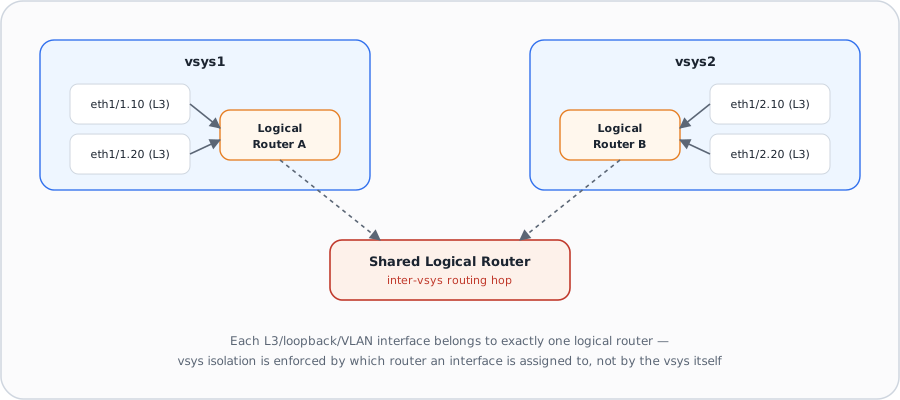
On a multi-vsys firewall, each virtual system is a logically separate policy and object domain — but routing isolation between vsys is actually enforced one layer down, by which routing container (virtual router, or logical router under Advanced Routing) each vsys's interfaces are assigned to.
Why
A vsys needs its own routing decisions — Finance's vsys shouldn't automatically leak routes into HR's vsys just because they live on the same piece of hardware. But some environments legitimately need vsys to reach each other or share a common upstream/internet path, so the routing model has to support both hard isolation and deliberate, explicit inter-vsys connectivity, not force an all-or-nothing choice.How
One interface, one routing container, exactly. Whether you're on the legacy model or the Advanced Routing Engine, every Layer 3, loopback, and VLAN interface belongs to exactly one virtual router or logical router — never more than one, never zero if it needs to route. Because each vsys's interfaces are typically bound to a dedicated router, routing state (RIB/FIB, dynamic routing adjacencies) for one vsys doesn't automatically become visible or reachable from another vsys's router. This is the real mechanism behind vsys routing isolation — the vsys boundary itself doesn't do the isolating, the routing container assignment does.
Inter-vsys routing is deliberate, not automatic. When two vsys genuinely need to exchange traffic, the common pattern is a shared logical/virtual router that both vsys' dedicated routers hand off to (often via static routes or route redistribution pointing at that shared router), or interfaces from each vsys explicitly bound into the same router. Either way, the connectivity is something an admin configures on purpose — it's never an implicit side effect of two interfaces merely existing on the same physical box.
Choosing logical router per-vsys is a per-router decision, not all-or-nothing at
the box level in principle — but PAN-OS commits to one engine at a time. Once
Advanced Routing is enabled on a firewall (device-wide, via Device > Setup >
Management), every vsys that needs dynamic routing depth — BGP peer groups, OSPF area
types, RIPv2 route-maps — configures it through logical routers rather than legacy virtual
routers. A vsys admin evaluating whether they even need this level of routing control is
exactly the judgment call this section is testing: if a vsys's needs are simple static
routing or basic OSPF, the legacy virtual router model may be entirely sufficient and avoids
a disruptive Advanced Routing migration for the whole box.
Migration considerations. Because switching engines is device-wide and requires a commit and reboot, a multi-vsys firewall moving to Advanced Routing has to plan the cutover for every vsys's routing simultaneously — you can't migrate one vsys's virtual router to a logical router while another vsys stays on its legacy virtual router. Plan static-route and redistribution-profile equivalents for each vsys before the cutover, since the configuration model (tabs vs. profiles) genuinely differs, not just the underlying protocol daemons.
Pros
- Routing isolation between vsys is explicit and interface-driven, not an implicit side effect of sharing hardware
- Inter-vsys connectivity via a shared router is straightforward when genuinely needed
- A vsys with simple routing needs can stay on the legacy virtual router model without forcing every other vsys onto Advanced Routing
Cons
- Advanced Routing is enabled device-wide — you can't run legacy virtual routers for one vsys and logical routers for another
- Multi-vsys migrations to Advanced Routing require planning every vsys's routing cutover at once, not incrementally
- Misassigning an interface to the wrong router is a silent routing-isolation break, not a policy error the firewall will flag
Exam Trap
A question describing "vsys A can unexpectedly reach vsys B's subnet" is testing whether you know the vsys boundary itself does not enforce routing isolation — an interface accidentally bound to the wrong (shared) router is the actual cause, not a vsys or Security policy misconfiguration. Fix the routing container assignment, not the rulebase.
Self-check: Logical Routers & Multi-VSYS Routing
Source: ngfw_help_11-1_network_network-routing-logical-routers.md; ngfw_help_11-1_network_network-routing-logical-routers_network-routing-logical-routers-general.md; ngfw_help_11-1_network_network-virtual-routers.md
📋 Cheat Sheet — Logical Routers Domain 1.4
Logical Routers are only available when the Advanced Routing Engine is enabled, and they replace the concept of Virtual Routers in ARE mode.
GRE & Tunnel Interfaces 16
Learning objectives
- Explain what a tunnel interface is and why both GRE and IPSec are built on top of it
- Describe GRE tunnel mechanics — encapsulation, keepalives, TTL — and how it differs fundamentally from IPSec
- Identify scenarios where GRE is the better choice than IPSec, including GRE-over-IPSec
Alongside IPSec site-to-site VPNs, PAN-OS supports GRE (Generic Routing Encapsulation) tunnels — a simpler, unencrypted point-to-point encapsulation mechanism that, like IPSec, rides on a logical tunnel interface.
Why
Not every tunnel needs confidentiality — sometimes you just need to carry traffic (multicast, a routing protocol adjacency, non-IP payloads) across a network that wouldn't otherwise forward it, with the least possible packet overhead and complexity. GRE exists for exactly that case, while IPSec exists for when confidentiality and integrity genuinely matter.How
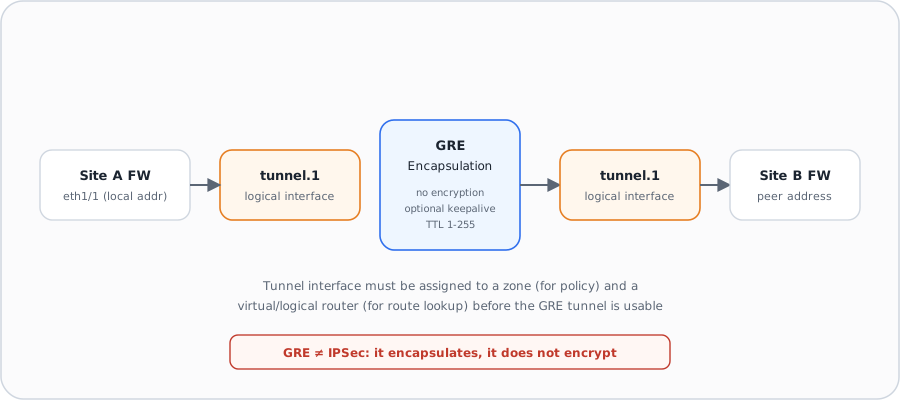
The tunnel interface is the shared logical construct. Before configuring
either a GRE tunnel or an IPSec tunnel, you first create a tunnel interface
(Network > Interfaces > Tunnel) — a purely logical interface with no
physical port behind it, used to deliver traffic between two endpoints. The tunnel interface
must be assigned to a zone (so Security policy can apply to what rides
through it) and to a virtual/logical router (so the firewall can route
traffic into it) — and critically, the tunnel interface and the underlying physical interface
should sit in the same router so a route lookup correctly resolves which tunnel to
use as the next hop. A tunnel interface doesn't strictly need an IP address to pass traffic,
but you must assign one if you want tunnel monitoring or a dynamic routing protocol running
across the tunnel, since that IP becomes the next-hop address routing points at.
GRE tunnel configuration references the tunnel interface, not the other way
around. A GRE tunnel object (Network > GRE Tunnels) specifies a local
source interface and address, a peer address at the far end, and the tunnel interface that
identifies this tunnel when it's used as a routing next hop. GRE simply wraps the original
packet inside a new IP+GRE header — no encryption, no authentication of the payload
— which is both its main limitation and the reason it's cheap in CPU and simple to
troubleshoot. Keep Alive is optional (disabled by default): when enabled, it
takes a configurable number of missed keepalive intervals (default: 3 retries at 10-second
intervals) before PAN-OS considers the tunnel down, and a separate Hold Timer count of
successful keepalives before it's considered back up — this asymmetry (slower to declare
"up" than "down") avoids flapping a marginal link. TTL (default 64) and an optional
ERSPAN decapsulation mode (for ingesting mirrored switch traffic over GRE,
commonly for IoT Security use cases) round out the object.
When GRE beats IPSec. Pick GRE when you need to carry multicast traffic or a dynamic routing protocol's multicast/broadcast hellos across a tunnel (IPSec alone doesn't natively transport multicast), when encryption is genuinely unnecessary (the path is already trusted, e.g. within a private WAN), or when overhead and simplicity matter more than confidentiality. A common hybrid pattern is GRE-over-IPSec: run GRE inside an IPSec tunnel so the GRE tunnel gets IPSec's encryption while still getting GRE's ability to carry multicast/dynamic-routing traffic that plain IPSec can't.
Pros
- Lower CPU overhead than IPSec since there's no cryptographic processing
- Natively carries multicast and dynamic-routing-protocol traffic that plain IPSec cannot transport
- GRE-over-IPSec combines GRE's multicast/routing-protocol support with IPSec's confidentiality when both are needed
Cons
- Zero encryption or authentication of the payload on its own — anyone who can see the packets can read them
- Requires the same tunnel-interface zone/router setup discipline as IPSec, so it's not meaningfully simpler to deploy correctly
- Keepalive is off by default — a silently-dead GRE tunnel can sit unnoticed unless you explicitly enable and tune it
Exam Traps
- Don't assume GRE provides any confidentiality — a question describing GRE as "securing" traffic between sites is testing whether you know GRE only encapsulates, it never encrypts. Encryption + multicast/routing-protocol transport → GRE-over-IPSec.
- Tunnel interface shows "Up" but traffic doesn't flow → the transport is fine; you're missing a static (or dynamic) route pointing into the tunnel interface, or the tunnel interface has no IP address so the virtual router can't use it as a next hop.
- Essential GRE steps, every time: create the tunnel interface → assign to a zone → assign to a virtual/logical router → give it an IP → add a route through it. Assigning it to "Untrust" specifically, enabling GRE checksums, or wrapping it in IPSec are not the essential step.
Self-check: GRE & Tunnel Interfaces
Source: ngfw_help_11-1_network_network-gre-tunnels_gre-tunnels.md; ngfw_networking_advanced-routing_configure-a-tunnel-interface.md
Web Proxy on PAN-OS 17
Learning objectives
- Distinguish explicit from transparent web proxy mode and how each intercepts traffic
- List the prerequisites each mode has (DNS proxy object, DNAT rule) before it will work
- Explain the authentication options available specifically in explicit proxy mode
Beyond its normal Layer 3 forwarding role, PAN-OS can act as an explicit HTTP/HTTPS web proxy — a distinct forwarding mode that a browser (or the network) directs traffic to on purpose, rather than the firewall simply being a routed hop in the path.
Why
Some environments need to guarantee every client's web traffic actually reaches a specific inspection point — regardless of what the client's own routing table says — and want that enforcement point to also authenticate users before they get internet access. Ordinary L3 forwarding can't force that; a proxy, by design, is something traffic is explicitly (or transparently) redirected to.How
A DNS proxy object is a hard prerequisite. Before any web proxy mode can be configured at all, you must first configure a DNS proxy object — the proxy needs its own DNS resolution path independent of whatever DNS the client would otherwise use, since the proxy itself is the one resolving destination hostnames on the client's behalf.
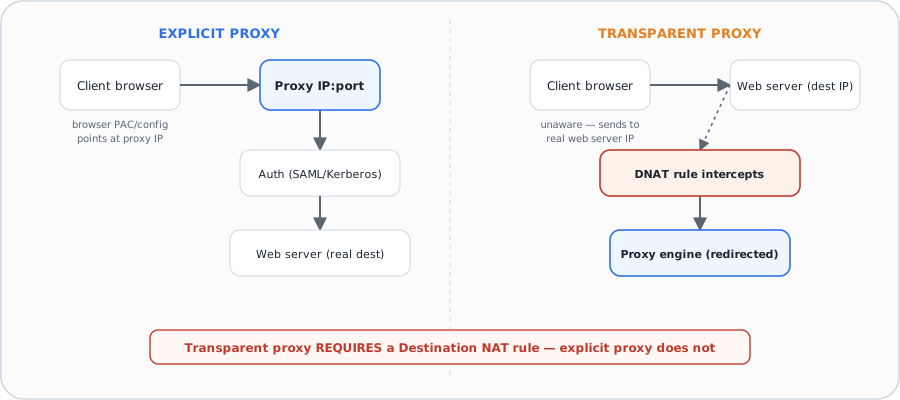
Explicit proxy — the client knows it's using a proxy. The client's browser is configured (manually, via PAC file, or via policy push) to send requests directly to the proxy's IP and port — the request itself contains the proxy's address as the destination. On the firewall side, you configure a Listening Interface (the L3 interface where the firewall watches for proxy-bound traffic) and an Upstream Interface (used if you're chaining to another proxy layer — a loopback interface if the firewall is itself both listening and forwarding). Explicit proxy is also where user-facing authentication lives: SAML/CAS (2.0-based, requiring Prisma Access, the Cloud Services plugin, and the add-on web proxy license), Kerberos Single Sign-On (requiring Panorama and a Kerberos-based authentication profile), or No Authentication (exempting all explicit proxy traffic from auth entirely — and notably, no authentication events get logged in that mode, which is itself worth remembering).
Transparent proxy — the client has no idea. The client sends requests addressed to the real destination web server's IP, completely unaware a proxy is involved. The firewall intercepts this via a specific Destination NAT (DNAT) rule that redirects matching traffic to the proxy engine — this DNAT requirement is explicitly called out because it's easy to configure the Proxy object correctly and still have nothing happen, simply because the DNAT rule that actually redirects traffic to it was never created.
Palo Alto Networks Service Proxy — a narrower, platform-gated third mode.
Forwards traffic from firewalls in a downstream network up to destinations in an upstream
network, chaining as a single proxy or as one hop in a series. This mode is explicitly
restricted to specific platforms (PA-1400, PA-3400, VM-300/500/700) running PAN-OS
11.0.1-h2 or later, and must be turned on via a CLI command (set system setting
paloalto-networks-service-proxy on) followed by a reboot before it even appears as a
configurable option — an easy exam-trap detail since it's not simply a checkbox like the
other two modes.
Pros
- Explicit proxy supports real per-user authentication (SAML/CAS, Kerberos SSO) before granting web access
- Transparent proxy requires no client-side configuration or PAC file distribution
- Both modes still sit on the same NGFW platform doing App-ID/Content-ID inspection, not a bolt-on separate proxy appliance
Cons
- Transparent proxy has a hard, easy-to-forget DNAT prerequisite that silently no-ops the proxy without it
- SAML/CAS authentication in explicit proxy mode requires Prisma Access, a plugin, and an add-on license — it isn't available out of the box
- "No Authentication" mode generates zero authentication-event logging, weakening audit trail if chosen without realizing the tradeoff
| Proxy Mode / Role | How Traffic Arrives | Key Configuration Path | Core Exam Rules |
|---|---|---|---|
| Explicit Web Proxy | Client browser points directly at proxy IP + port (PAC file or browser proxy setting) | Network > Explicit Proxy |
Requires a Layer 3 listening interface and a DNS Proxy object. Supports SAML and Kerberos auth. |
| Transparent Web Proxy | Client addresses external web server directly; intercepted invisibly | Network > Transparent Proxy + DNAT Rule |
Hard requirement: A Destination NAT (DNAT) rule must redirect port 80/443 traffic to the proxy. |
| Outbound Service Proxy | Firewall itself sends management / cloud traffic through an enterprise proxy | Device > Setup > Services > Use proxy... |
Used to send logs to Strata Logging Service and download PAN-OS software/content updates in restricted networks. |
Crucial Exam Rules (Domain 2.7)
- No-Decrypt Rule: Ensure you are NEVER decrypting outbound management traffic destined for Palo Alto Networks cloud services (e.g.
api.paloaltonetworks.com, updates, Strata Logging Service) when routed via a proxy. - Proxy Authentication: Optionally configure credentials under
Device > Setup > Servicesif the upstream corporate proxy requires basic or NTLM authentication.
Exam Traps
- A fully-configured web proxy that "does nothing" to traffic is almost always the transparent-proxy DNAT prerequisite — the Proxy object alone redirects nothing in transparent mode.
- Don't confuse "No Authentication" (a deliberate choice that also disables auth logging) with "authentication not yet configured".
- Scenario: "users must not connect to web servers directly — a device must build the TCP session on their behalf and authenticate every session to Active Directory, with browsers pointed at it" → the answer is the PAN-OS explicit web proxy (with an authentication profile + authentication policy). This is a recurring dump question.
- Explicit proxy needs a Layer 3 listening interface and a DNS proxy object; to decrypt HTTPS through the proxy you also need a certificate the clients trust.
Self-check: Web Proxy on PAN-OS
Source: ngfw_help_11-1_network_proxy.md; Palo Alto Next-Gen Firewall (NGFW) Master Cheat Sheet Domain 2.7
Module Quiz
1. An administrator edits a NAT rule in the Web UI and immediately asks a colleague, logged into another admin session, to check whether the new rule is enforcing yet. The colleague reports traffic is still hitting the old rule. What is the most likely explanation?
2. Before pushing a large rule-base change, an engineer wants to confirm the candidate configuration is syntactically and semantically valid without generating a diff view or affecting traffic in any way. Which commit-related action should they run?
3. An organization wants to integrate its ticketing system so that approved change requests automatically generate and push firewall configuration changes without any operator opening the Web UI. Which management interface should the integration target?
4. Admin A runs a commit scoped to "commit changes made by: Admin A" only. The commit unexpectedly includes an address object that Admin B had separately edited but not yet committed. Why did this happen?
5. A security team wants an admin role that is guaranteed to gain visibility into every new PAN-OS feature automatically after each upgrade, with no manual profile maintenance required. Which role type meets this requirement?
6. A company wants a single external system to control both which administrators can log in AND which role, access domain, and vsys each one is assigned — with no per-admin role configuration stored locally on the firewall. Which setup achieves this?
7. Which two firewall objects are considered shared, device-level resources that a Virtual System administrator role cannot configure, regardless of which vsys they are assigned to? (Choose two.)
8. An engineer needs to insert a firewall into an existing network segment for a two-week proof of concept, enforcing Security policy on real traffic, but the customer will not permit any change to IP addressing or the existing routing design. Which interface mode satisfies both requirements?
9. Which of the following must be configured on top of an already-existing physical interface, rather than being a mode a physical interface itself is set to?
10. A network engineer needs BGP peer dampening profiles and per-peer AFI/SAFI filtering that aren't available under the legacy virtual router's BGP tab. What must they do to get this configuration depth, and what's the cost?
11. Two vsys on the same firewall unexpectedly have full IP reachability to each other, with no documented inter-vsys requirement. What is the most likely root cause?
12. A design requires carrying OSPF's multicast hello traffic to a partner site while also encrypting everything end-to-end. Which single approach satisfies both requirements?
13. A transparent web proxy is fully configured with a DNS proxy object and a Kerberos authentication profile, but no traffic is being intercepted. What is most likely missing?
14. Which set of firewall models supports the Advanced Routing Engine (ARE)?
15. What must be enabled first before a logical router can be configured under the Advanced Routing Engine (ARE)?
16. Which two are valid security zone types when creating a new zone on a PAN-OS firewall? (Choose two.)
17. Several Layer 2 interfaces all carry the same VLAN tag, but clients behind them still can't reach each other. Assigning a VLAN tag alone didn't fix it — what's actually missing?
18. A static route is configured with route monitoring, and the preemptive hold time is set to 0 minutes. What happens when the monitored path comes back up?
19. A customer requires that users never connect directly to websites, that a security device brokers every connection, and that every session re-authenticates against Active Directory. Which deployment meets this?
20. Which networking feature can be configured on a Layer 3 interface but not on a Layer 2 interface?
21. A firewall learns a route to the same destination from two different routing protocols. How does it decide which one to install in the forwarding table?
22. Which CLI command sets the management interface to obtain its address via DHCP?
deviceconfig system, not a deviceconfig management branch. For a successful commit you must also set all four parameters together: accept-dhcp-domain, accept-dhcp-hostname, send-client-id, and send-hostname.23. What is the purpose of assigning an Admin Role Profile to a firewall administrator?
24. A technician unboxes a PA-Series firewall. Which is the correct way to reach it for first-time configuration?
25. A ZTP-capable branch firewall is powered on and connected. An administrator performs a local commit before checking Strata Cloud Manager. What is the result?