Access & Identity
GlobalProtect (Remote Access & Large-Scale VPN) 22
Learning objectives
- Explain the roles of the GlobalProtect portal vs. gateway
- Describe how LSVPN removes manual per-site IPSec tunnel configuration
- Identify which GlobalProtect features require a paid Gateway license
Think of GlobalProtect as moving the firewall's front door to wherever the laptop is. A user working from a coffee shop doesn't get a weaker version of your security stack — their traffic tunnels back and hits the same App-ID/User-ID/Content-ID policy an office user would. LSVPN does the same trick for whole branch offices instead of individual laptops.
Why
Remote and mobile users need the same protection as on-network users, and branch offices need a scalable way to establish site-to-site VPN without hand-building IPSec tunnels one by one.How
GlobalProtect deliberately splits into two separate pieces instead of one box that does everything — the same reason a hotel splits reception from room access: reception (the portal) needs to be reachable and lightweight so any client can check in, while the actual rooms (the gateways) do the heavy, sensitive work and can scale independently.
- Portal — "how does a client even know what to connect to?" A laptop leaving the office doesn't inherently know which gateway to use, what authentication method applies, or what the current agent settings should be — that has to come from somewhere. The portal is that somewhere: the client checks in here first, the portal authenticates it, then hands back the agent's live configuration plus the specific list of gateways it's allowed to use (which can differ by user group, location, or OS). The portal never sees a byte of the user's actual traffic — its whole job ends the moment it's handed out a config, which is why it can be small and centralized even for a huge fleet.
- Gateway — "who actually does the security work?" This is the piece that terminates the VPN tunnel, decrypts the session, and runs the exact same App-ID/User-ID/Content-ID Security Policy a wired office connection would get. Because this is where the real load lives (crypto, decryption, inspection), gateways are sized and licensed independently from the portal — you can have one portal and many gateways spread across regions, each sized for its own concurrent-user count.
Large-Scale VPN (LSVPN) — "how do I connect fifty branch offices without hand-building fifty tunnels?" A traditional site-to-site VPN means an admin manually creating IKE/IPSec objects for every single branch, one at a time — that doesn't scale past a handful of sites and every new branch is a repeat of the same manual, error-prone work. LSVPN solves it by reusing the exact same portal/gateway roles, just with firewalls instead of laptops as the "clients":
- A branch firewall is configured as a satellite and points at the LSVPN portal — same check-in concept as a GlobalProtect client.
- The satellite proves it's a legitimate branch device using a certificate (issued via Certificate Management), not a shared password — a stolen or guessed PSK would let anyone claim to be a branch office, but a certificate has to actually be issued to that device.
- Once trusted, the portal pushes back that satellite's specific gateway assignment and IPSec configuration — the same "hand out the config" pattern as regular GlobalProtect.
- The satellite then auto-negotiates its own IKE/IPSec tunnel to those gateways. The admin's job shrinks from "hand-build a tunnel" to "approve a certificate" — adding branch number fifty-one costs the same five minutes as branch number two.
Licensing — "why is some of this free and some of it paid?" Palo Alto draws the license line around advanced capability, not around basic connectivity — the core promise (remote users get real policy enforcement) is free. Portal and gateway deployment cost nothing by default. A paid GlobalProtect Gateway license (purchased per gateway) is only required to unlock capability layered on top of that base:
- Host Information Profile (HIP) checks (and their content updates) — inspecting the connecting device's actual security posture (patch level, disk encryption, AV running) before granting access, not just who's logging in
- the GlobalProtect Mobile App — extending the same tunnel to phones/tablets
- IPv6 connections
- GlobalProtect Clientless VPN — browser-based access to specific web apps with no agent installed at all
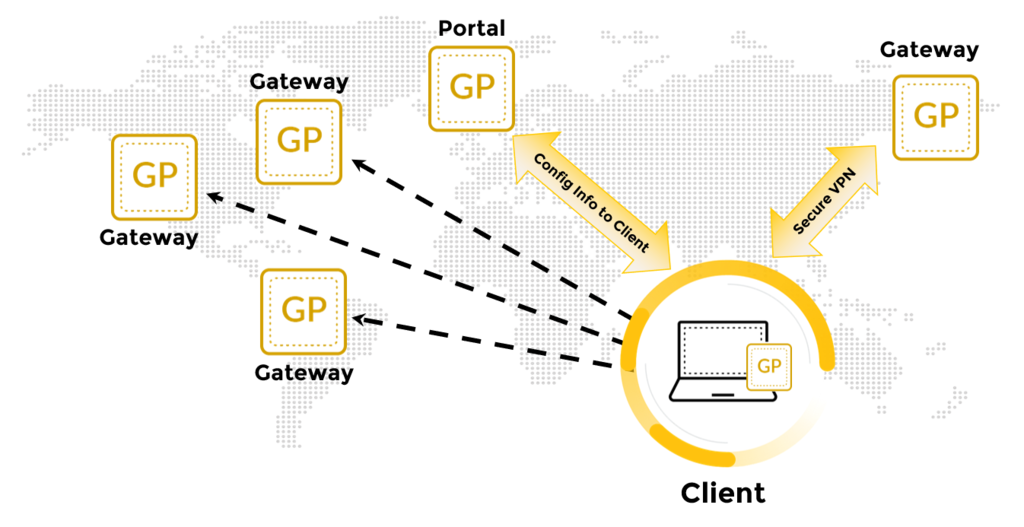
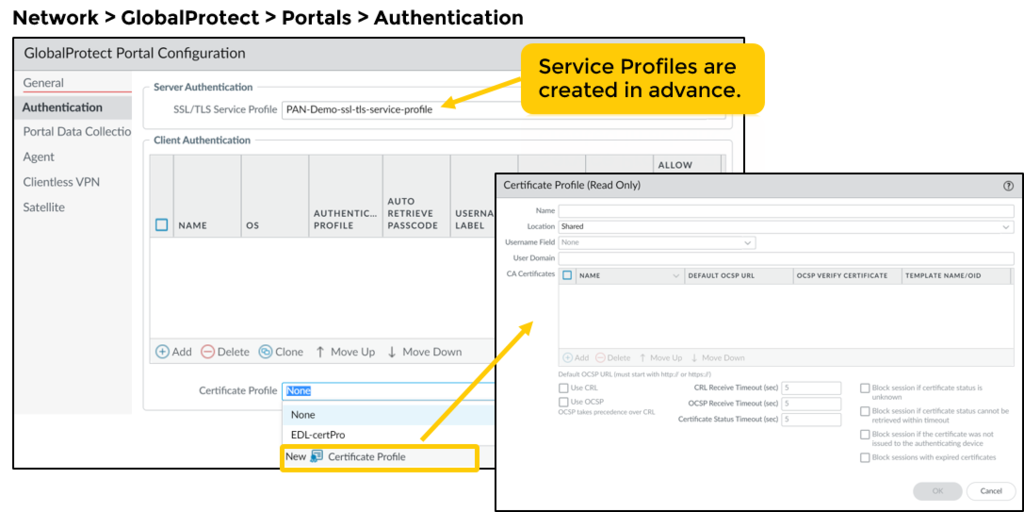
Diagrams: Palo Alto Networks Learning Center, PAN-OS course: Globalprotect configuration. Click an image to enlarge.
Pros
- Remote users get the exact same App-ID/Content-ID policy enforcement as on-prem users
- Basic portal/gateway deployment (no HIP checks) doesn't require a separate license
- LSVPN scales branch site-to-site VPN without per-tunnel manual config
Cons
- Advanced features — Host Information Profile (HIP) checks, mobile app, IPv6, clientless VPN — need a paid Gateway license
- Client agent deployment/lifecycle management is extra operational overhead across a mixed device fleet
- Gateway sizing/licensing has to scale with concurrent remote-user counts
Watch: short GUI walkthroughs
Clips from the Palo Alto Networks Learning Center. They load only when you press play.
Exam Traps & Consultant Video Insights (Videos 5–7)
- Portal vs Gateway Roles: The portal only distributes agent config/gateway lists (control plane), while the gateway terminates IPSec/SSL tunnels and enforces security policies (data plane).
- Custom Data Collection Dual-Location Requirement: To collect custom registry keys, process names, or macOS plist files for HIP evaluation, you MUST configure them in two places in the Portal GUI:
Device > GlobalProtect > Portal > Data CollectionANDPortal > Agent > [Profile] > App Config > Data Collection. Missing either location leaves HIP data uncollected. - Cookie Cert Synchronization: To enable seamless single sign-on between Portal and Gateway using Authentication Override cookies, both appliances MUST encrypt/decrypt cookies using the exact same Master Cookie Certificate.
- SAML Default Browser: Enable "Use Default Browser for SAML Authentication" in Portal App Config if modern FIDO2 / YubiKey / IdP redirects fail inside the default embedded browser.
- Client IP Pool Mutual Exclusivity: Client IP pools can be defined globally on the Gateway tab OR within individual Agent Client Settings profiles, but defining them in both locations causes a commit validation failure!
Self-check: GlobalProtect Deep Dive
Q1. A branch office needs site-to-site connectivity without an admin manually building an IPSec tunnel to headquarters. Which GlobalProtect feature fits?
A: Large-Scale VPN (LSVPN) — satellite firewalls auto-establish tunnels to portal/gateway infrastructure instead of manual per-site IPSec configuration.
Q2. An admin configures a HIP profile to check a custom corporate registry key, but the client logs show the key was never checked. What configuration step was missed?
A: Custom registry keys must be added under Device > GlobalProtect > Portal > Data Collection AND enabled under Portal > Agent > [Profile] > App Config > Data Collection.
GlobalProtect config essentials & connection methods — exam drill
Mandatory pieces of a working GlobalProtect deployment:
- An interface (with an IP/FQDN) and a zone for the portal and gateway to listen on (often the same Untrust interface).
- An SSL/TLS Service Profile with a server certificate for the portal/gateway (trusted by clients to avoid warnings).
- An Authentication Profile linked to the portal (and gateway).
- A GlobalProtect Portal with an agent/app configuration that lists the gateway(s).
- A GlobalProtect Gateway with a tunnel interface (in a zone + virtual router) and a client IP address pool.
- Security policy allowing the GP app traffic (
panos-globalprotect→ pullsssl; plusipsec-esp-udpfor tunnel mode) and policy for the GP-users zone to internal resources.
Authentication methods GlobalProtect supports: SAML 2.0, RADIUS (incl. OTP), LDAP, Kerberos, TACACS+, local database, and client certificate — plus MFA. Not supported: SSH key-based authentication (that's for CLI access to network devices).
| Connection method | Behaviour | Typical use |
|---|---|---|
| On-demand | User manually connects/disconnects the agent | Occasional VPN users |
| User-logon (Always On) | Agent connects automatically at user logon and stays connected; can be configured so the user cannot disconnect | Force a subset of users onto the VPN at all times |
| Pre-logon | Tunnel is established with a machine certificate before the user logs into Windows, then transitions to a user tunnel after logon (SAML/MFA can apply at user logon) | Domain scripts, GPO, "VPN before the Windows logon screen" |
Pre-logon setup: import the internal CA that issues machine certificates onto the firewall, then on the GlobalProtect Gateway > Authentication / Client Authentication add a rule with OS/pre-logon matching and a Certificate Profile; set the portal agent config connect method to Pre-logon.
Certificate-based auth (users or devices): a Certificate Profile (references the issuing CA cert, CRL/OCSP checking, and the username field e.g. CN/subject-alt) is attached to the Authentication Profile, which is applied to the portal and the gateway. "Users get an untrusted-certificate warning" almost always = the Root CA certificate was not imported onto the firewall (or the server cert lacks the right chain), not the hash algorithm or key size.
Multiple gateways across regions provide HA / load balancing — the client picks a gateway by priority and response time and automatically fails over to the next available gateway.
Exam traps (GlobalProtect)
- Portal = config + authentication + gateway list. Gateway = tunnel termination + IP pool + policy enforcement. Answers that swap these are wrong.
- "MFA + scalable + cloud IdP" for the portal → SAML. "Username/password then MFA via external IdP" → a SAML authentication profile applied to portal and gateway, or an authentication sequence LDAP → RADIUS-OTP.
- Split tunnel is configured on the Gateway (Agent > Client Settings > Split Tunnel), not in a security policy. Include routes = through the tunnel; Exclude routes/domains/apps = bypass. "Split tunnel by domain" Include list forces those domains through the tunnel (and, with "Both Network Traffic and DNS", resolves them via the internal DNS).
- First step to set up the portal = assign an IP address or FQDN to the portal interface.
Source: Palo Alto Professional Video Series (VID5, VID6, VID7); pan-os/11-1/pan-os-admin/subscriptions; ngfw/administration/large-scale-vpn-lsvpn; pan-os-admin/globalprotect/globalprotect-quick-configs; practice-set synthesis
📋 Cheat Sheet — GlobalProtect Architecture Domain 1.5
- Portal = config delivery + authentication. Gateway = tunnel termination.
- Split Tunneling reduces bandwidth load (only corporate traffic via VPN)
- HIP checks enforce endpoint compliance (disk encryption, AV installed)
- Clientless VPN for unmanaged devices
⌨️ CLI Verification
| Command | Purpose |
|---|---|
show global-protect-gateway current-user | Displays currently connected gateway users |
show global-protect-portal current-user | Displays currently connected portal users |
Authentication Services 23
Learning objectives
- Distinguish an Authentication Profile from an Authentication Sequence
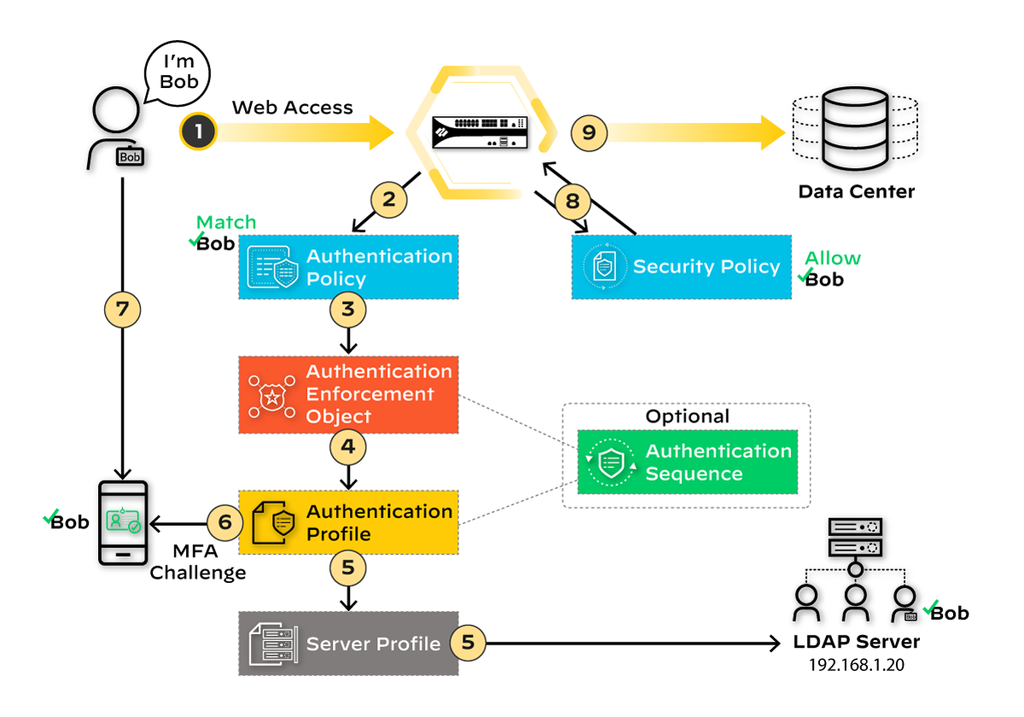
- Explain how Authentication Policy triggers a Captive Portal / Authentication Portal challenge
- List the interactive and non-interactive authentication methods PAN-OS supports
One shared front door for two very different visitors: an admin logging into the firewall's Web UI, and an end user whose web traffic just tripped an Authentication Policy rule. Both end up going through the same underlying plumbing.
Why
Different organizations already run different identity infrastructure (AD, RADIUS, SAML IdP, TACACS+); the firewall needs to plug into whatever exists rather than forcing a new identity silo.How
Three building blocks stack on top of each other. Take them one at a time:
- Authentication Profile — "how do I even talk to one specific identity source?" Your company doesn't have one identity system, it has several — maybe an on-prem AD server, a RADIUS box for network gear, and a SAML identity provider for SaaS apps. Each of those speaks a completely different protocol and hands back identity info in a different shape. An Authentication Profile is PAN-OS's answer to "how do I wire the firewall up to this one specific backend": you pick the backend type (LDAP, RADIUS, SAML, Kerberos, TACACS+, local database, or a certificate profile), give it the actual connection details to reach it (server address, shared secret, bind credentials — whatever that protocol needs), and — critically — tell it which field in that backend's response should be treated as "the username" going forward (an AD server can return several different name formats; get this attribute mapping wrong and User-ID/Security Policy will silently be matching the wrong string against every rule). It also carries timeout and lockout settings, because a login attempt has to fail gracefully instead of hanging or letting someone brute-force it indefinitely. One profile = one backend, fully specified. Some profiles are interactive (MFA, SAML, Kerberos SSO, TACACS+, RADIUS, LDAP, local database — the user has to do something); a certificate-based profile is silent and PKI-driven — the device's certificate itself is the proof, nobody types anything.
- Authentication Sequence — "what if the first backend I check is down, or the user isn't in it?" A single profile is a dead end if that one backend is unreachable. A Sequence is just an ordered list of profiles: try profile 1; only if that backend can't be reached or flatly rejects the login, move on and try profile 2; and so on. This is the mechanism that makes a phased IdP migration painless (old AD profile first, new SAML IdP as the fallback, flip the order once everyone's migrated) and lets two business units on two different RADIUS servers share one login flow without merging their directories.
- Authentication Policy — "which traffic actually has to prove who it is, and
which profile/sequence checks it?" Profiles and sequences are just backends
sitting there, unused, until something decides to invoke them. That something is an
Authentication Policy rule — matched by zone/source/destination/URL category exactly
like a Security Policy rule, but sitting in its own rulebase evaluated
before Security Policy ever runs. If a session doesn't match any Authentication
Policy rule, it's simply never asked to authenticate here — it goes straight to Security
Policy exactly as if this feature didn't exist. If it does match, the firewall has to
actually challenge the user for credentials somehow, and that's what an Authentication
Portal method is for — three different ways to actually collect the proof:
- Browser challenge — the browser silently hands over a Kerberos ticket it already has (because the user is domain-joined and already logged into Windows); if that ticket is valid, the user never even sees a prompt.
- Web form — the fallback for anyone without a silent ticket: an actual login page, backed by whichever profile/sequence applies (MFA, SAML, Kerberos, TACACS+, RADIUS, LDAP, or local auth).
- Client certificate authentication — the device itself presents a certificate at the TLS layer; nobody types a username or password at all.
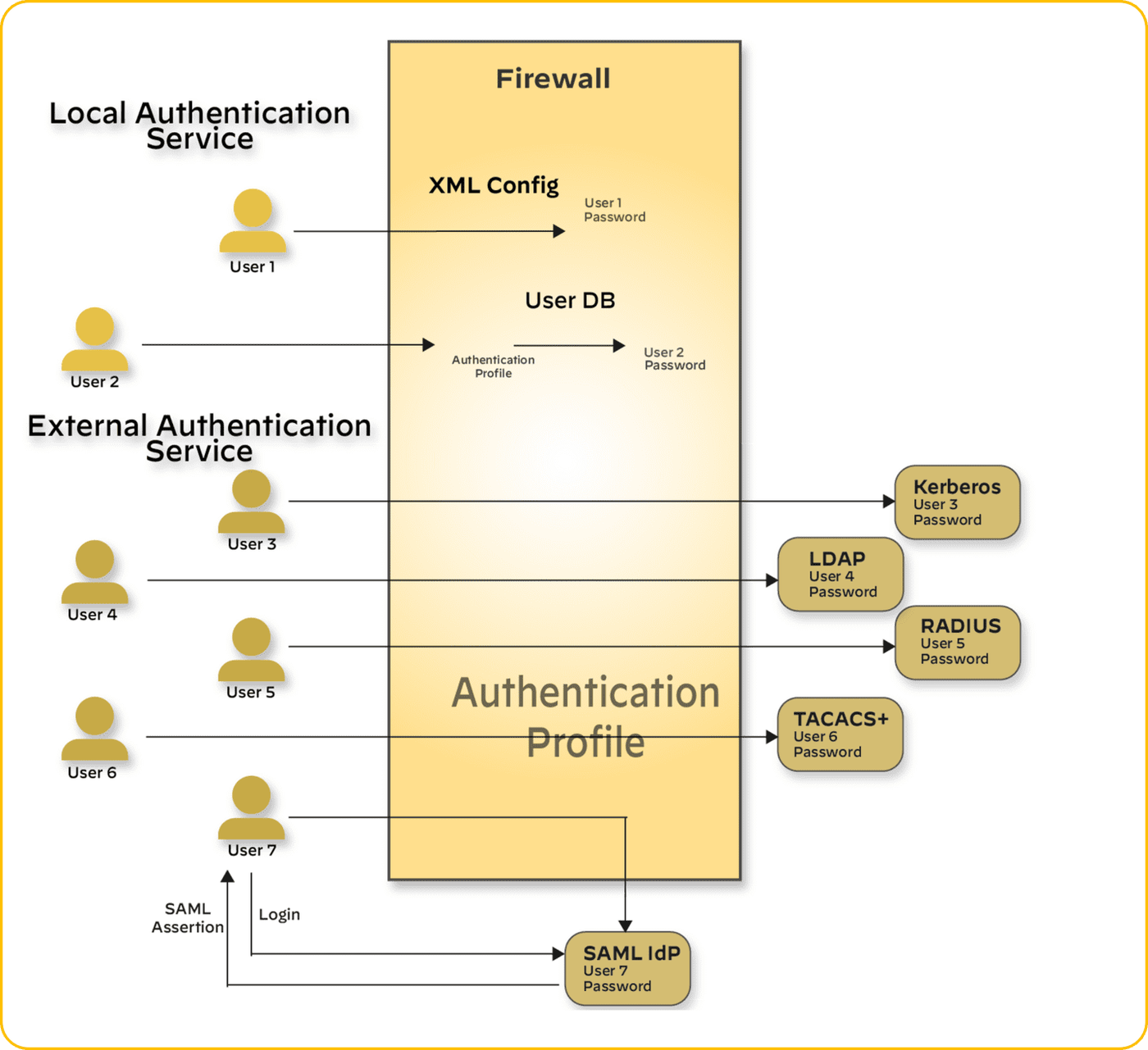
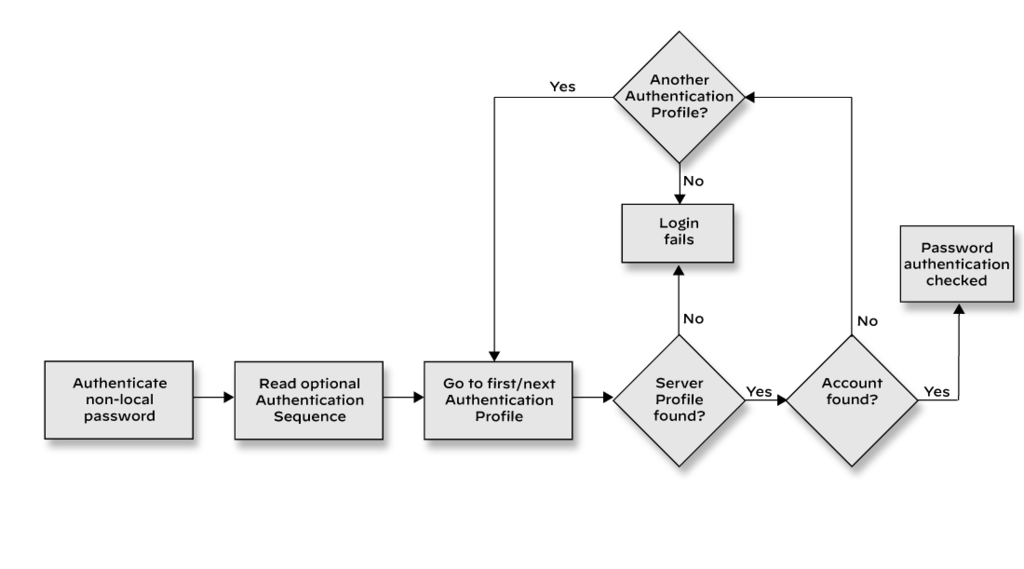
Diagrams: Palo Alto Networks Learning Center, PAN-OS course: Local firewall admin accounts; PAN-OS course: Non local firewall admin accounts. Click an image to enlarge.
Pros
- Broad protocol support means it fits into almost any existing identity stack
- Certificate-based auth avoids user friction entirely where PKI already exists
- Authentication sequences allow layered/fallback authentication methods
Cons
- Each method (SAML, Kerberos, RADIUS...) has its own setup and failure modes to troubleshoot
- Misconfigured connection timeouts to auth servers can cause slow logins or lockouts network-wide
Watch: short GUI walkthroughs
Clips from the Palo Alto Networks Learning Center. They load only when you press play.
Exam trap
Authentication Policy is evaluated before Security Policy — a common wrong answer is assuming the firewall checks Security Policy first and only prompts for auth if the app is allowed.Self-check
Q1. You want users to try SAML SSO first, and fall back to a local database login if the IdP is unreachable. What do you configure?
A: An Authentication Sequence chaining the SAML profile first, then the local database profile as fallback.
Q2. Two business units use different RADIUS servers with different login attribute mappings. Do they need separate Authentication Profiles or can one profile cover both?
A: Separate profiles — an Authentication Profile is scoped to one server/backend and its attribute mapping, so different backends need their own profile (which can then be combined in a sequence if needed).
Admin RBAC, certificates, SCEP & revocation — exam drill
- Role-based admin auth against an external server: create an Authentication Profile (RADIUS / LDAP / TACACS+ / SAML), then map admin roles to the groups the server returns. For fallback across two servers use an Authentication Sequence. Running SAML and RADIUS in parallel during a migration = two separate profiles (a SAML/IdP profile and a RADIUS profile), referenced where needed.
- Custom Admin Role profiles give granular read/read-write control per feature area (e.g. network operators view logs/policy only; security engineers edit security policy but not network settings). Don't use the predefined superuser/device-admin roles for least privilege.
- Certificate-based admin login: import the CA certificate
and mark it a trusted CA under
Device > Certificate Management >
      Certificates
, build a Certificate Profile, and reference it from the admin authentication settings. Import a third-party or root CA cert atDevice > Certificate Management > Certificates; import the root CA before generating a CSR. - Automated enrollment: SCEP (Simple Certificate Enrollment Protocol) is the standard way for the firewall (and clients, via GPO) to obtain certificates from an internal CA such as Microsoft AD CS — used for GlobalProtect machine/user certs at scale.
- Revocation checking — OCSP vs CRL: both are configured in the Certificate Profile. OCSP is real-time, per-certificate, lower bandwidth/memory — preferred for large deployments; CRL is a periodically-downloaded full list. Best practice: OCSP with CRL fallback. A firewall still accepting certs from a compromised intermediate CA → enable OCSP (and block on unknown status).
Source: ngfw/administration/authentication; pan-os-admin/certificate-management; practice-set synthesis
📋 Cheat Sheet — Authentication Profiles & Sequences Domain 2.1
- Authentication Profile = the service (Local, LDAP, RADIUS, TACACS+, SAML 2.0)
- Authentication Sequence = ranked list of profiles tried in order
- SAML, TACACS+, and RADIUS can handle both authentication AND authorization externally
Multi-Factor Authentication 24
Learning objectives
- Explain why MFA is applied selectively via Authentication Policy, not everywhere
- List the supported MFA factors and native vendor integrations
- Describe the request flow: Authentication Policy → Authentication Portal → MFA factor(s) → Security Policy
A stolen password alone stops being enough — MFA makes a user prove identity a second, different way ("something you know" plus "something you have") before they reach the thing that matters.
Why
Not every application needs the same bar: MFA on a low-value internal wiki would just add friction, but financial systems or admin access justify the extra step. Applying it selectively, by application/service/user, balances security against user experience.How
MFA isn't a separate system bolted on — it reuses the exact same Authentication Policy / Authentication Portal plumbing from the previous section, and just adds more checkpoints after the first one. Walking the request end to end:
- Authentication Policy decides who even gets stopped. If MFA applied to every single request, users would be hit with push notifications constantly and start reflexively approving them without looking — which defeats the entire point. So the same selective, zone/user/URL-category-matched Authentication Policy rule that gates regular authentication is what decides whose traffic needs the extra step at all. A rule pointed at the finance app's URL category triggers MFA; a rule that never matches the internal wiki means the wiki never asks for it.
- The user clears the normal login first ("something you know"). This is the ordinary Authentication Portal challenge — password, SSO ticket, whatever the profile says. This is factor one.
- Then one more challenge per additional required factor ("something you have"). A second screen appears for each factor still required — some MFA services let the user pick which one to answer with if several are enrolled. The factor types PAN-OS supports are Push (approve a prompt on a phone), SMS, Voice (a phone call reads a code), and One-Time Password (a code from an authenticator app) — but note these are just the categories of proof; which specific vendor actually issues and checks that proof is a separate question, covered next.
- Only once every required factor clears does Security Policy even see the request. Until then, the session is stuck at the authentication layer — it never reaches the allow/deny decision for the actual application.
Why does the MFA vendor split even exist? You'd expect "we integrated with Duo" to mean Duo works everywhere MFA is used — but PAN-OS draws a hard boundary around where a given integration is trusted, because GlobalProtect login and admin login to the firewall/Panorama itself are higher-stakes, lower-volume paths than day-to-day app access, and PAN-OS only ships pre-built, maintained connector logic for the high-volume end-user case:
- End-user Authentication Policy MFA — gets native, plug-and-play connectors for Duo, Okta Adaptive, PingID, and RSA SecurID (or RADIUS/SAML for any other vendor) — built for the everyday "user hits a sensitive app" case.
- GlobalProtect login and firewall/Panorama admin-login MFA — never uses those native connectors, full stop; both only ever speak RADIUS or SAML. Practically: setting up Duo for end-user MFA does nothing for admin-login MFA — that has to be wired up separately, through RADIUS or SAML, even if it's the same Duo tenant underneath.
One more limitation worth remembering because it trips people up: MFA profiles can't be chained inside an Authentication Sequence the way regular authentication profiles can — there is no "try MFA vendor A, and if that's down, fall back to vendor B." If the MFA backend is unreachable, there's no automatic fallback path the way there is for ordinary authentication.
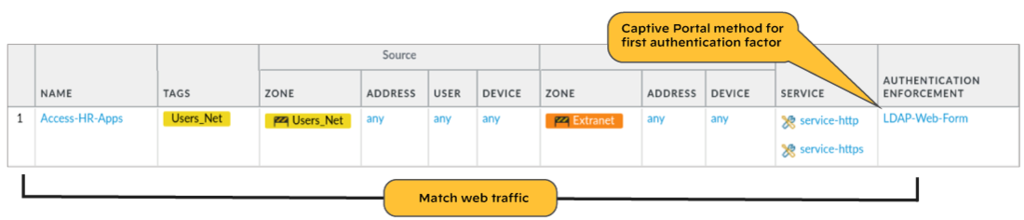
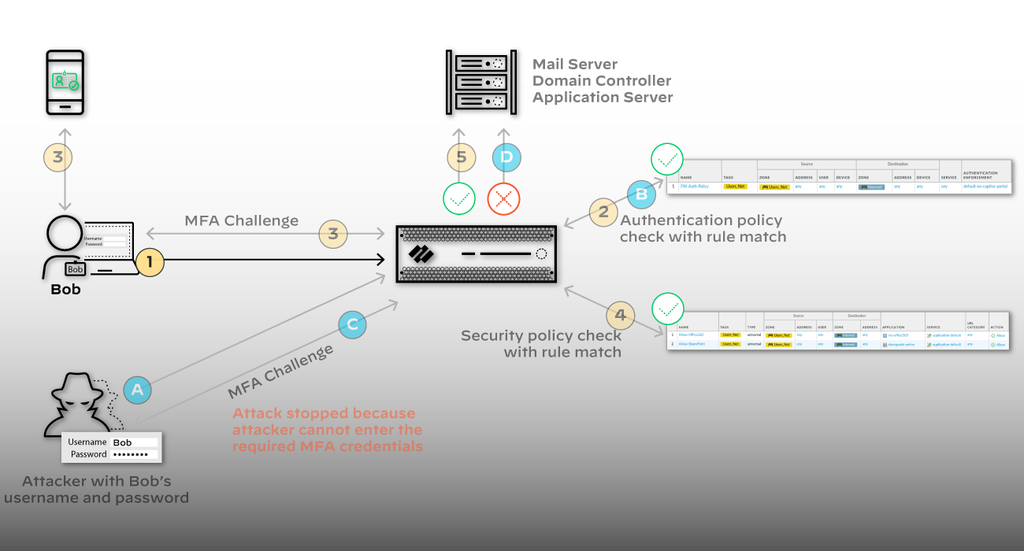
Diagrams: Palo Alto Networks Learning Center, Identity course: Configure multi factor authentication. Click an image to enlarge.
Pros
- Selective enforcement via Authentication Policy avoids MFA fatigue on low-risk services
- Native connectors (Duo, Okta, PingID, RSA SecurID) simplify integration versus building RADIUS/SAML from scratch
- Kerberos/SAML SSO as the first factor reduces how often users are interrupted
Cons
- GlobalProtect and admin-login MFA are limited to RADIUS/SAML — the native app integrations don't apply there
- MFA profiles can't be combined into authentication sequences, limiting some layered-fallback designs
- Decryption must be in place for the firewall to see and evaluate the traffic MFA is meant to protect
Exam trap
GlobalProtect and admin-login MFA only support RADIUS/SAML — the native Duo/Okta/PingID/RSA SecurID connectors are for end-user Authentication Policy MFA only. This distinction shows up often.Self-check
Q1. You want to enforce MFA on admins logging into the firewall's Web UI using Duo's native integration. Is that supported?
A: No — admin-login MFA only supports RADIUS/SAML integrations, not the native vendor connectors like Duo.
Q2. Why does MFA get applied selectively via Authentication Policy instead of globally?
A: To balance security against user friction — low-value services don't need the extra step, while sensitive/financial/admin access justifies it.
Source: ngfw/administration/authentication/authentication-types/multi-factor-authentication
Credential Phishing Prevention 25
Learning objectives
- Explain how the firewall detects a corporate credential being typed into a web form
- Compare the three detection methods: IP User, Group Mapping, Domain Credential
- Connect credential detection to URL-category-based blocking policy
A fake login page can be a pixel-perfect clone — no filter reliably tells a convincing fake from the real thing by looking at it. So the firewall stops trying to judge the page, and instead watches the one thing that actually matters: is a real corporate credential being typed into a box and sent somewhere it shouldn't go?
Why
Stolen corporate credentials are one of the highest-value outcomes for an attacker, and phishing pages are cheap to stand up and hard for users to spot. Detecting the credential submission itself is more reliable than trying to blocklist every phishing domain.How
URL Filtering's User Credential Detection feature has one specific job: watch a username/password being typed into a web form, and figure out — in real time, before the submission completes — whether that's a genuine corporate credential heading somewhere it shouldn't. To do that it has to answer two separate questions, and how confidently it can answer each one is what defines the three detection tiers:
- IP User — "does the typed username match who's logged in here?" This tier reuses data the firewall already has for free: User-ID already knows which user is currently mapped to the source IP the form submission came from. So it just compares the submitted username string against that mapping. It needs nothing beyond basic User-ID — no new agent, no new config — which is exactly why it's the easiest tier to turn on. The catch: it never looks at the password field at all, so it can't tell a correct password from a wrong guess. If an attacker knows a real employee's username (trivial — it's often firstname.lastname), this tier alone can't catch a bad password being phished.
- Group Mapping — "is this at least a real employee's name?" Instead of checking against the live IP-to-user mapping, this checks the submitted username against the list of known LDAP group members. Just as cheap to enable as IP User, and it has the exact same blind spot — the password is never examined. It's actually the least reliable of the three in practice: group membership lists are broader and change less often than live login state, so it's more likely to fire on a name that merely looks plausible, generating more false positives.
- Domain Credential — "did they actually get the password right?" This is the only tier that closes the gap the other two share: it validates the submitted username and password against the real domain, meaning it genuinely confirms the credential was correct, not just that the name was real. That certainty costs infrastructure: it requires a Windows-based User-ID agent installed on a read-only domain controller (RODC — a DC that can be safely placed somewhere less trusted since it can't push changes back to the domain), plus the Credential Service Add-on running alongside it. If an exam question emphasizes "confirms the actual password," this is the only tier that qualifies.
Why does every tier need decryption enabled first? A username/password typed into an HTTPS login form is, by definition, encrypted the moment it leaves the browser — that's the whole point of HTTPS. Without SSL decryption active on that traffic, the firewall is looking at opaque encrypted bytes and literally cannot see the form fields being submitted, so none of the three detection tiers has anything to inspect. This is a hard prerequisite, not a tuning knob.
Once detection can actually see a submission, a URL Filtering profile decides the outcome per destination URL category — this is the step that turns "we detected a credential" into an actual enforcement action:
- Allowed — your own SSO domain, trusted partner sites
- Alerted — logged for visibility, submission still goes through
- Blocked — newly-registered or uncategorized domains, exactly where a phishing kit would live

Pros
- Detects phishing by behavior (credential submission), not by trying to keep up with every fake domain
- Category-based policy lets you allow legitimate SSO/partner sites while blocking the long tail
- Three detection tiers let you trade setup complexity for accuracy
Cons
- Requires decryption to be enabled on the relevant traffic — no visibility otherwise
- Domain Credential mode (the most accurate) has the narrowest platform requirement: Windows-based agent + RODC + add-on
- Group Mapping mode's false-positive rate means it needs tuning before relying on it to actually block
Exam trap
Domain Credential mode checks username and password against the domain; IP User and Group Mapping only ever look at the username — neither validates the password itself. Don't assume any mode confirms the password matched unless it's Domain Credential.Self-check
Q1. Which detection method requires the Windows-based User-ID agent on a read-only domain controller with the Credential Service Add-on?
A: Domain Credential — the most accurate mode, validating both username and password against the domain.
Q2. A user's real corporate username matches a phishing page's submitted username, but the firewall has no way to verify the password. Which detection method is being used?
A: IP User or Group Mapping — both only compare the submitted username, not the password, unlike Domain Credential.
Source: ngfw/help/10-1/objects/objects-security-profiles-url-filtering/user-credential-detection
Cloud Identity Engine 26
Learning objectives
- Distinguish the Cloud Identity Engine's two components: Directory Sync and Cloud Authentication Service
- Explain why moving identity to the cloud reduces per-firewall operational load
- Describe the profile setup flow on the firewall side
Instead of a hundred firewalls each independently phoning a domain controller — a hundred separate connections to babysit — the Cloud Identity Engine puts one cloud service in the middle that does the querying once and hands identity out to everyone who asks.
Why
Large or distributed fleets querying a domain controller directly from every firewall doesn't scale well operationally, and configuring the same authentication source separately for every method (Authentication Portal, admin login, etc.) is repetitive and error-prone.How
Two components handle this, usable independently but stronger together — the split exists because "who is this user" and "prove it's really them" are genuinely different problems with different failure modes:
- Directory Sync — "who is this user, and what do they belong to?" This is the read side: it pulls user/group/device attributes from Azure AD, on-prem AD, or another cloud directory, and keeps a copy the firewall/Panorama can query without touching the real directory every time. It runs a fast incremental "sync changes" pass every 5 minutes by default — incremental matters here: it's only asking "what changed since last time," not re-pulling the whole directory, which is why it can run that often without hammering anything. A full sync is available separately, for when something has drifted and you need to rebuild from scratch rather than trust the delta trail.
- Cloud Authentication Service — "prove you're actually them, right now." This is the write/interactive side: it redirects a login request to a SAML 2.0 identity provider, waits for that IdP to actually authenticate the user, then maps the now-authenticated identity and lets policy apply. The reason this is worth having as its own component rather than just "configure SAML on the firewall": without it, you'd configure the same identity source separately for every place authentication happens (Authentication Portal, admin login, GlobalProtect) — with it, you wire up the IdP once, centrally, and every consumer just points at this service.
On the firewall side, you add a Cloud Identity Engine profile (region, instance, domain, update interval, attribute formats) under Device > User Identification. That profile is anchored to the firewall's own device certificate — this is the mechanism that lets the cloud service trust that a request claiming to be "Firewall X" really is Firewall X, without a shared password that could leak — plus an already-activated Cloud Identity Engine instance on the hub, which the firewall's Region setting must match exactly.
Two different sync intervals, easy to conflate. The 5-minute incremental pass above is Directory Sync pulling changes from AD/Azure AD into the cloud service — it says nothing about when the firewall itself sees those changes. That second leg is governed by the profile's own Update Interval field (how often the firewall polls the Cloud Identity Engine for updates), which defaults to 60 minutes and can be set anywhere from 5 to 1440 minutes. A firewall showing stale mappings isn't necessarily a Directory Sync problem — check the profile's own Update Interval before assuming the cloud side is behind. One detail worth internalizing because it explains a common "why isn't this syncing" confusion: the firewall only pulls attributes for users/groups that are actually referenced somewhere in security policy — not the whole directory. This keeps sync traffic proportional to what you actually use rather than the size of the entire org, but it also means adding a brand new AD group to a rule and expecting it to already have synced members is backwards — nothing pulls until it's referenced, and even then, only after the next sync interval elapses.
User Context extends the same "centralize instead of per-firewall setup" idea past just directory data: it's a cloud service firewalls connect to for viewing and managing the redistribution of mappings and tags across your whole fleet from one place, instead of an admin wiring up redistribution links firewall by firewall.
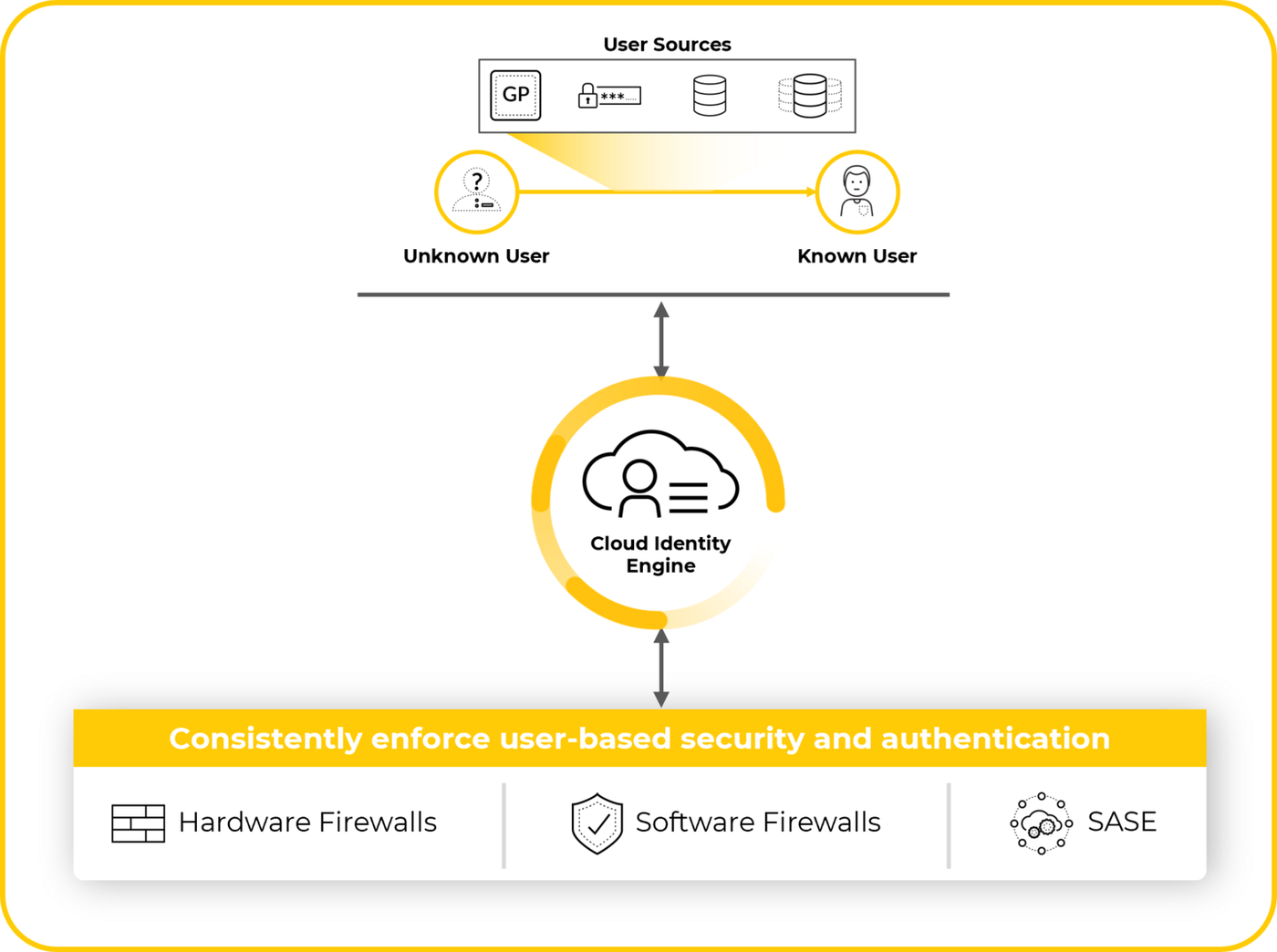
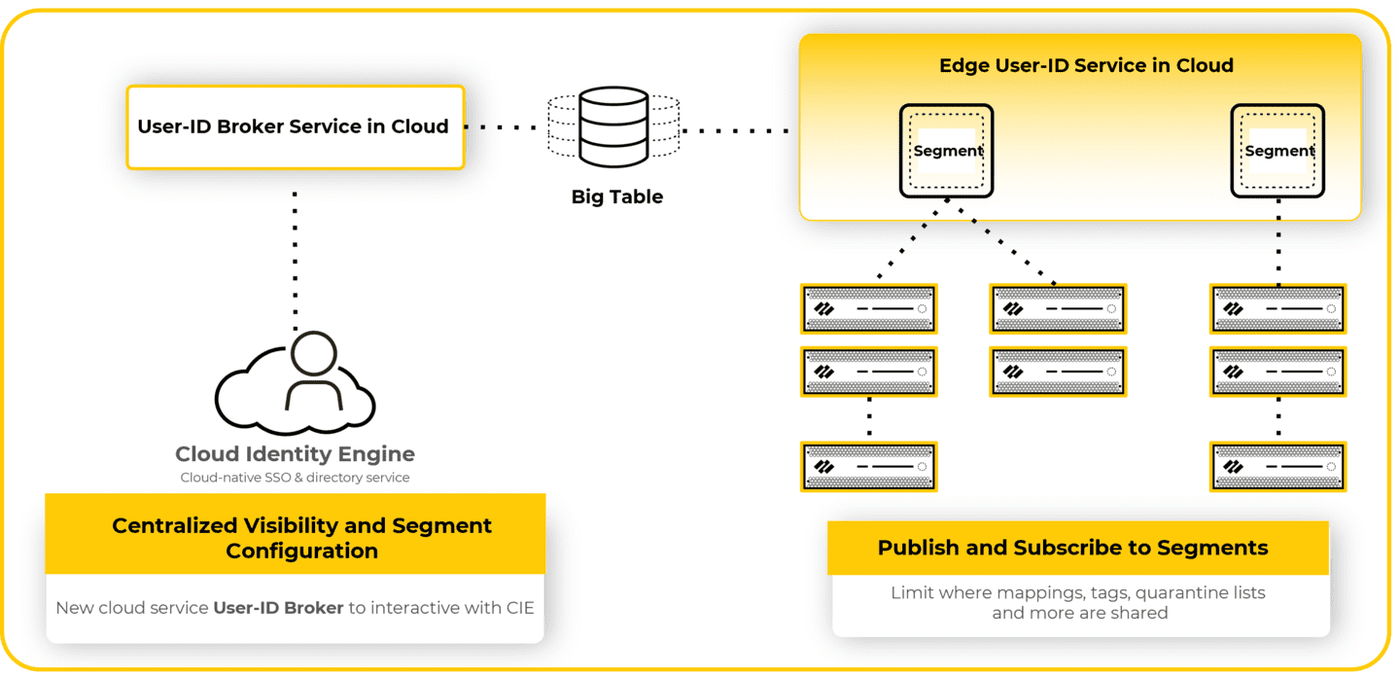
Diagrams: Palo Alto Networks Learning Center, Identity course: User context. Click an image to enlarge.
Pros
- Offloads authentication/directory load from the firewall/Panorama onto the cloud service
- Configure the identity source once instead of per authentication method
- Incremental sync (every 5 min by default) keeps mappings fresh without full-sync overhead
Cons
- Adds a cloud-service dependency to something as fundamental as authentication
- Only pulls attributes for users/groups referenced in policy — forgetting to reference a group in a rule means it silently isn't synced
- Requires a device certificate on every firewall/Panorama that connects, adding a PKI prerequisite
Watch: short GUI walkthroughs
Clips from the Palo Alto Networks Learning Center. They load only when you press play.
Exam trap
Directory Sync and Cloud Authentication Service are separate, independently usable components — you can sync directory attributes without using the cloud service for authentication, or vice versa.Self-check
Q1. A user/group was just added to Azure AD. How soon will the Cloud Identity Engine reflect that on the firewall, by default?
A: Within about 5 minutes — the default incremental "sync changes" interval — unless a full sync is manually triggered.
Q2. You reference a new AD group in a security rule but the firewall doesn't seem to have synced its members. Why?
A: The Cloud Identity Engine only pulls attributes for users/groups actually referenced in security policy — the group won't sync until it's referenced somewhere and the sync interval elapses.
Source: pan-os/10-1/pan-os-new-features/identity-features/cloud-identity-engine; pan-os/11-0/pan-os-new-features/identity-features/user-context-for-the-cloud-identity-engine
Advanced Identity Concepts & User Context 27
Learning objectives
- Explain why large environments redistribute User-ID data instead of querying sources directly from every firewall
- Describe what gets redistributed (and what can't be)
Picture 50 branch firewalls each independently interrogating the same three domain controllers for the same mapping data — that's 50x the load for one answer. Redistribution is one firewall doing the asking and everyone else just listening in.
Why
Large networks may have far more enforcement points than identity sources, and repeated direct queries from every firewall waste resources on both sides. A user's authentication state and IP mapping also needs to be consistent everywhere the user is enforced against, not just where they first authenticated.How
The basic mechanism — "one firewall asks, everyone else just listens." A small number of firewalls are designated as collectors: they're the ones actually running Server Monitoring, reading syslog, or whatever other mapping method applies, and building the User-ID table the normal way. Instead of every other firewall repeating that same work against the same sources, those collectors redistribute — push — their finished mapping table out to the rest of the fleet. Panorama can manage this redistribution centrally (define once which firewalls collect and which firewalls receive), which is far simpler to operate than wiring up direct point-to-point redistribution links between every pair of firewalls by hand.
What can and can't ride along — and why the exceptions exist. Redistribution carries mapping data from any collection method except Terminal Server agents, and it specifically can't carry Group Mapping or HIP match data. This isn't an arbitrary limitation: Terminal Server mappings and HIP match data are tied tightly to per-session state on the specific firewall that saw that session (which port range belongs to which user right now, what posture that exact device reported), and Group Mapping is a full LDAP group membership snapshot rather than a lightweight per-user fact — none of the three compress down into the kind of simple "IP → user" record that redistribution is built to carry efficiently. Practically: those three always need their own direct configuration on every single firewall that needs them — there's no shortcut via redistribution for these.
Authentication timestamps — the part people forget. If you use Authentication Policy, there's a second, separate thing that has to travel alongside the mapping data: a timestamp recorded the moment a user actually authenticates. Here's the concrete failure this prevents: a user authenticates once at Firewall A (clearing an Authentication Policy challenge there), then their traffic later happens to be enforced by Firewall B. If B has the user's identity mapping (via redistribution) but no record of when they authenticated, B has no way to know whether that user's authentication session is still fresh or long expired — it couldn't correctly apply its own timeout rule. Sharing the timestamp alongside the mapping is what keeps that timeout decision consistent no matter which firewall in the fleet is doing the enforcing. The two ride the same redistribution flow, so once redistribution itself is configured, there's no separate switch to flip for timestamps.
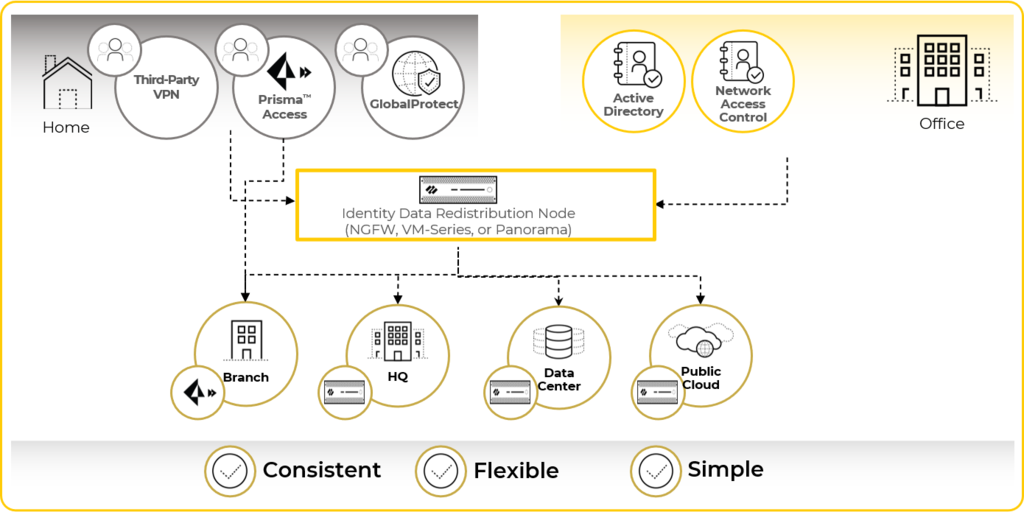
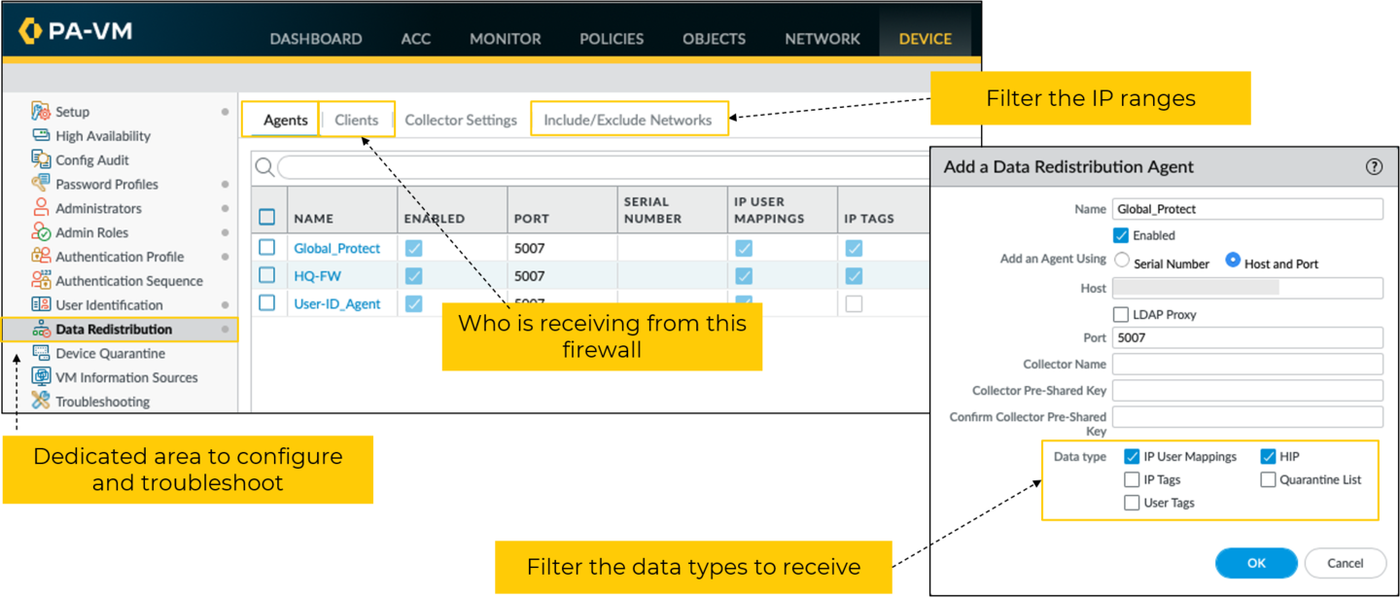
Diagrams: Palo Alto Networks Learning Center, Identity course: User id data redistribution and dynamic user groups. Click an image to enlarge.
Pros
- Cuts direct-query load on identity sources as the firewall fleet grows
- Panorama-managed redistribution is simpler than a mesh of direct firewall links
- Shared authentication timestamps keep Authentication Policy timeouts consistent fleet-wide
Cons
- Terminal Server agent mappings and Group Mapping/HIP data can't be redistributed — those still need direct configuration per firewall
- Adds another data-flow topology to design and troubleshoot in a large-scale User-ID deployment
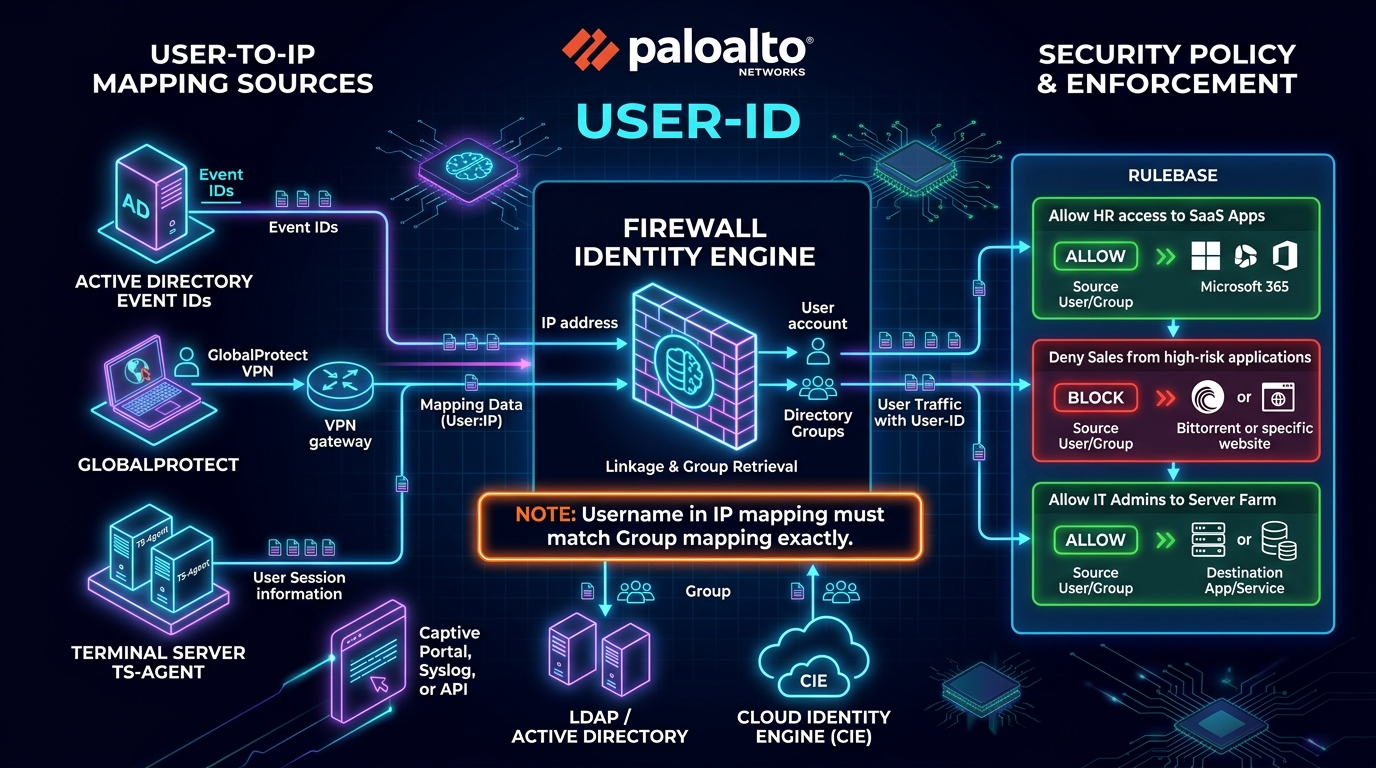
Master Cheat Sheet User-ID Blueprint (Domain 2.6):
- CRITICAL CASE-SENSITIVITY RULE: The username resolved in the IP mapping must match the username format in the Group Mapping EXACTLY (case-sensitive, including domain prefixes like
corp\jdoevsjdoe@corp.comvsjdoe). Any mismatch causes rule evaluation failure. - Server Monitoring Event IDs: Windows User-ID Agent and agentless WMI/WinRM monitor Security Event IDs: 4624 (successful logon), 4625 (failed logon), and 4768 (Kerberos TGT request).
- Terminal Server (TS) Agent: Required for multi-user Citrix / Windows Remote Desktop servers where multiple concurrent users share a single IP address. Allocates unique source port ranges (e.g. 20,000-20,999) to each user session.
| Feature | On-Premises User-ID | Cloud Identity Engine (CIE) |
|---|---|---|
| Deployment Model | Local servers, Windows User-ID agents, or direct agentless WMI/WinRM queries | Cloud-hosted service; connects to cloud directories and syncs with firewalls via device cert |
| Directory Integrations | Active Directory (LDAP), OpenLDAP, Novell eDirectory | Microsoft Entra ID (Azure AD), Okta, Google Workspace, on-prem AD via agent |
| User-to-IP Mapping | From Windows agents, GlobalProtect, Syslog listener, Captive Portal, TS-Agent, XML API | From agents, GlobalProtect, or consolidated Cloud User Context redistribution |
| Group Mapping | Direct periodic LDAP sync from domain controllers to each local firewall/Panorama | Centralized cloud sync; firewalls pull only groups referenced in active security policies |
CLI Verification Commands
Exam trap
Redistribution carries mapping data from any source except Terminal Server agents, and it specifically cannot carry Group Mapping or HIP match data — those always need direct per-firewall configuration.Self-check
Q1. Why must authentication timestamps be redistributed alongside user mapping data when Authentication Policy is in use?
A: So Authentication Policy timeout/re-auth behavior stays consistent across every firewall enforcing that user, not just the one that first authenticated them.
Q2. Can Group Mapping data be redistributed between firewalls?
A: No — Group Mapping and HIP match data cannot be redistributed; only direct configuration per firewall provides them.
Source: ngfw/administration/user-id; Palo Alto Next-Gen Firewall (NGFW) Master Cheat Sheet Domain 2.6
SCIM Provisioning 28
Learning objectives
- Explain what SCIM standardizes and why identity platforms use it
- Position SCIM relative to User-ID/Cloud Identity Engine in the identity stack
SCIM (System for Cross-Domain Identity Management) is the plumbing behind a simple promise: when HR/IT deactivates someone in the identity provider, every downstream system that trusted that account finds out automatically — no admin has to remember to go flip the switch in ten different places.
Why
Manually provisioning and, critically, deprovisioning accounts across every connected system doesn't scale and is a common source of stale access — a departed employee's account lingering somewhere it shouldn't. A standard provisioning protocol lets an IdP push create/update/deactivate events automatically instead of relying on scheduled exports or manual admin work.How
The mechanism itself. SCIM defines a standard REST/JSON API — a fixed shape for "here is a user resource, here is a group resource, here is how to create/update/ deactivate one" — that an identity provider (Azure AD/Entra ID, Okta, etc.) and a downstream service provider both agree to speak. Because it's a published standard rather than a one-off integration, the create/update/deactivate events flow over that same API the moment they happen in the IdP, and — critically — any SCIM-compliant service on the receiving end understands them the same way, without a custom sync job being written per application.
Why it's worth keeping conceptually separate from Directory Sync, even though the two sit side by side inside the Cloud Identity Engine: they're answering two genuinely different questions on two different timescales. Directory Sync answers the fast-moving, frequently-asked question — "does this user/group match a policy rule right now" — refreshed every few minutes because policy needs to react quickly. SCIM answers a slower, more fundamental question — "does this account exist at all, and is it still active." Think of the relationship this way: SCIM controls whether a record exists to sync in the first place. The moment SCIM deactivates a user in the IdP, that user stops being a valid account entirely — Directory Sync doesn't need any special logic to "notice" the departure, because there's simply nothing left there for it to find and sync on its next pass. This is exactly the mechanism that closes the offboarding gap described above: no admin has to remember to revoke access somewhere, because access was never a separate thing to revoke — it was always downstream of account existence.
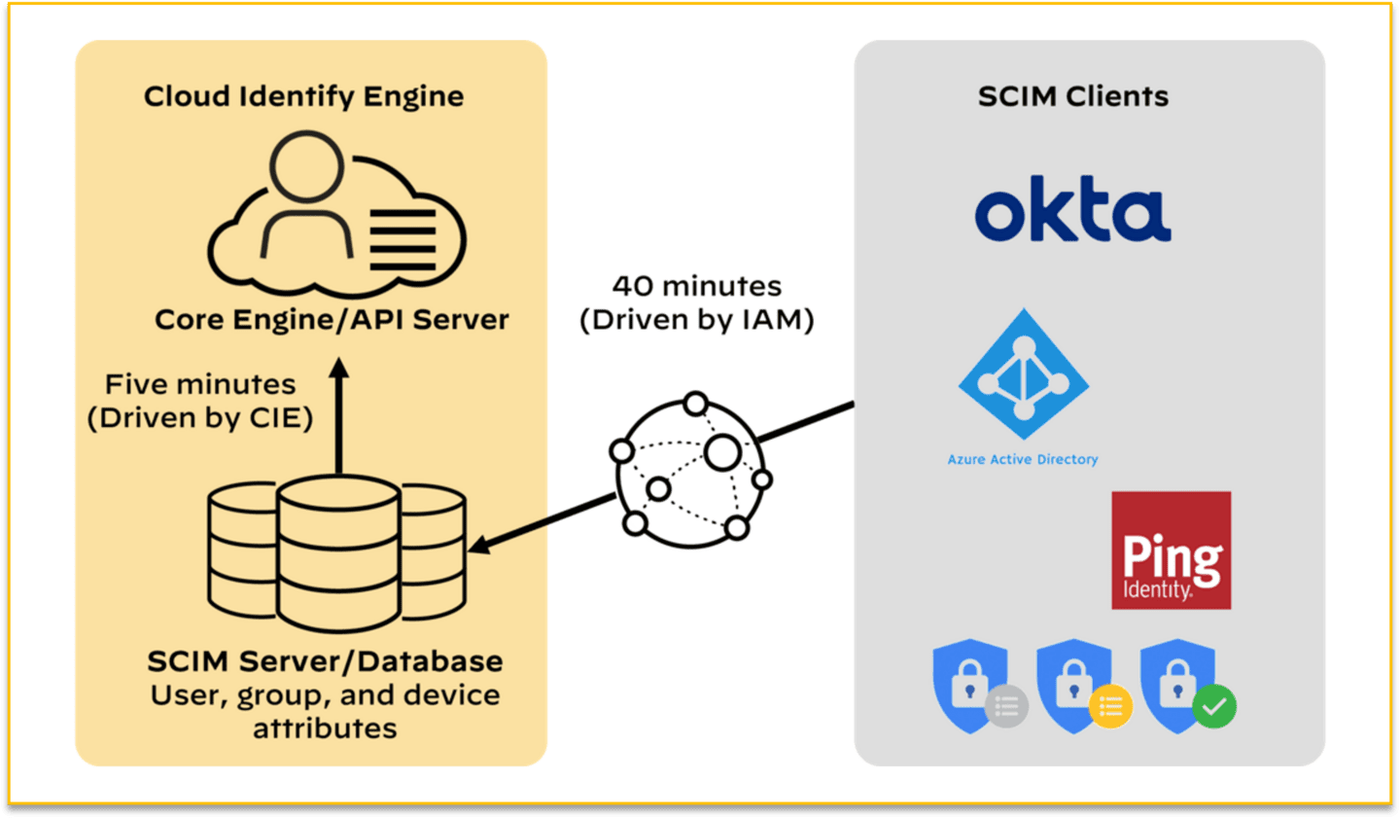
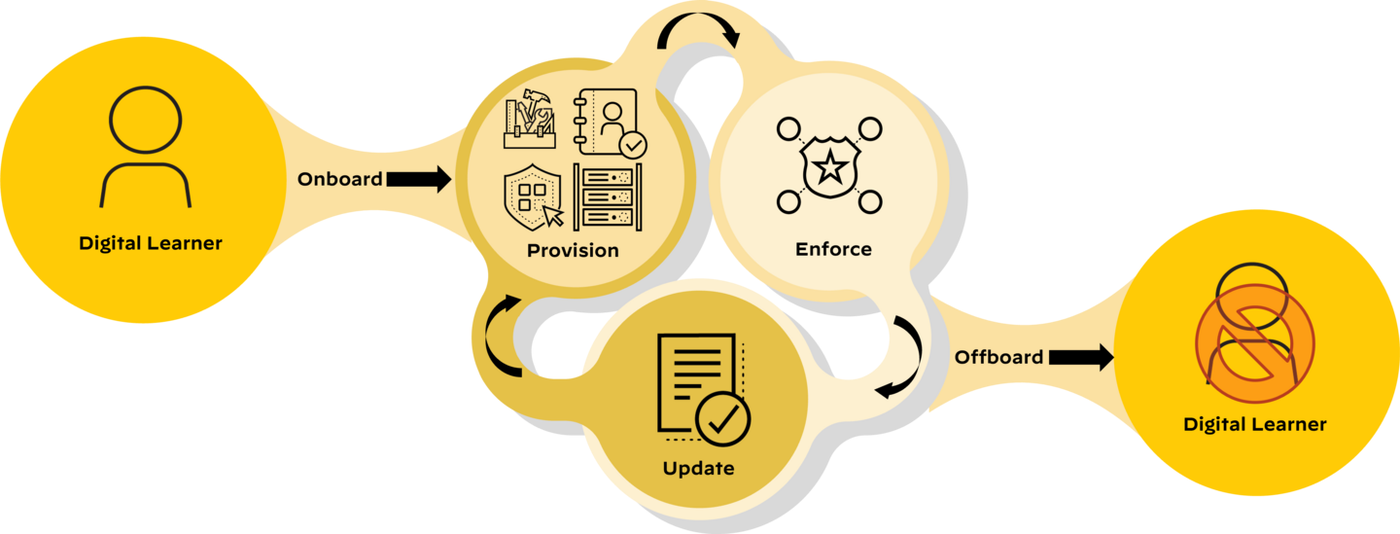
Diagrams: Palo Alto Networks Learning Center, Identity course: System for cross domain identity management. Click an image to enlarge.
Pros
- Automated deprovisioning closes a common access-hygiene gap that manual processes miss
- Standard protocol — works the same way across compliant IdPs instead of a custom sync for each
Cons
- Only as reliable as the IdP-side configuration; a broken SCIM feed silently stops propagating deactivations
- Not itself a policy engine — it keeps identity data current, but User-ID/Cloud Identity Engine still does the actual policy matching
Exam trap
SCIM keeps user/group lifecycle data current (create/update/deactivate) — it is not what performs security-policy matching. Don't confuse it with User-ID or the Cloud Identity Engine's Directory Sync, which is what policy actually reads.Self-check
Q1. An employee is offboarded in the IdP. What keeps their account from silently lingering in downstream systems?
A: SCIM's automated deprovisioning — it pushes the deactivation event to connected systems instead of relying on manual exports.
Q2. Does SCIM decide whether a user's traffic is allowed by a security rule?
A: No — SCIM only keeps identity data (user/group lifecycle) synced; User-ID and Security Policy still do the actual policy matching.
Curriculum: Identity course, "System for Cross-Domain Identity Management" lesson. Not covered as a dedicated topic in the local NGFW docs mirror — summarized against the general SCIM standard and its role alongside the Cloud Identity Engine.
Dynamic User Groups 29
Learning objectives
- Explain what a Dynamic User Group is and how membership changes without a commit
- Give a concrete example of tag-driven automated response
An AD group is a photograph — accurate the moment it was taken, stale the second someone's situation changes and nobody updates the directory. A Dynamic User Group (DUG) is a live camera feed instead: its membership is driven by tags that any system can add or strip in real time, with zero config change and zero commit required to move a user in or out.
Why
Static group membership (LDAP groups, manual lists) is too slow for automated response — by the time an admin edits a group and commits, a compromised user could already have caused damage. DUGs let policy react to a user's current risk state instead of their static org-chart membership.How
Why "no commit" is even possible here — what's actually different from a normal config change. Every other object on the firewall (a security rule, an address object, a normal AD group reference) is committed configuration — it lives in the candidate/running config, and changing it means editing that config and pushing a commit, which takes real time and touches the whole device. A DUG sidesteps that entirely because its membership isn't config at all — it's a live filter expression evaluated against tags, and tags are runtime data, not configuration. A tag can be attached to or stripped from a user the instant something happens, the same way a log entry gets written instantly — no candidate config, no commit, no device-wide push. The DUG object (the filter expression itself, e.g. "match any user tagged compromised-credentials") is configured once, normally, with a commit like anything else — what never needs a commit again afterward is which specific users currently satisfy that filter.
Where the tags actually come from. Tags can be applied automatically — most commonly, a Log Forwarding profile has a built-in tagging action that fires when a correlation object or a WildFire verdict flags suspicious behavior, stamping a tag onto the responsible user with no human in the loop. (Tags can also be set manually or pushed by an external system via the API — the DUG doesn't care about the source, only that the tag exists.)
The full concrete chain, end to end — this is the example worth memorizing because it shows every piece working together:
- Threat Prevention observes command-and-control (C2) beacon traffic from a specific user's session — a live detection, happening right now.
- A Log Forwarding profile's tagging action fires off that detection and auto-tags the responsible user "compromised-credentials" — no admin involved, this is pre-configured automation reacting to a log match.
- Separately, and in advance — potentially weeks earlier — an admin already wrote a security rule with Source User set to the "compromised-credentials" DUG, routing any match to a remediation-only zone. This rule has been sitting in the rulebase the whole time, matching nothing, waiting for a condition that didn't exist yet.
- The instant the tag lands on the user (step 2), that pre-built rule (step 3) starts matching them — because the DUG's membership just changed, and DUG membership changes don't need a commit to take effect.
- The user's traffic now hits the remediation-zone rule and gets contained.
The point of walking through all five steps: detection to containment happens with zero admin action at the moment of the incident — all the human effort (writing the tagging automation, writing the remediation rule) happened ahead of time, once, and then sat dormant until the runtime tag state made it relevant.
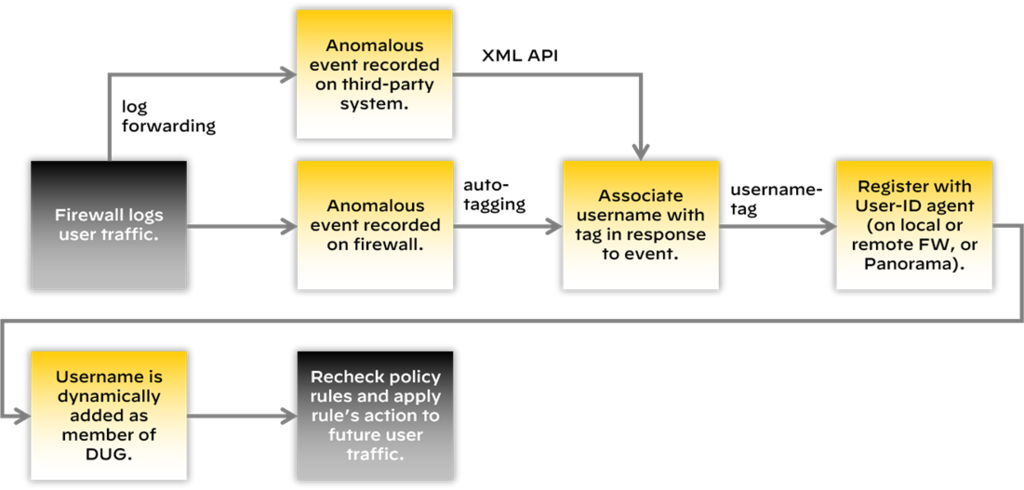
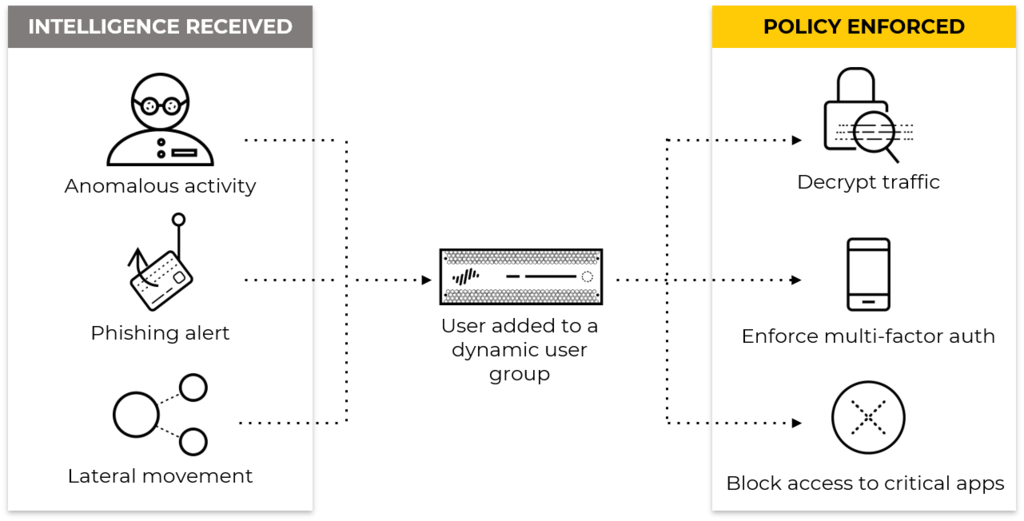
Diagrams: Palo Alto Networks Learning Center, Identity course: Implementing user id in security policy; Identity course: User id data redistribution and dynamic user groups. Click an image to enlarge.
Pros
- Enables automated, near-real-time response (quarantine, step-up auth) without waiting on a commit cycle
- Decouples enforcement from static directory group membership
- Tags can originate from multiple sources (log forwarding actions, external orchestration via API) for flexible automation
Cons
- Automation quality depends entirely on tagging logic being correct — a bad automated tag can quarantine legitimate users
- Debugging "why is this user in this group" is harder than reading a static LDAP group, since membership is runtime tag state
Exam trap
DUG membership changes require no commit — that's the entire point. If an exam question implies you need to edit/commit config to move a user in or out of a DUG, that's wrong; only the tag changes.Self-check
Q1. Threat Prevention flags a user's session for C2 traffic. How can policy react to that within seconds, without an admin editing any rule?
A: A Log Forwarding profile action auto-tags the user (e.g. "compromised-credentials"), and a DUG-based security rule referencing that tag immediately starts matching — no commit needed.
Q2. What's the practical difference between an AD group and a Dynamic User Group as source-user match criteria?
A: An AD group reflects static directory membership (changes require directory edits); a DUG reflects runtime tag state that can change automatically and instantly.
Source: ngfw/help/11-1/objects/objects-dynamic-user-groups; ngfw/administration/user-id/deploy-user-id-in-a-large-scale-network/redistribute-user-mappings-and-authentication-timestamps
📋 Cheat Sheet — User-ID Redistribution
- User-ID data hub shares mappings between VSYS
- Redistribution between firewalls via User-ID Redistribution agent
- Segments separate user communities for segment-based policy
Implementing User-ID in Security Policy 30
Learning objectives
- Write a security rule that references users/groups instead of IPs
- Recognize common real-world user-based policy patterns
This is the payoff for everything else on this page: once User-ID knows who's behind an IP, a Security Policy rule stops saying "allow TCP/443 from this subnet" and starts saying "allow Finance to use Concur" — the same rulebase, just one more field filled in.
Why
IP-based rules can't express business intent — the same subnet might contain finance, engineering, and guest devices. User- and group-based rules let policy match how the organization actually thinks about access.How
Mechanically, what changes. Once User-ID is enabled and group mapping is populated, a Security Policy rule gets one more match field: Source User. It accepts specific individual users, AD/LDAP groups, or Dynamic User Groups, and it combines with the zone/app/service criteria a rule already has — it isn't a new kind of rule or a separate rulebase, it's the exact same rule with one more filter applied on top. This matters because it means everything you already know about how Security Policy rules behave (ordering, logging, actions) still applies unchanged.
Three patterns that show up constantly, and the reasoning behind each:
- Lock down admin-style protocols to IT staff only. A rule allowing SSH/ Telnet/FTP on standard ports, with Source User set to the IT group. The reason this beats a subnet-based rule: subnets describe where a device physically sits, not who's using it — a guest laptop plugged into the "IT subnet" via a spare port would pass a subnet-based rule but fails a user-based one, because they're not actually in the IT group.
- Carve a narrow exception into an org-wide block. Slack is blocked organization-wide by a lower-priority rule, but a higher rule allows it specifically for Source User = Support group. Because rules evaluate top-to-bottom and stop at first match, Support's traffic matches the narrower allow rule above the broad deny and never reaches it — everyone else's Slack traffic falls through to the deny exactly as before. This is a direct, practical consequence of ordinary rule ordering, just with a user condition added.
- Split read access from write/upload access on one URL category. One rule allows browsing the "social-media" category for everyone; a separate, more specific rule (matched on the same category plus an App-ID for the upload/posting function) restricts that narrower action to Source User = Marketing group. This shows user criteria combining with App-ID granularity, not just replacing it.
The one thing that never changes: rules still run top-to-bottom, first match wins, exactly like a rulebase with no user criteria at all. Adding "who" to a rule never alters evaluation order — it only narrows what that specific rule is willing to match, the same way adding a service or an application to a rule would.
Pros
- Policy intent maps directly to organizational roles instead of network topology
- Combines cleanly with App-ID for fine-grained "who can do what with which app" rules
- Works whether the group comes from static LDAP or a real-time Dynamic User Group
Cons
- Only as accurate as the underlying User-ID mapping — stale or wrong mappings silently misapply policy
- Group-based rules inherit LDAP group sprawl/hygiene problems if the directory itself isn't well maintained
Watch: short GUI walkthroughs
Clips from the Palo Alto Networks Learning Center. They load only when you press play.
Exam trap
User/group criteria is just another match dimension in the same Security Policy rulebase — there is no separate "user rulebase." Rules are still evaluated top-to-bottom, first match wins.Self-check
Q1. You want IT staff to be the only ones who can SSH into servers, using standard ports. How do you express that?
A: A Security Policy rule with Source User set to the IT group/AD group, combined with App-ID matching SSH — the rule sits in its normal position in the ordered rulebase.
Q2. What happens if User-ID mapping for a user is stale (wrong IP-to-user mapping)?
A: Policy gets silently misapplied — the rule matches whoever the stale mapping says is at that IP, not the actual current user.
User-ID mapping methods & Group Mapping — exam drill
User-to-IP mapping sources (how the firewall learns which user is at an IP):
- GlobalProtect — the mapping comes from an explicit authentication event directly with the firewall, so it is the most reliable / most accurate source (recurring dump answer).
- User-ID agent (Windows) or agentless firewall polling — monitors AD Domain Controller security logs; the agent can also do WMI probing of workstations for real-time verification (best for mixed VPN / Wi-Fi / domain-joined estates).
- Authentication Policy / Authentication Portal, syslog listener, XML API, Terminal Services (TS) agent (port-range mapping), server session monitoring.
Group Mapping (which groups a user belongs to, for user/group policy): configure an LDAP Server Profile pointing at the AD domain controllers, then a Group Mapping setting that pulls group membership over LDAP. This must be done before you can reference users or groups in Security policy. Cloud IdPs: use the Cloud Identity Engine group retrieval instead.
Cloud Identity Engine (CIE) — exam drill
- Cloud service; you register the firewall with CIE via the Palo Alto hub / CSP and configure User-ID settings to use it. Needs API permissions to the cloud IdP.
- Retrieves users, groups and attributes from cloud IdPs (Azure AD, Okta, Google Workspace) and on-prem AD (via directory sync). Integrates multiple identity providers at once.
- Does NOT provide user-to-IP mapping — that still needs a User-ID agent, GlobalProtect, Captive Portal, syslog, etc. So "office users not identified, remote GP users fine" → the office needs a real IP-mapping source; CIE alone won't do it.
- Key advantage over an on-prem Identity Engine: reduced hardware and maintenance cost. Main dependency: a stable internet connection to the CIE service.
- Regional data isolation → use selective User-ID redistribution so each region's firewalls only receive their own region's mappings.
Source: ngfw/administration/user-id/enable-user-and-group-based-policy; ngfw/administration/user-id/map-users-to-groups; ngfw/administration/cloud-identity-engine; practice-set synthesis
Module Quiz
1. A network security administrator has been tasked with deploying User-ID across a mixed environment of domain-joined workstations, GlobalProtect-connected laptops, and a custom internal application that can push mappings itself. Which three are valid methods of collecting User-ID information? (Choose three.)
2. A branch office needs site-to-site-style connectivity to headquarters, but the admin wants satellite devices to auto-establish tunnels against a central portal instead of hand-building IKE/IPSec objects for every new site. Which GlobalProtect capability fits, and does it require the paid Gateway license?
3. An engineer wants to require MFA for a specific finance application without applying it to every other service on the firewall. Which policy layer evaluates first and decides whether that traffic needs to authenticate at all?
4. Two business units authenticate against different RADIUS servers with different login-attribute mappings, and the design must fall back to a local database login if both RADIUS servers are unreachable. How should this be built?
5. An organization uses Duo's native integration for end-user Authentication Policy MFA and now wants admins logging into the firewall's Web UI to use Duo the same way. Is this supported as designed?
6. Security wants to confirm that a credential typed into a suspected phishing page actually matches both a real corporate username and the correct password, not just the username. Which User Credential Detection method is required, and what does it depend on?
7. A URL Filtering profile is configured to block credential submission to uncategorized domains, but logs show no credential-detection events at all for HTTPS traffic to those sites. What is most likely missing?
8. Which two statements about the Cloud Identity Engine are correct? (Choose two.)
9. An engineer configures User-ID redistribution across a large firewall fleet but notices Terminal Server agent mappings never propagate to peer firewalls, even though other mapping sources do. Why?
10. An employee is offboarded in the corporate IdP, but their account continues to authenticate against several downstream systems days later. Which capability, if properly configured, would have automatically deactivated those accounts?
11. Threat Prevention flags a user's session for command-and-control traffic. A Log Forwarding profile auto-tags the user "compromised-credentials," and a matching security rule quarantines them to a remediation zone within seconds — with no admin editing or committing any rule. What makes this possible?
12. An engineer wants only members of the IT group to be able to SSH into servers, while everyone else's SSH attempts are blocked, all inside the existing security rulebase rather than a separate policy layer. Which mechanism achieves this?
13. GlobalProtect is configured with a hybrid model: certificate-based authentication for pre-logon, and SAML-based MFA once the user signs in. How does the agent process this on a Windows endpoint?
14. What two functions do certificate profiles serve when GlobalProtect uses certificate-based authentication? (Choose two.)
15. Which method of mapping users to IP addresses is considered the most reliable in PAN-OS?
16. What must be configured before an administrator can write Security policy rules that match on users and groups?
17. What does enabling split tunneling with the "Both Network Traffic and DNS" option in a GlobalProtect portal configuration actually control?
18. Which two connection types are secured using SSL/TLS Service Profiles on a PAN-OS firewall? (Choose two.)
19. A large enterprise with an on-prem AD CS hierarchy needs certificate-based auth for users and devices, OCSP-based revocation checks, and Panorama-managed firewalls with distinct user/device certificate profiles. Which approach fits?
20. A firewall's User-ID mappings via the Cloud Identity Engine look stale — a user added to an AD group an hour ago still isn't matching a policy rule that references that group. Directory Sync's incremental pass runs every 5 minutes. What else should be checked before assuming Directory Sync is broken?
21. RADIUS is the current admin-authentication method and must keep working for six months while SAML is rolled out in parallel. Which two configuration actions correctly enable both to function during the transition? (Choose two.)
22. An enterprise deploys domain-issued machine certificates via Group Policy and needs pre-logon, OCSP checks, and minimal user disruption across many Panorama-managed firewalls. Which approach is correct?