Traffic Classification
App-ID 03
Learning objectives
- Explain why App-ID classifies by signature/decoder/heuristic instead of trusting port numbers
- Describe the order of operations App-ID follows within a single session (policy match → signature → decryption → decoder → heuristic)
- Identify the operational risk of new App-IDs shipping in content updates against broad "allow any application" rules
App-ID is Palo Alto's patented traffic classification engine. It determines what application is actually running — regardless of port, protocol, or evasive encryption (SSH/SSL) — rather than trusting the port number.
Why
Attackers and legitimate apps alike hop ports or hide inside allowed protocols (e.g. instant messaging tunneled over HTTP). Port-based rules can't distinguish "port 443 web browsing" from "port 443 BitTorrent."How
App-ID doesn't make one single judgment call — it's a layered pipeline where each stage only has to catch what the stage before it missed. That layering exists because no single technique reliably identifies every application: a fixed signature is fast but useless against encryption, decoders catch structural tricks a signature can't, and heuristics are the last resort for traffic that's actively trying to look like something else. Walking the pipeline in order:
- Security policy match — "which rule even applies here?" The very first thing that happens on a new session is an initial policy lookup based on what's known so far (zone, IP, port) — this is what lets the firewall start applying a policy decision immediately, before the application is even fully known, rather than holding every new session in limbo.
- Application signatures — "does the traffic pattern match a known app?" Palo Alto maintains signatures that identify applications by their actual traffic pattern, not their port — this is the step that catches the classic evasion case: a BitTorrent client running on port 443 gets classified as BitTorrent by its signature, not waved through as "port 443 = web browsing" the way a legacy ACL would. This is also where the firewall notices if a known app is running on a non-standard port at all, which itself is often a signal worth logging.
- SSL/SSH decryption, if configured — "the signature can't see through encryption, so let's remove the encryption." If the session is SSL or SSH and a decryption rule matches it, the firewall decrypts the session and re-runs signature matching against the now-plaintext payload. This step explains a detail that trips people up on the exam: classification is not necessarily final at session start — a session that started out looking like "unknown-tcp" or just "SSL" can be reclassified mid-session the moment decryption exposes what's actually inside, and Security Policy is re-evaluated against that new classification.
- Protocol decoders — "does this traffic actually behave like the protocol it claims to be?" Decoders go a level deeper than pattern-matching: they actively validate that traffic conforms to the protocol's real behavior/state machine, which is what catches an application tunneling itself inside another allowed protocol (e.g. a chat app riding inside what's nominally HTTP). A signature might match the outer wrapper; a decoder is what notices the wrapper is being abused.
- Heuristics / behavioral analysis — "nothing above worked; make the best call from behavior." This is the last resort, reserved for traffic that's evasive enough to defeat both signatures and decoders. It's explicitly probabilistic rather than exact — it's inferring from behavior patterns, not matching a definitive fingerprint, which is why it's positioned last: you only fall back to a "best guess" once the more certain methods have both failed.
Whatever stage finally nails the classification, the outcome feeds straight back into policy: block, allow-and-scan (run Content-ID's threat/URL/file inspection on it), restrict specific features of that app (e.g. allow Facebook but block its chat function), or apply QoS — the same App-ID result drives all of these simultaneously.

Pros
- Sees through port-hopping and protocol tunneling that port-based ACLs miss
- No separate license — core to every NGFW
- Feeds Policy Optimizer, which finds port-based rules you can safely convert to App-ID rules
Cons
- New App-IDs ship in content updates — existing "allow all apps" rules can silently start (or stop) matching new traffic, so you must review new App-ID impact each release
- Custom/internal apps need manual App-ID objects or they show up as "unknown-tcp/udp"
- Heuristic identification for very evasive apps is probabilistic, not exact
Watch: short GUI walkthroughs
Clips from the Palo Alto Networks Learning Center. They load only when you press play.
Exam Trap
App-ID re-evaluation on decryption is often missed: a session first classified as "unknown" or as the wrapper protocol can be reclassified mid-session once SSL/SSH decryption exposes the real application, and Security Policy is re-checked against the new App-ID — the exam expects you to know classification isn't necessarily final at session start.
Self-check: App-ID
unknown-tcp or unknown-udp until you create a custom App-ID object (or application override) for it — port-based rules alone won't give it a proper identity.Objects > Applications) — define the port and, where possible, a
signature so the firewall still identifies and inspects it. An
Application Override policy also forces traffic to a named app, but it
bypasses App-ID / Layer-7 inspection for that traffic — use it only for
performance or genuinely opaque internal traffic, not when you want visibility. Unidentified
traffic that was allowed logs as unknown-tcp/unknown-udp;
not-applicable means the session was denied before an app could be identified.Source: ngfw/administration/app-id/app-id-overview; pan-os-admin/app-id/manage-custom-or-unknown-applications
📋 Cheat Sheet — App-ID Domain 1
App-ID's 4-step identification: protocol decode → application signatures → heuristics → custom signatures.
User-ID 04
Learning objectives
- List the identity sources User-ID can build its IP-to-username mapping from, and which method fits which scenario
- Explain why shared/NAT'd IPs (Citrix, proxies) require special handling
- Describe how Security rules reference users/groups once User-ID is populated
- Explain why Client Probing is discouraged on untrusted or high-security segments
Think of the firewall as a bouncer who can only see wristbands (IP addresses), not faces. Two people can wear the same wristband at different times (DHCP reassigns an IP), or ten people can share one wristband at once (a Citrix server). User-ID's whole job is to keep a lookup table — "this wristband currently belongs to this person" — fresh enough that policy and logs can say who, not just what address.
Why
An IP address doesn't tell you who did something — DHCP leases change, users share machines, and incident response needs "which person" not "which socket." Effective policy and forensics both need identity.How
User-ID is really two separate jobs that get talked about as one feature, and keeping them mentally separate avoids a lot of confusion later:
- User mapping — "which IP belongs to which username, right now?" This is the live, constantly-refreshed IP-to-username table — built from whichever collection methods apply to a given segment (domain controller security logs, Terminal Server agents, captive portal, GlobalProtect, and the rest — see the breakdown below). This table is what turns a raw session's source IP into an actual username the moment traffic arrives.
- Group mapping — "which groups does that username belong to?" A separate, independent process: the firewall queries an LDAP directory directly (via a Group Mapping configuration tied to an LDAP server profile) to pull group membership — this has nothing to do with watching login events; it's a straightforward directory lookup, refreshed on its own schedule. Without group mapping configured, User-ID can still tell you a session belongs to "jsmith," but a Security Policy rule scoped to the "Finance" AD group has nothing to match against, because the firewall was never told which groups jsmith is actually in.
Only once both pieces are in place can a Security Policy rule reference an actual person or an actual group directly — "allow Finance-group to use Concur" — instead of a subnet that merely probably contains the finance team.
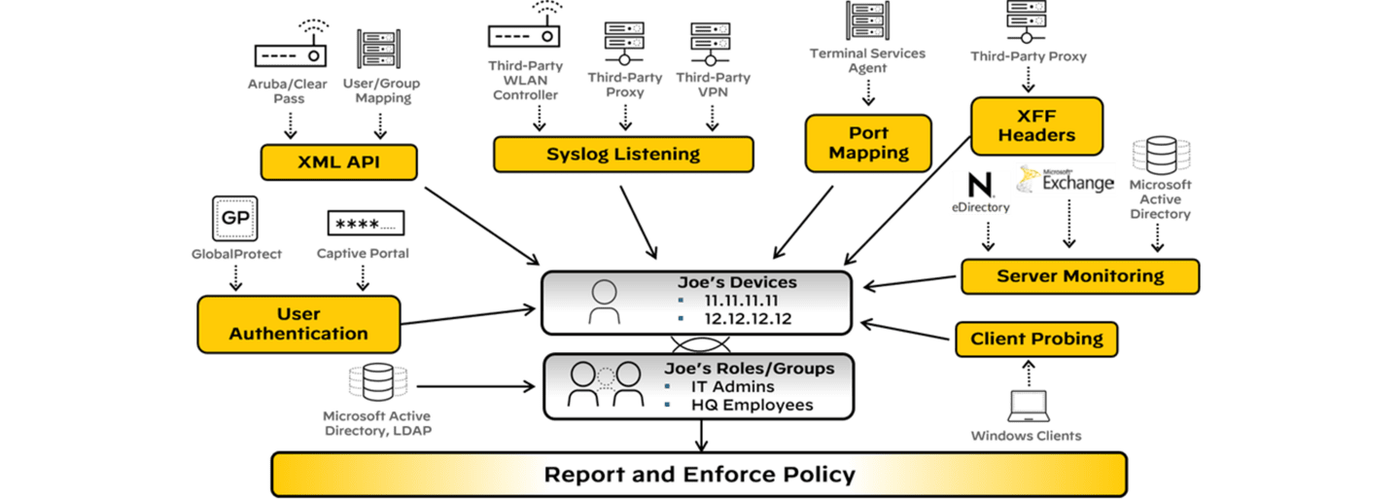
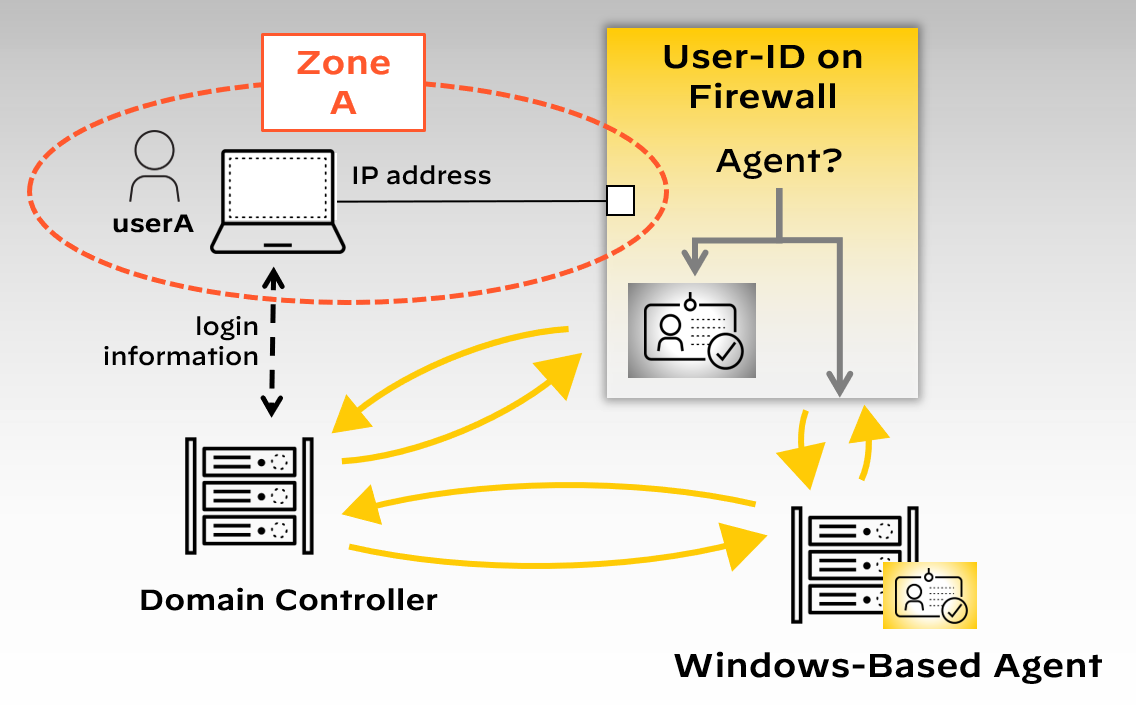
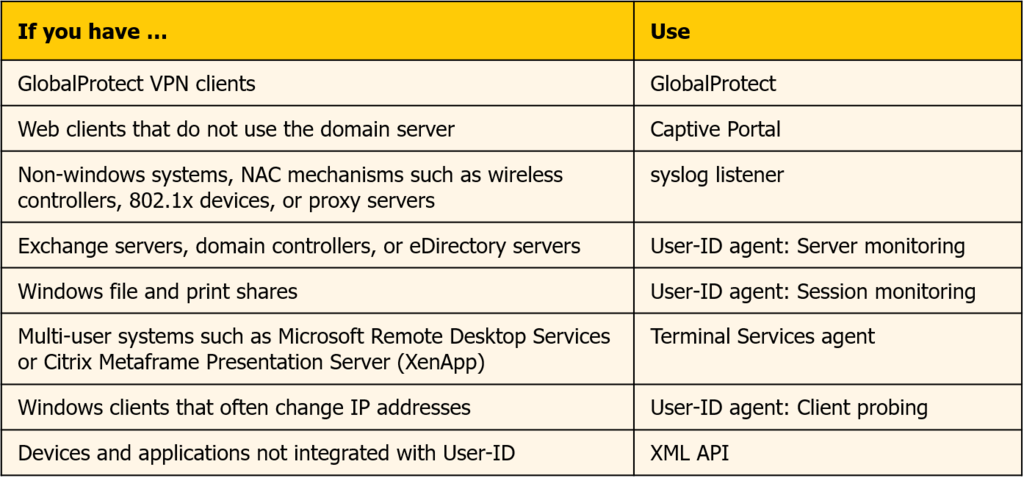
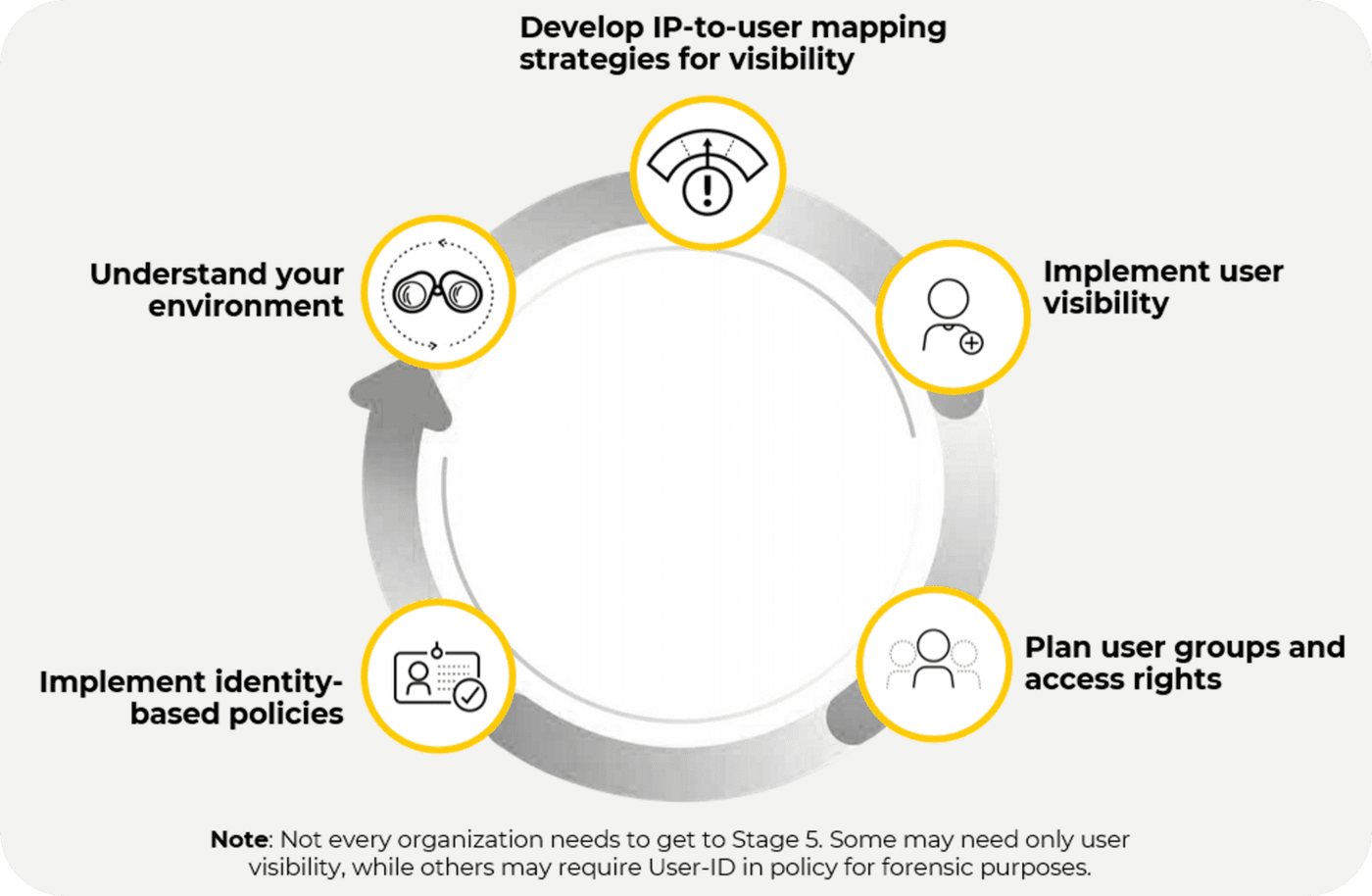
Diagrams: Palo Alto Networks Learning Center, Identity course: User id components and operation; Identity course: Identifying users using user id. Click an image to enlarge.
How each mapping method actually works
"Pulling from directories and GlobalProtect" is the one-line version. In practice you pick a combination of these per network segment, because no single method covers every device type:
| Method | How it learns "who" | Use it when… |
|---|---|---|
| Server Monitoring | A User-ID agent (Windows-based, on a domain server, or PAN-OS-integrated, on the firewall itself) reads the security event log of your Domain Controllers, Exchange Servers, or Novell eDirectory servers — watching for Kerberos ticket grants, Exchange logons, file/print connections. AD must be set to log successful logons, and you monitor every DC, since a user can log in anywhere. | Standard domain-joined Windows environment — this is the default workhorse method. |
| Port Mapping (Terminal Server agent) | On a Citrix/RDP box, many users share one IP, so the agent hands each user's session its own source port range instead of relying on IP alone — installed directly on the terminal server. Linux terminal servers that can't run the agent use the XML API for login/logout events instead. | Shared multi-user hosts (Citrix, RDS) — plain IP mapping can't tell users apart. |
| Syslog | Wireless controllers, 802.1x switches, NAC systems, and proxies already log logon/logoff events — point them at the agent, which parses each message (one line, ≤8000 bytes) with a Syslog Parse profile. Logoff parsing matters as much as logon: it's what deletes a mapping when it goes stale. | Any device that already authenticates users but isn't a domain controller. |
| Authentication Portal (Captive Portal) | Unmapped or ambiguous web traffic gets redirected to a login page — a silent browser challenge via Kerberos SSO, or an interactive web form (SAML, MFA, RADIUS, TACACS+, LDAP, local, client cert). | Devices no other method can map — non-Windows hosts, unauthenticated guests — or whenever you want a hard identity check before sensitive apps regardless of other mappings. |
| GlobalProtect | The user types real login credentials into the VPN client to get on the network at all, so the mapping is 100% explicit — no inference. | Remote/roaming users, or any environment where you must be certain of identity. |
| XML API | A script or third-party system (a non-Windows VPN concentrator, an 802.1x wireless controller) pushes login/logout events straight to the agent over a documented API. | Any identity source with no native Palo Alto integration — you write the glue yourself. |
| XFF Headers | Behind a forward proxy, the firewall would otherwise only see the proxy's IP. If the proxy adds an X-Forwarded-For header with the real client IP, the firewall can extract that instead and map the real user. | Users sit behind a proxy that already inserts XFF. |
| Client Probing (WMI) | The agent actively pings each learned IP every 20 minutes (default) via Windows Management Instrumentation to confirm the same user is still logged in, and probes immediately on any unmapped IP. | Avoid in high-security networks — see the trap below. |
Pros
- Policy and logs are attributable to people, drastically speeding incident response
- Works with existing AD/LDAP — no separate identity store to maintain
- Mappings can be shared across virtual systems via a "User-ID hub"
Cons
- Depends on correct agent placement/permissions on domain controllers — misconfiguration causes stale or wrong mappings
- Shared/NAT'd IPs (Citrix, proxies) need special handling (Terminal Server agent) or mappings become unreliable
- Large environments need a deliberate "large-scale User-ID" design, not just default settings
Exam Trap
User-ID mappings are IP-based and time-limited — a stale mapping (e.g. a DHCP lease reassigned to a different user) will misattribute traffic until it times out or is refreshed, so User-ID accuracy depends on mapping timeout tuning, not just agent deployment. Separately, Palo Alto explicitly recommends disabling Client Probing on untrusted/high-security networks: because it trusts whatever the endpoint reports back, an attacker on an external interface could harvest the probing service account's credential hash from the probe traffic itself.
Self-check: User-ID
Source: ngfw/administration/user-id
📋 Cheat Sheet — User-ID Domain 2.6
User-ID Pipeline: IP→User mapping sources (AD 4624/4768, GP, Captive Portal, TS Agent, XFF headers) + User→Group mapping (LDAP/CIE).
- Cloud Identity Engine (CIE): Cloud-hosted, supports Azure Entra ID and Okta, no on-prem agent needed.
- Redistribution: User-ID info can be shared between VSYS or between firewalls.
⌨️ CLI Verification
| Command | Purpose |
|---|---|
show user ip-user-mapping all | View all IP-to-username mappings |
show user group list | List all groups learned by the firewall |
show user group name "<group>" | Show members of a specific user group |
Content-ID 05
Learning objectives
- Explain why Content-ID runs after App-ID/User-ID in the classification pipeline
- List the services Content-ID drives (Threat Prevention, URL Filtering, file/data filtering, DNS analysis)
- Identify which of Content-ID's capabilities are free vs. subscription-gated
Content-ID is the stream-based content-inspection engine that runs threat prevention, URL filtering, file/data-filtering, and DNS-based protections on the already-classified traffic — in real time, without waiting for the whole file to buffer.
Why
Knowing "this is Dropbox traffic from Bob" isn't enough — you also need to know if the payload contains malware, exploits, sensitive data, or a malicious URL. Content-ID supplies that content-level inspection layer.How
Why Content-ID runs after App-ID/User-ID, not before or in parallel. Content-ID's checks are all about the payload — is this file malicious, does this URL belong to a bad category, is this DNS query beaconing to a C2 domain — and running expensive content inspection makes sense only once you know what you're even looking at and whether policy even allows it. There's no point deep-scanning a file transfer that App-ID has already identified as an application the Security Policy rule is going to block outright. So the pipeline is deliberately sequential: App-ID/User-ID answer "what is this and who sent it," Security Policy makes the allow/deny call based on that, and only allowed traffic gets handed to Content-ID for the deeper look.
What Content-ID actually does, stream by stream. Once a session is classified and allowed, Content-ID applies several checks to the traffic as it flows rather than after it's fully arrived — a genuinely different processing model from "buffer the whole file, then scan it," which matters because buffering a large file before making any decision would add real, noticeable latency to every download:
- IPS signatures — pattern-matching known exploit attempts against the traffic itself, not just files inside it
- Antivirus — matching known-malicious file signatures
- Anti-spyware / C2 detection — catching traffic that looks like malware phoning home, even after an initial infection happened some other way
- URL categorization — classifying the destination so policy can allow/ block/alert by category rather than by a manually maintained list of domains
- File-type and data filtering — blocking specific file types outright, or catching sensitive data patterns (like credit card or SSN formats) leaving the network
- DNS analysis — inspecting DNS queries themselves for signs of malware using DNS as a covert channel
All of these draw on the same underlying signature/content database, kept current through scheduled dynamic content updates — which is exactly why this database, not the inspection engine itself, is what most of Content-ID's subscriptions are actually paying to keep fresh.

Pros
- Stream-based scanning avoids the latency of full file buffering
- One engine drives Threat Prevention, URL Filtering, and DLP-style data filtering consistently
- Signature/content updates are centrally managed and pushed on a schedule you control
Cons
- Most of Content-ID's real power (Threat Prevention, URL Filtering, DNS Security) is subscription-gated
- Signature-based detection still needs WildFire/ML add-ons to catch genuinely novel malware
Exam Trap
Content-ID inspects the stream in real time, but it can only see what App-ID has decrypted for it — if a decryption policy exempts a category (e.g. banking), Content-ID's threat/URL/file inspection is blind to that traffic regardless of how the Content-ID profiles themselves are configured.
Self-check: Content-ID
Source: ngfw/administration/content-id
📋 Cheat Sheet — Content-ID Domain 1
Content-ID's 4 sub-engines: Threat Prevention (IPS/AV), URL Filtering, File Blocking, Data Filtering.
Module Quiz
1. An engineer reviews Traffic logs and finds sessions for a custom internal application with no matching App-ID signature. Which application value will the firewall assign by default?
2. A user is running an instant-messaging application deliberately tunneled inside HTTP to evade port-based controls. Which App-ID classification mechanism is responsible for identifying the true application in that case?
3. A session is initially classified as ssl by App-ID. Partway through the session, the firewall applies a Decryption policy rule and begins decrypting the traffic. What happens to the App-ID classification at that point?
4. Multiple users share a single source IP address on a Citrix XenApp/RDP terminal server, and User-ID mappings are coming back ambiguous. Which identity source should the engineer deploy to resolve this?
5. Which two of the following are valid, commonly used methods for a Palo Alto Networks firewall to collect User-ID mapping information? (Choose two.)
6. A host is reassigned a new DHCP lease, but the firewall continues attributing its traffic to the previous user for several minutes. What is the underlying cause?
7. Content-ID inspects traffic as a continuous stream rather than buffering an entire file before scanning it. What is the primary operational benefit of this design?
8. A Decryption policy rule exempts traffic to banking and healthcare URL categories from SSL decryption for compliance reasons. What is the effect on Content-ID's Threat Prevention and URL Filtering inspection for that exempted traffic?
9. A firewall has a Threat Prevention license but not WildFire. A genuinely novel, never-before-seen executable crosses the firewall. What capability gap results?