Software Firewalls: VM-Series & Public Cloud
Cloud Network Security Concepts 37
Learning objectives
- Explain the shared-responsibility model as it applies to network security in public cloud
- Name the recurring cloud-native constructs VM-Series integrates with (load balancers, transit gateways, autoscaling)
Moving NGFW into public cloud isn't just "run the same appliance on a different hypervisor" — it means integrating with cloud-native constructs (load balancers, autoscaling groups, transit routing) that don't exist in a traditional data center.
Why
Cloud providers secure the underlying infrastructure, but you remain responsible for securing what runs on top of it — network segmentation, traffic inspection, and policy are still the customer's job under the shared-responsibility model. Cloud workloads also scale elastically, so a static-capacity firewall design doesn't fit; security has to scale with the workload.How
In a data center, "insert the firewall inline" means physically recabling. In the cloud, there's no cable to move — instead, VM-Series plugs into whatever traffic-steering construct the cloud provider already offers:
- Load balancers / Gateway Load Balancers — distribute traffic across an autoscaled firewall fleet (see AWS GWLB / Azure GWLB) instead of pinning all traffic to one instance, which is what lets the firewall layer itself scale rather than becoming a fixed-capacity bottleneck.
- Transit gateways/hubs — centralize routing so one shared security VPC/VNet can inspect traffic on behalf of many spoke VPCs/VNets, rather than every application VPC needing its own firewall pair.
- Autoscaling — adds or removes firewall instances based on actual current load, replacing the traditional approach of permanently provisioning for peak capacity you might only hit occasionally.
The reassuring part: none of this changes what the firewall actually does once traffic reaches it — the same App-ID/User-ID/Content-ID policy model carries over completely unchanged. What's different in the cloud is purely the plumbing that gets traffic to the firewall, not the inspection or policy logic itself.

Pros
- Autoscaling avoids permanently over-provisioning for peak traffic
- Hub-and-spoke/transit designs centralize inspection instead of a firewall per VPC/VNet
- Consistent policy model with on-prem NGFW — no separate cloud rulebase language to learn
Cons
- Shared-responsibility confusion is a real, recurring cause of cloud misconfiguration incidents — "the provider secures it" is a common false assumption
- Each cloud's native constructs (GWLB, transit gateway, NSX-T service insertion) have their own quirks — expertise doesn't fully transfer between clouds
Exam trap
Don't assume the cloud provider secures your traffic inspection. Under the shared-responsibility model, the provider secures the underlying infrastructure — network segmentation, traffic inspection, and policy enforcement inside your VPC/VNet remain your job.Self-check
Curriculum: Software Firewall (NGFW) course, "Cloud Network Security" lesson; cross-referenced against the VM-Series public/private cloud deployment docs.
VM-Series Requirements & Licensing 38
Learning objectives
- Compare flexible vCPU (Software NGFW Credits) vs. fixed VM-Series Model licensing
- Compare BYOL vs. PAYG license types
VM-Series licensing has two independent axes to choose: how you pay (BYOL vs. PAYG) and how capacity is defined (flexible vCPU credits vs. a fixed model) — picking the right combination shapes both cost and deployment flexibility.
Why
Cloud-native workloads want elastic, pay-for-what-you-use capacity; traditional enterprise buyers often want predictable, pre-purchased capacity tied to an existing agreement. One licensing model can't serve both well, so VM-Series offers both.How
Axis one — license type — answers "how do you pay":
- BYOL (bring your own license) — purchased and activated against your existing support account, fitting an organization that already buys enterprise software this way.
- PAYG — bought hourly/usage-based directly from a cloud marketplace (AWS/Azure/GCP) or a CSSP, fitting a trial, short-lived, or genuinely elastic workload where upfront procurement doesn't make sense.
Axis two — capacity model — answers "how is firewall capacity defined and changed":
- Software NGFW Credits (flexible vCPU) — reusable credits you activate and pool, then spend via a deployment profile bundling vCPU count, chosen security services, and optionally Panorama, up to 64 vCPUs on PAN-OS 10.0.4+. All firewalls sharing one profile share a single auth code and update together — and because a profile change is just a credit reallocation, not a new license, it propagates automatically with no reboot, which is exactly what a genuinely elastic cloud workload needs.
- VM-Series Model — fixed vCPUs per model (VM-100/300/500/700), sold as an Enterprise License Agreement token pool, a perpetual capacity license, or a term license, each optionally bundling Threat Prevention and other services. Because capacity here is tied to a specific license grant rather than a reallocatable credit pool, changing it means acquiring a new license and rebooting — real downtime that the credit model was built specifically to avoid.
The two axes are genuinely independent — you pick a payment method and a capacity model separately, and the combination you land on determines both your ongoing cost structure and how much operational friction a future capacity change will cost you.
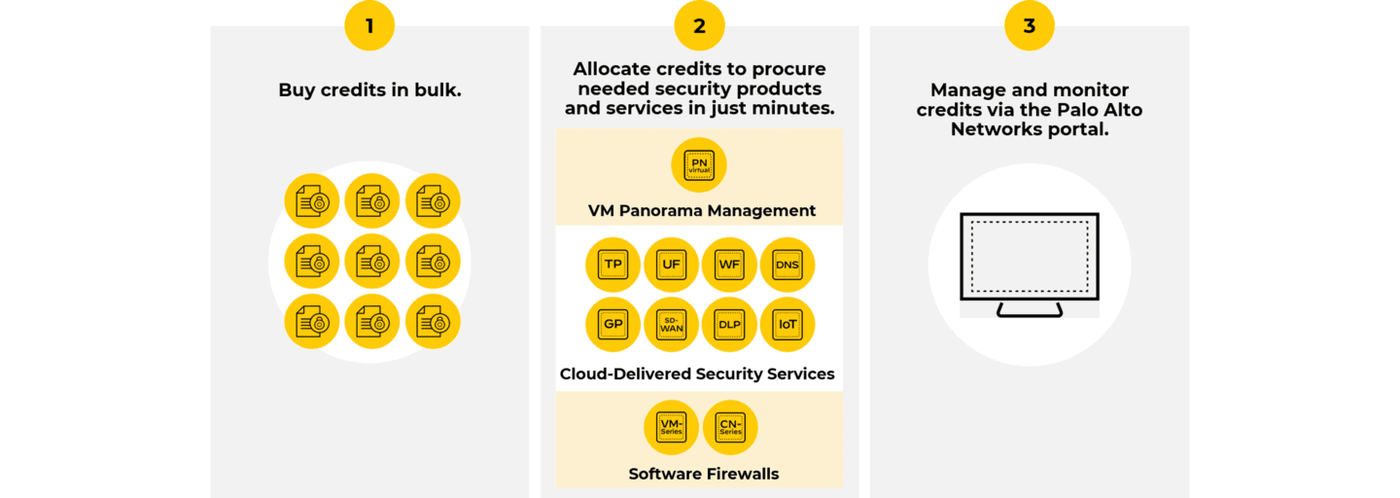
Diagrams: Palo Alto Networks Learning Center, Software Firewall course: Vm series requirements and licensing. Click an image to enlarge.
Pros
- Software NGFW Credits let you resize a fleet's vCPU/service mix without reboots, matching cloud elasticity
- Fixed VM-Series Models suit organizations that prefer predictable, pre-committed capacity and cost
- PAYG marketplace billing removes upfront procurement friction for short-lived or trial deployments
Cons
- Two independent licensing axes (type × capacity model) is genuinely more to get right than a single SKU
- Changing a fixed-model firewall's capacity requires a new license and a reboot — real downtime, unlike a credit-based profile change
- New (non-Software-NGFW-Credits) capacity licenses are no longer sold — only renewals — pushing new deployments toward the credit model whether or not it fits the buying pattern
Exam trap
A Software NGFW Credits deployment-profile change propagates automatically with no reboot; changing a fixed VM-Series Model's capacity requires a new license and a reboot. Don't assume both capacity models behave the same way operationally.Self-check
Source: vm-series/activation-and-onboarding/vm-series-firewall-licensing
VM-Series Traffic Flow Designs 39
Learning objectives
- Name the three traffic directions a cloud NGFW deployment typically protects
- Explain why centralized (hub) inspection is the common target design
Regardless of which public or private cloud it runs in, VM-Series deployments are generally designed around the same three traffic patterns: north-south inbound, north-south outbound, and east-west.
Why
Each direction carries a different threat model — internet-facing inbound traffic needs to be defended against exploits and vulnerability scans, outbound traffic needs to be prevented from exfiltrating data or reaching malicious infrastructure, and east-west (inter-VPC/VNet/subnet) traffic needs to stop malware or a compromised workload from moving laterally. A single design has to account for all three without three separate, unrelated firewall deployments.How
Each direction is answering a different question about traffic, which is why one firewall design has to reason about all three separately even though they share the same rulebase concept:
- Inbound (north-south) — "is this exploit traffic aimed at what we've exposed?" A cloud security-group/NSG has already made a coarse allow/deny decision on ports and source ranges before traffic ever reaches the firewall — inbound inspection picks up from there, protecting externally-reachable resources (web servers) from exploits and vulnerabilities riding inside traffic that was already let through the coarse cloud-native filter.
- Outbound (north-south) — "is this workload behaving, or leaking data?" Ensures workloads only reach permitted destinations/URL categories, blocks data exfiltration attempts, and — because outbound connections get responses — still scans the return traffic for malware riding back in.
- East-West — "can a compromise in one place spread to another?" Inspects traffic between VPCs/VNets/subnets specifically to contain malware propagation and enforce segmentation between application tiers or business units — the cloud equivalent of the zone-based segmentation covered on the Policy & Segmentation page.
Why centralization is the common target, not per-VPC firewalls. The common target architecture funnels all three directions into one shared security VPC/VNet (a "hub"), reached via Gateway Load Balancer endpoints or a transit gateway. The reasoning: deploying and managing a separate firewall pair inside every single application VPC multiplies operational overhead by the number of VPCs, while a hub design lets one managed firewall fleet protect many application VPCs at once — the tradeoff (that hub becoming a concentrated critical path) is covered in the cons below.

Pros
- Centralized hub design means one firewall fleet protects many application VPCs/VNets instead of one per VPC
- Same three-direction model applies consistently whether you're on AWS, Azure, GCP, or NSX-T
Cons
- Centralized hub designs concentrate risk — the security VPC/VNet becomes a critical path for every application VPC behind it
- Symmetric routing (traffic returning through the same firewall instance that inspected the outbound leg) has to be engineered deliberately or connections break
Exam trap
A centralized hub design only works if return traffic is pinned to the same firewall instance that inspected the outbound leg. Asymmetric routing silently breaks stateful inspection (decryption, session tracking) — this is engineered deliberately, not automatic.Self-check
Curriculum: Software Firewall (NGFW) course, "Traffic Flow Designs and Features for VM-Series" lesson; cross-referenced against the AWS/Azure GWLB integration docs.
VM-Series on AWS 40
Learning objectives
- List what's required to deploy VM-Series on AWS
- Name the AWS-specific deployment variants (GovCloud, China, Outposts)
VM-Series on AWS runs as a standard EC2 instance, secured with the same PAN-OS policy engine, but licensed and network-integrated through AWS-specific plumbing (AMIs, the AWS plugin, Panorama's AWS plugin).
Why
Workloads on EC2 need the same App-ID/Content-ID protection as on-prem servers, but the deployment mechanics (image sourcing, licensing, autoscaling, network attachment) have to speak AWS's native model rather than a traditional hardware install process.How
Baseline requirements to get a VM-Series instance running on standard AWS: an AWS account, an Amazon Machine Image (AMI) ID for the VM-Series image itself, a license (PAYG from the AWS Marketplace, or BYOL), the VM-Series plugin, and Panorama with the Panorama plugin for AWS specifically needed once you're managing licensing/config for more than one or two instances at scale.
Why the specialized variants exist, and what actually changes in each:
- AWS GovCloud — an isolated AWS region built for US government compliance/CUI (controlled unclassified information) data. Same feature set as standard AWS, but with two real operational differences: only horizontally-scalable deployment is supported (not every standard-AWS design pattern carries over), and offline licensing requires manually entering CPU ID/UUID/auth-code through the CSP rather than the streamlined online activation standard AWS gets — a genuinely heavier process, consistent with GovCloud's isolation requirements.
- AWS China — BYOL-only, through a completely separate AWS China account. There's no PAYG marketplace shortcut here the way there is on standard AWS, because China's cloud regions operate as functionally distinct accounts/ecosystems.
- AWS Outposts — BYOL AMIs deployed on AWS hardware that physically sits in your own data center. This exists for organizations that want AWS's operational model and consistency but have a regulatory, latency, or data-residency reason they can't put the workload in an actual AWS region.
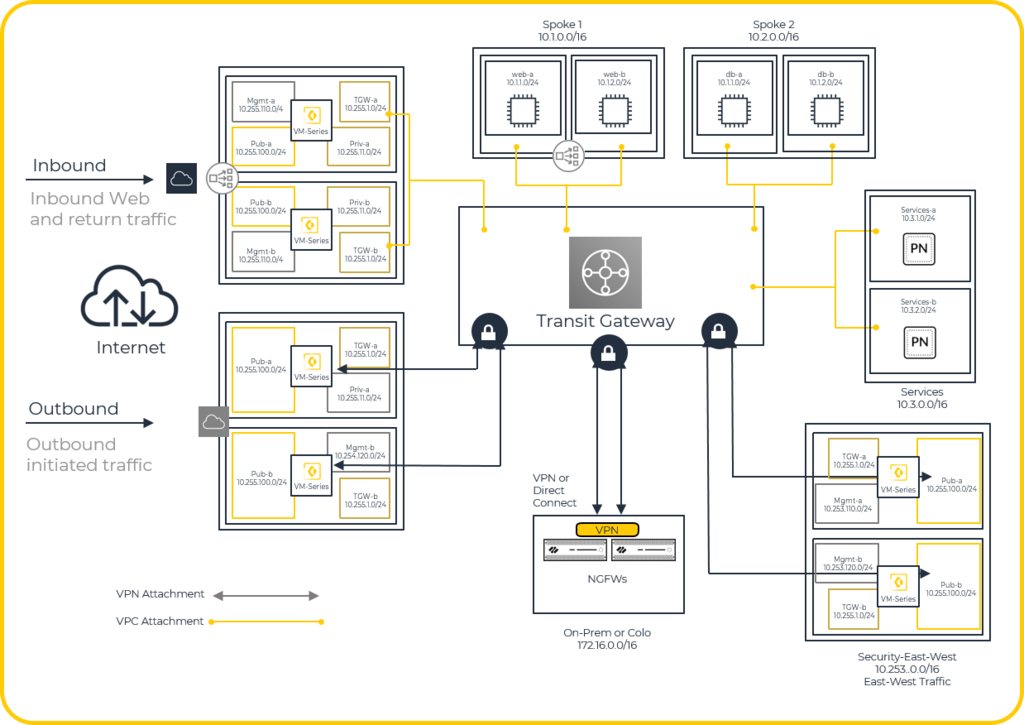
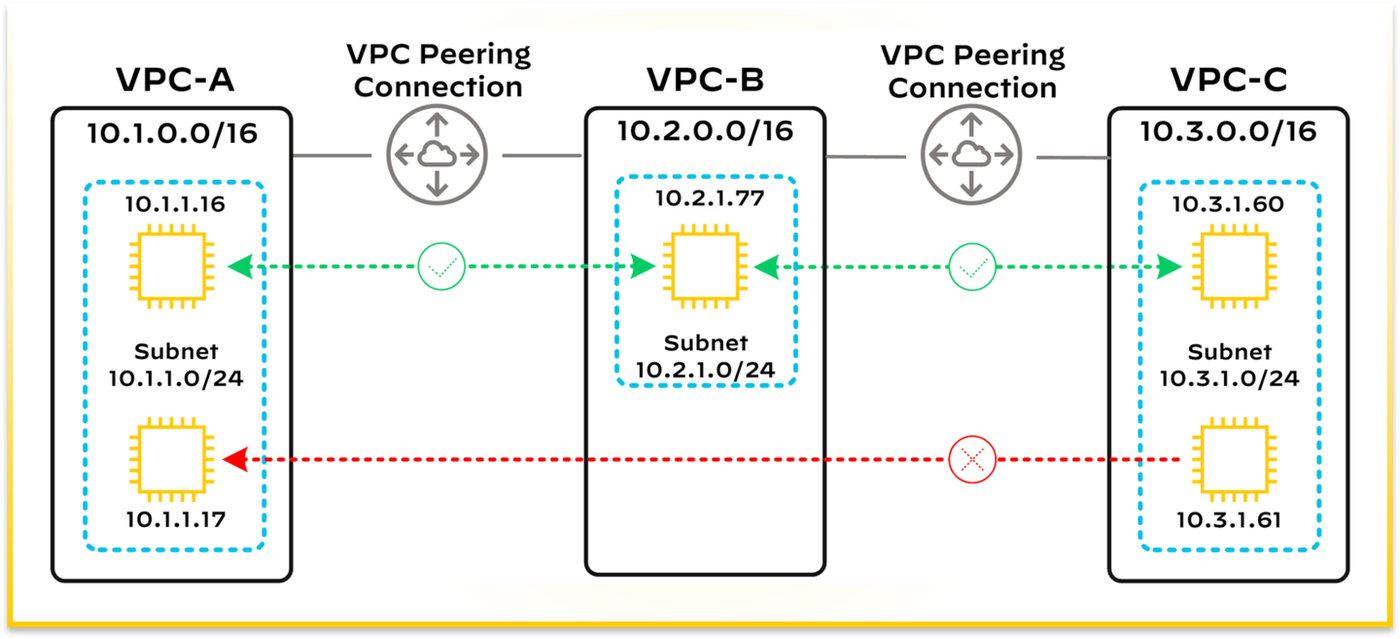
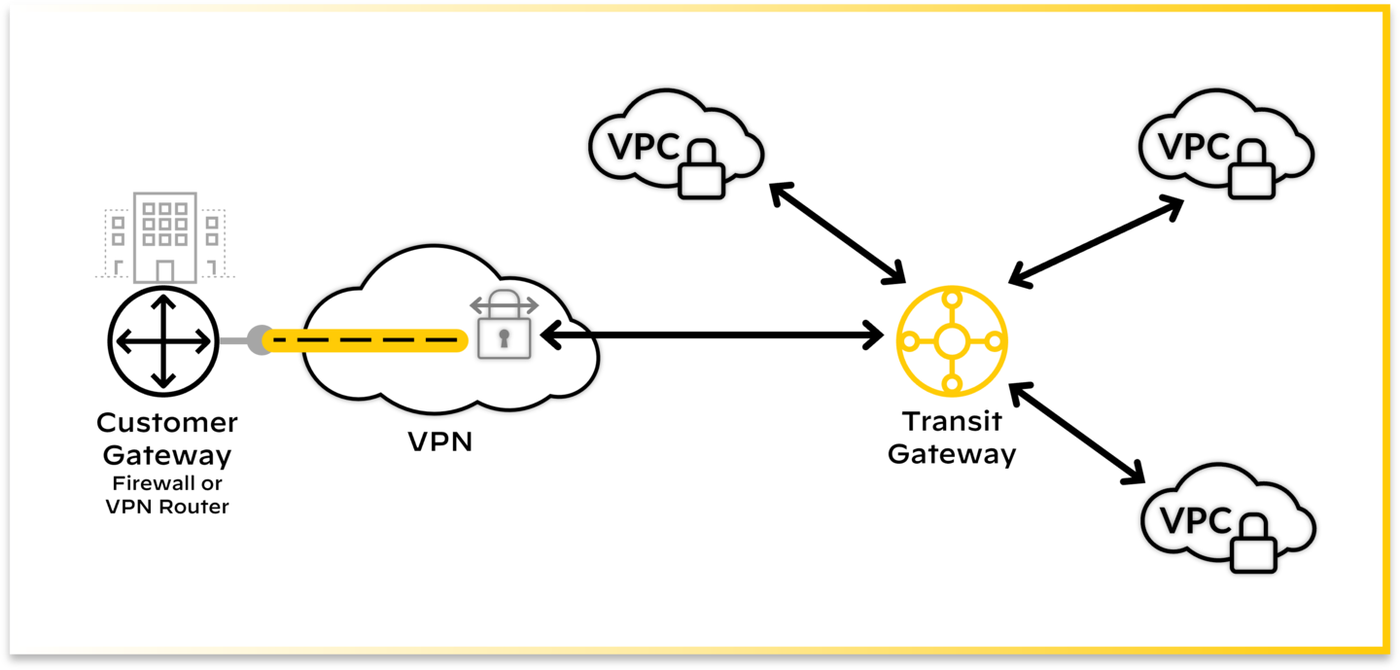
Diagrams: Palo Alto Networks Learning Center, Software Firewall course: Vm series firewall on aws. Click an image to enlarge.
Pros
- Same PAN-OS policy engine and management model as every other form factor — no separate cloud-only rule language
- GovCloud/China/Outposts variants extend one deployment pattern to regulated and on-prem-AWS environments
Cons
- GovCloud restricts you to horizontally-scalable deployment only — some designs from standard AWS don't carry over
- Offline GovCloud licensing (manual CPU ID/UUID/auth-code entry) is materially more operationally heavy than standard activation
- Requires its own account (China) or region-specific version/plugin minimums (GovCloud) — easy to trip on prerequisites
Exam trap
GovCloud restricts you to horizontally-scalable deployment only — don't assume every standard-AWS design pattern (or licensing/activation flow) carries over unchanged to GovCloud or China variants.Self-check
Cloud NGFW, bootstrapping & IaC — exam drill
- Cloud NGFW for AWS / Azure is a managed service (Palo Alto runs the firewalls), not a VM you operate. Deploy it by subscribing in the AWS Marketplace (or Azure), creating an NGFW resource + a rulestack (its policy), and attaching it to traffic via a VPC endpoint / Gateway Load Balancer endpoint (AWS) or the native path (Azure). You do not "install PAN-OS on an EC2 instance" for Cloud NGFW.
- Managing Cloud NGFW policy: the Cloud NGFW API, the official Terraform provider, Panorama (via the Cloud NGFW plugin), or Strata Cloud Manager — policy-as-code is the recommended approach.
- Multi-AZ resilience for VM-Series in a CSP: put firewalls in multiple Availability Zones behind a Gateway Load Balancer with auto-scaling — that's how you get HA + horizontal scale in the cloud, not a traditional PAN-OS active/passive HA pair (which AWS/GCP don't fully support).
- Bootstrapping: a VM-Series instance can configure itself at first boot from
a bootstrap package (
init-cfg.txtwith mgmt/Panorama/licensing details, optionalbootstrap.xmlfull config, plus content/licenses/software) held in an S3 bucket (AWS), Azure storage, or GCP bucket. Essential for hands-off auto-scaling. - Canonical IaC answer: deploy VM-Series with Terraform, enable bootstrapping via S3, and drive security policy with Dynamic Address Groups keyed to cloud tags (VM metadata) so policy follows workloads as they scale. Ansible then manages ongoing config. Multi-cloud consistency = VM-Series (or Cloud NGFW) + Panorama.
- NSX-T: deploy VM-Series via Panorama + the VM-Series NSX-T plugin; service insertion + NSX-T security tags drive Dynamic Address Groups for automatic policy.
Source: vm-series/deployment/public-cloud/set-up-the-vm-series-firewall-on-aws; cloudngfw/aws/cloud-ngfw-on-aws; vm-series/deployment/bootstrap-the-vm-series-firewall; practice-set synthesis
AWS Gateway Load Balancer Integration 41
Learning objectives
- Explain what a Gateway Load Balancer Endpoint (GWLBE) does
- Trace the inbound, outbound, and east-west traffic paths through a GWLB-fronted firewall stack
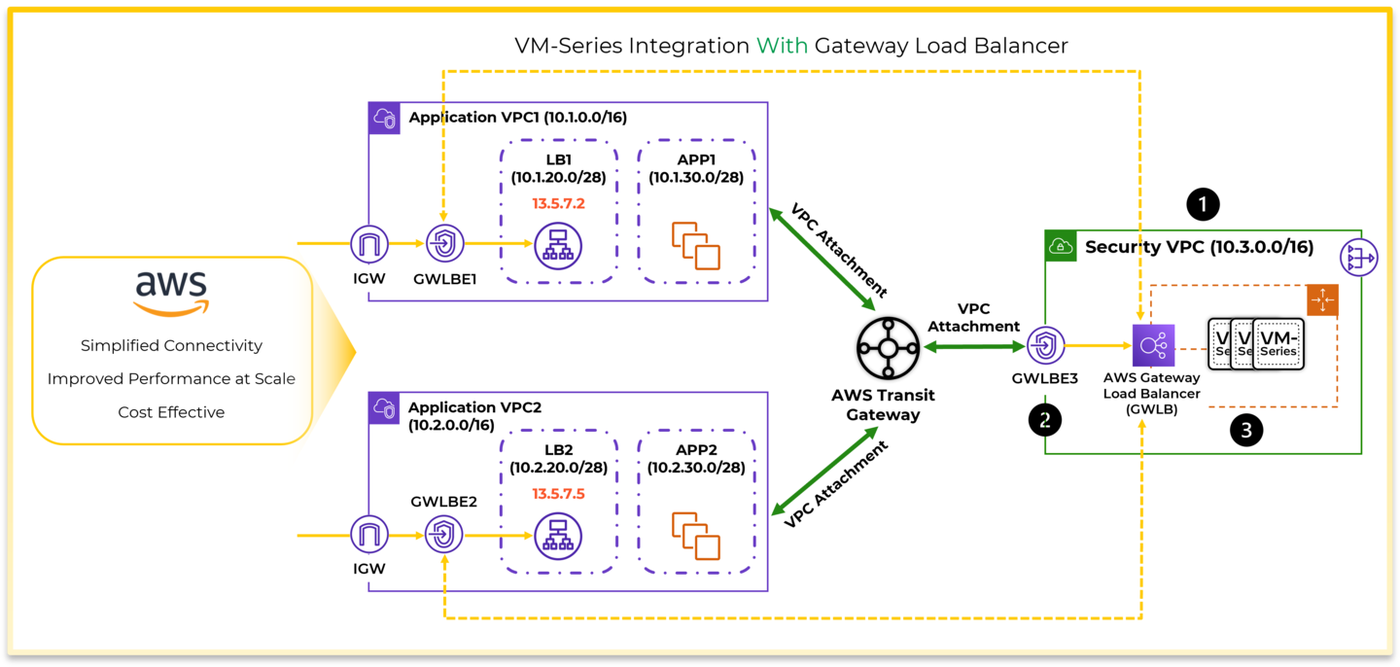
AWS Gateway Load Balancer (GWLB) lets you insert an autoscaling stack of VM-Series firewalls transparently into inbound, outbound, and east-west traffic paths — exposed to the rest of the environment as a single VPC Endpoint Service.
Why
Manually routing every application VPC's traffic through a fixed firewall pair doesn't scale and doesn't tolerate firewall failure gracefully. GWLB turns the firewall fleet into an elastic, load-balanced, fault-tolerant service that other VPCs can consume like any other AWS-managed endpoint.How
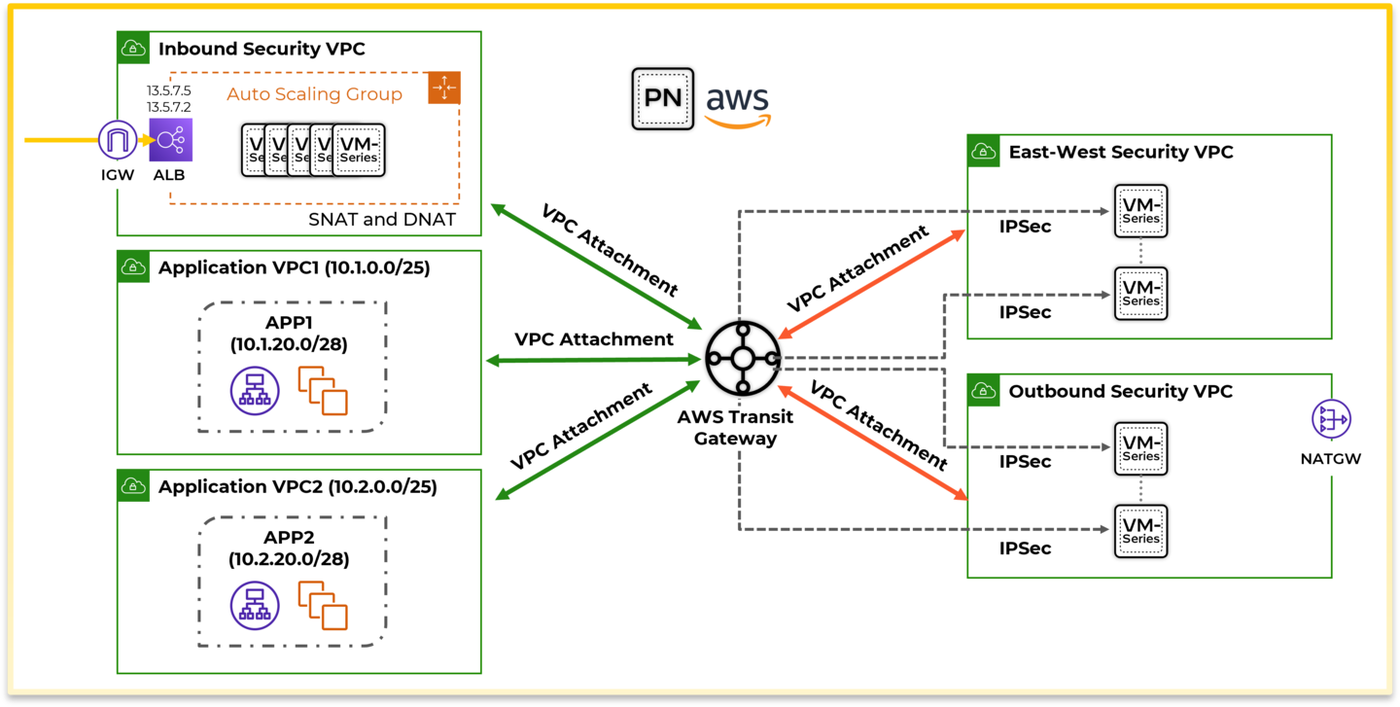
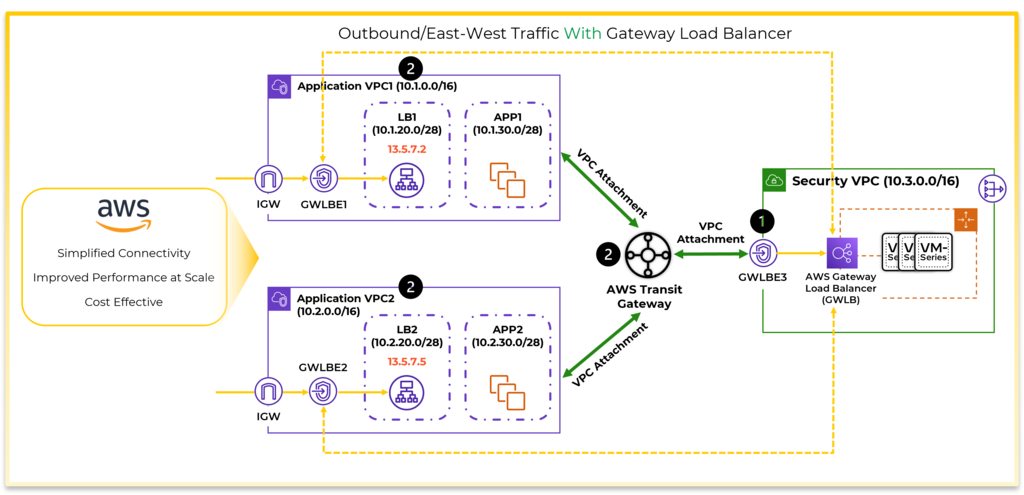
The core topology. Firewalls sit behind a GWLB in a centralized security VPC attached to a Transit Gateway (TGW) — this is the concrete implementation of the "hub" design described in the previous section. Traffic reaches the firewall via Gateway Load Balancer Endpoints (GWLBE), created both in each spoke/application VPC and in the security VPC itself, and the whole path uses GENEVE encapsulation between GWLB and VM-Series — which matters because GENEVE wraps the original packet without stripping or rewriting its headers/payload, so the firewall retains full end-to-end visibility (including the true original source) despite the traffic having passed through a load balancer along the way.
How each of the three traffic directions actually routes through this topology:
- Inbound — arrives via the Internet Gateway, routes to a GWLBE that sends it to the firewall, then continues to the application via an Application Load Balancer (ALB).
- Outbound — originates in an application VPC, routes via TGW to the security VPC's GWLBE, through the firewall, then exits via a NAT Gateway.
- East-west — between two application VPCs, routes through TGW into that same security-VPC GWLBE/firewall path before continuing on to its destination VPC — every direction funnels through the identical firewall stack, which is exactly what makes one centralized hub sufficient for all three.
Why Appliance Mode is a hard requirement, not an optimization. A GWLB distributes flows across an autoscaled pool of firewall instances — but a stateful firewall needs to see both the outbound leg and its return traffic on the same instance, since it's tracking session state (and if decryption is enabled, decrypted session material) that a different instance simply wouldn't have. Appliance mode, enabled on the TGW VPC attachment for the security VPC, is what pins request and response traffic to that same firewall instance. Without it, GWLB has no way to maintain that per-flow persistence, and traffic silently fails in one direction only — the single most common GWLB misconfiguration in practice. VM-Series supports full decryption (including TLS 1.2/1.3 with DHE/ECDHE) while deployed this way, so this isn't a design that trades away inspection depth for scalability.
Diagrams: Palo Alto Networks Learning Center, Software Firewall course: Aws gateway load balancer integration. Click an image to enlarge.
Pros
- One firewall stack protects inbound, outbound, and east-west traffic for every attached application VPC
- GENEVE encapsulation preserves full packet visibility (including original source) end-to-end
- Horizontally scalable and fault-tolerant by design — AWS load-balances and health-checks the firewall stack automatically
Cons
- Forgetting to enable Appliance Mode on the TGW attachment breaks symmetric routing — a common, confusing failure mode ("traffic works one direction only")
- Route-table design across application VPCs, the security VPC, and TGW is intricate — several route tables must all agree or traffic silently misroutes
- Recommended to keep all subnets in the same AZ to avoid cross-zone data transfer charges — an easy cost trap otherwise
Exam trap
Forgetting to enable Appliance Mode on the TGW VPC attachment for the security VPC is the single most common GWLB misconfiguration — without it, request/response traffic isn't pinned to the same firewall instance and "traffic works one direction only."Self-check
Source: vm-series/deployment/public-cloud/set-up-the-vm-series-firewall-on-aws/vm-series-integration-with-gateway-load-balancer
VM-Series on Azure 42
Learning objectives
- Compare deployment via Azure Solution Templates vs. custom image
- Explain Azure-specific integration points: health monitoring, Security Center, Application Gateway
VM-Series on Azure follows the same shape as AWS — same PAN-OS image, Azure-native licensing and networking glue — but plugs into Azure's own load-balancing, monitoring, and security ecosystem instead of AWS's.
Why
Azure customers expect firewall deployment and HA to integrate with Azure-native primitives (Azure Load Balancer health probes, Azure Security Center, ARM/Solution Templates) the same way AWS customers expect CloudFormation/GWLB integration — the underlying firewall logic is identical, but the cloud plumbing has to match the platform.How
Getting deployed — two ends of a convenience/flexibility tradeoff. Azure Marketplace Solution Templates are the fast path: pre-wired networking that gets a standard topology running quickly. A fully custom VM image trades that speed for the ability to fit a bespoke topology the template wasn't designed for — plus Azure China variants exist for deploying into that sovereign cloud specifically.
Why HA works differently here than on-prem — the actual reason, not just "it's cloud." Traditional on-prem PAN-OS HA relies on dedicated HA links and L2 adjacency between the active and passive firewall. Azure's virtual network model doesn't support that same L2 adjacency assumption between VMs the way a physical switch fabric does. So active/passive HA on Azure instead relies on Azure's own health-probe mechanism to detect a failed instance — a fundamentally different failure-detection mechanism, which is exactly why failover timing and behavior don't carry over unchanged from on-prem experience.
The Azure-native integrations, and what each solves:
- Azure health monitoring — lets Azure Load Balancer itself detect a failed firewall instance and stop routing traffic to it, the same health-probe mechanism underpinning HA above, now applied to load-balanced traffic distribution.
- Azure Security Center integration — surfaces VM-Series alerts directly inside Azure's native security dashboard, so Azure admins see firewall alerts in the same place they already monitor everything else, instead of needing a separate pane purely for firewall events.
- VM-Series + Azure Application Gateway template — combines Azure's own L7 web app gateway with VM-Series inspection specifically for web-facing workloads, layering NGFW-grade inspection onto traffic Application Gateway is already fronting.
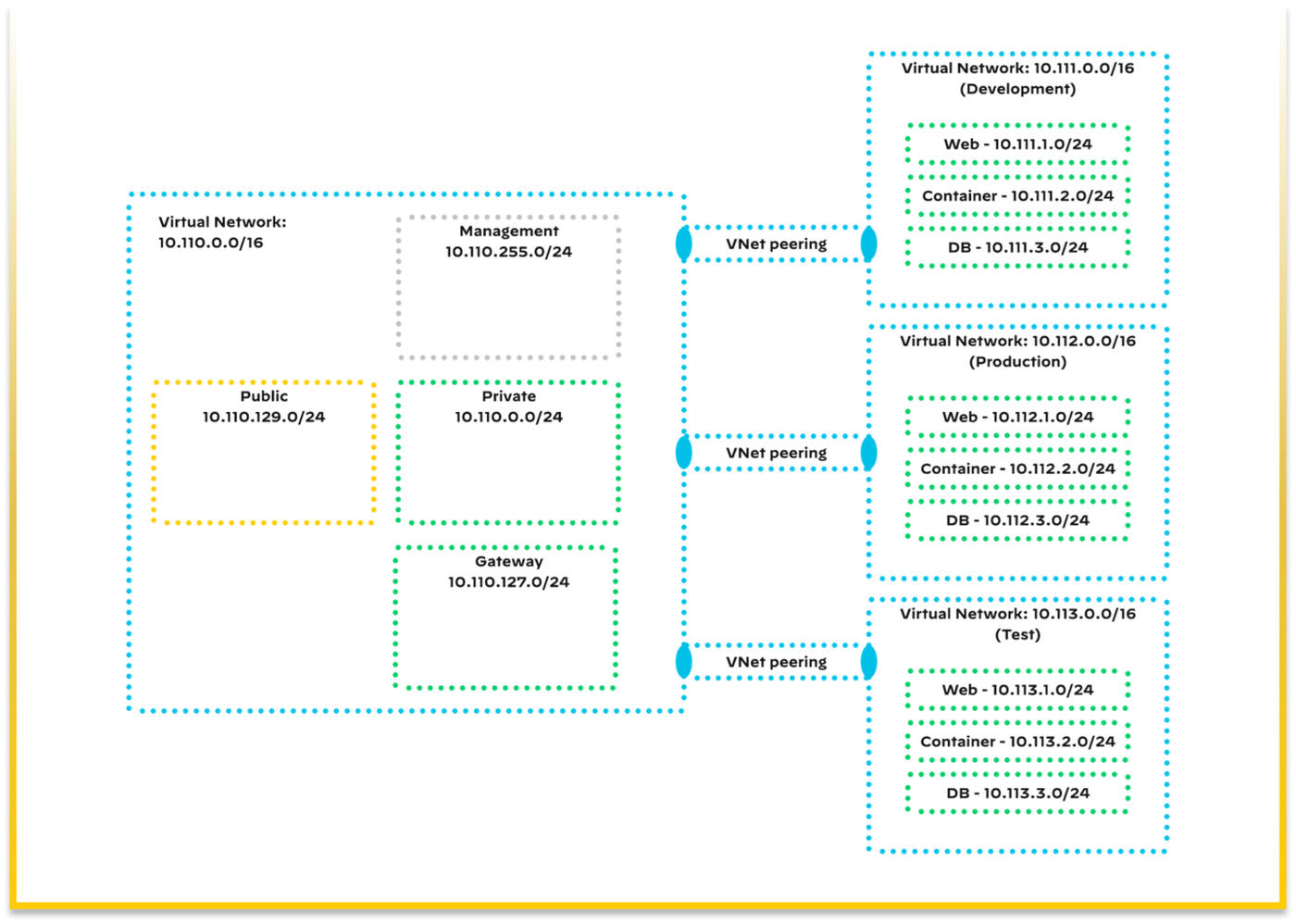
Diagrams: Palo Alto Networks Learning Center, Software Firewall course: Vm series firewall on azure. Click an image to enlarge.
Pros
- Solution Templates get a working, correctly-wired deployment up fast for standard topologies
- Azure Security Center integration keeps firewall alerts inside a dashboard Azure admins already use
- Azure China variant extends the same model into that sovereign cloud
Cons
- Active/passive HA depends on Azure health-probe timing rather than dedicated HA heartbeat links — failover characteristics differ from on-prem HA
- Custom-image deployments trade the Solution Template's convenience for more manual networking setup
Exam trap
Azure active/passive HA relies on Azure's own health-probe mechanism, not dedicated HA heartbeat links like on-prem HA. Don't assume on-prem HA failover timing/behavior carries over unchanged to Azure.Self-check
Source: vm-series/deployment/public-cloud/set-up-the-vm-series-firewall-on-azure (directory: azure-health-monitoring, azure-networking-and-vm-series, azure-security-center-integration, deploy-the-vm-series-and-azure-application-gateway-template, configure-activepassive-ha-for-vm-series-firewall-on-azure)
Azure Gateway Load Balancer 43
Learning objectives
- Explain how Azure GWLB achieves the same transparent-insertion goal as AWS GWLB
Azure Gateway Load Balancer mirrors AWS GWLB's purpose — transparent, scalable insertion of a VM-Series firewall stack into traffic paths without redesigning application-side routing — using Azure's own load-balancer chaining model.
Why
The same problem GWLB solves on AWS applies on Azure: a firewall fleet needs to sit transparently in front of application traffic, scale independently, and stay fault-tolerant, without every application VNet needing custom routing logic per firewall instance.How
The mechanism, and how it differs conceptually from AWS's GWLBE model. On AWS, GWLB Endpoints are inserted into route tables directly. On Azure, Gateway Load Balancer instead chains onto a standard Azure Load Balancer's frontend — meaning client traffic still enters through the Load Balancer frontend applications already point at, and Azure GWLB transparently redirects that traffic through the VM-Series firewall stack before it continues to the real backend. The end result is the same idea as AWS GWLB — a scalable firewall fleet sits transparently in the path without applications needing to know it's there — just implemented through Azure's own load-balancer-chaining primitive instead of AWS's endpoint-service model.
Why symmetric routing is non-negotiable here too, for the exact same reason as AWS. Decryption and threat prevention are connection-based — the firewall instance handling a flow needs to see both the outbound leg and its return traffic to maintain session and (if applicable) decrypted state. Whichever cloud platform provides the load-balancing layer, that requirement doesn't change; only the mechanism for achieving it (Appliance Mode on AWS, the chaining configuration on Azure) is platform-specific.
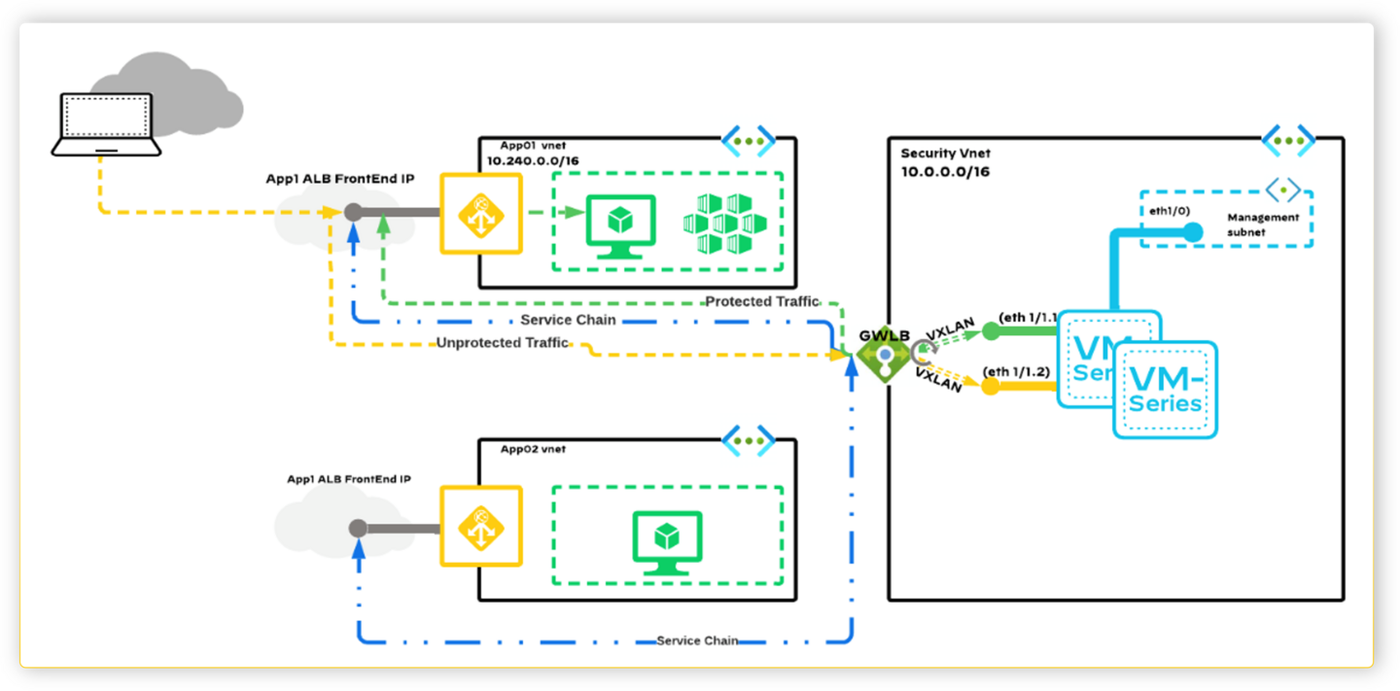
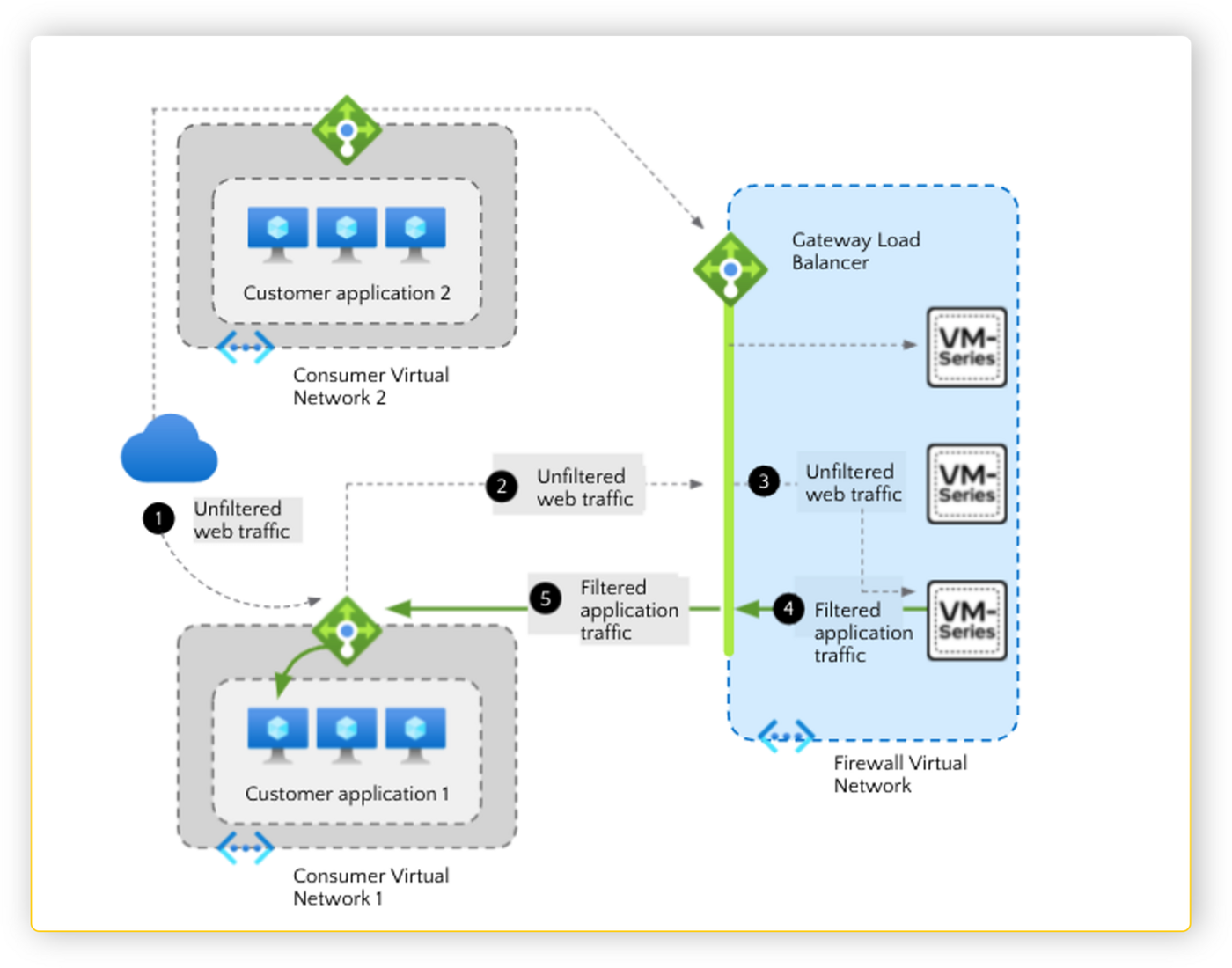
Diagrams: Palo Alto Networks Learning Center, Software Firewall course: Azure gateway load balancer integration. Click an image to enlarge.
Pros
- Transparent insertion means no re-addressing of application VNets to add inspection
- Chains onto existing Azure Load Balancer frontends rather than requiring a parallel routing scheme
Cons
- Same symmetric-routing discipline required as AWS GWLB — get it wrong and stateful inspection (decryption, session tracking) breaks
- Azure and AWS GWLB are conceptually similar but not configuration-identical — expertise on one doesn't fully transfer without re-learning the platform specifics
Watch: short GUI walkthroughs
Clips from the Palo Alto Networks Learning Center. They load only when you press play.
Exam trap
Azure GWLB and AWS GWLB solve the same problem conceptually but aren't configuration-identical — don't assume hands-on AWS GWLB experience transfers directly to Azure without re-learning the platform-specific chaining setup.Self-check
Curriculum: Software Firewall (NGFW) course, "Azure Gateway Load Balancer Integration" lesson; cross-referenced against the AWS GWLB integration doc for the shared architecture pattern (Azure-specific configuration doc in the local mirror was a stub).
VM-Series on GCP 44
Learning objectives
- Name the GCP-specific deployment models and integration points (autoscaling, GCP load balancer, NSI overlay)
VM-Series on GCP follows the same pattern again — image, license, deploy — with GCP's own autoscaling, load balancing, and network security integration APIs standing in for AWS/Azure's equivalents.
Why
GCP customers get the same App-ID/Content-ID policy engine, but need it to integrate with GCP's autoscaling groups and internal/external load balancers, and to meet GCP-specific platform requirements (minimum system requirements, secure boot support) for the images they run.How
By this point in the guide, the pattern across all three major clouds should feel familiar — the same underlying needs (scale with demand, steer traffic transparently, fail over gracefully), each solved with that specific cloud's own native primitive rather than a one-size-fits-all mechanism:
- Deployment models range from a single standalone instance up to a fully autoscaled firewall tier, depending on scale needed.
- Autoscaling on GCP adds/removes VM-Series instances behind a GCP load balancer based on real-time load — the same "match capacity to demand instead of provisioning for peak forever" idea as AWS/Azure autoscaling, just running on GCP's own autoscaling groups.
- The GCP load balancer is what actually steers traffic into the firewall tier — conceptually GWLB's role, but expressed through GCP's own internal/ external load balancer constructs rather than a GWLB-equivalent product.
- Secure boot support and documented minimum system requirements gate which GCP machine types/images are actually supported — worth checking before assuming any arbitrary GCP instance type will run VM-Series.
- Active/passive HA on GCP is supported, and like Azure, it relies on GCP's own health-check/failover primitives rather than dedicated HA links — but unlike Azure's relatively similar-in-spirit health-probe model, GCP HA has its own distinct documented caveats worth checking per release, which is exactly why HA runbooks don't transfer cleanly between clouds even though the underlying goal (detect failure, fail over) is identical everywhere.
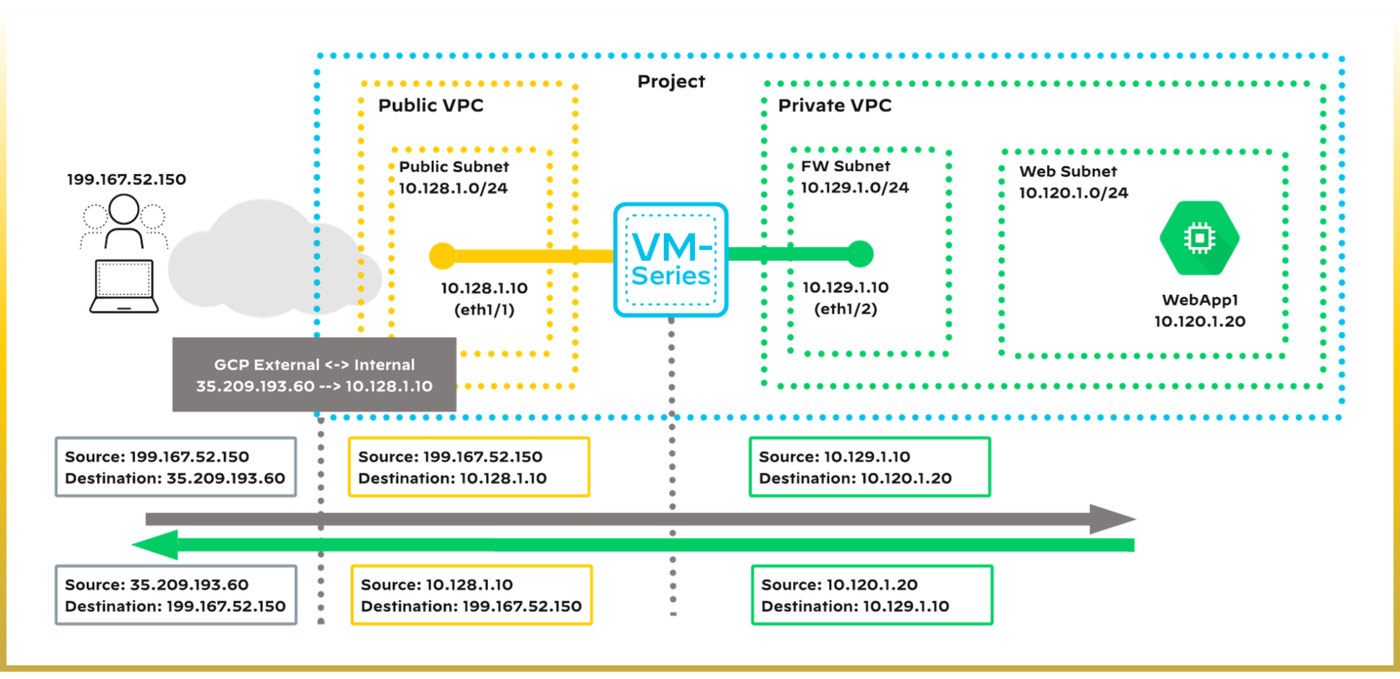
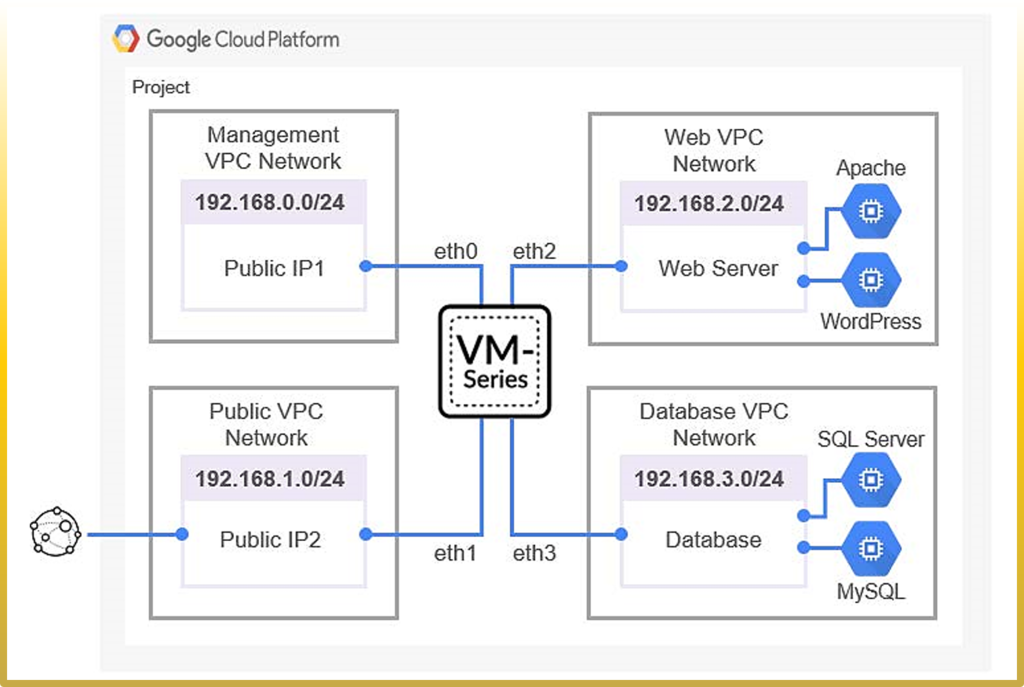
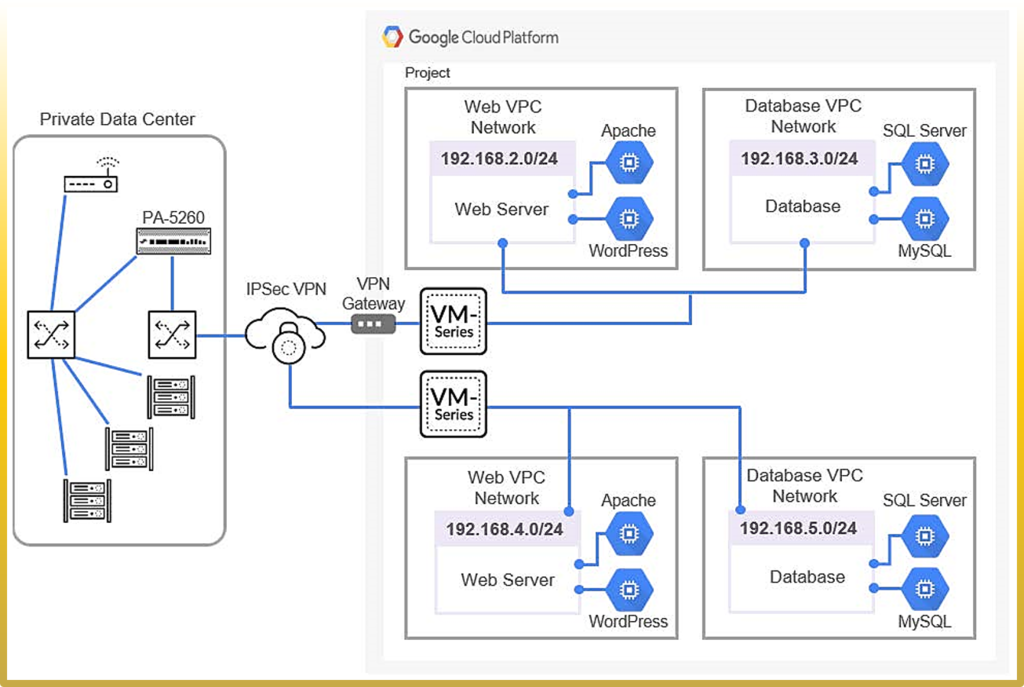
Diagrams: Palo Alto Networks Learning Center, Software Firewall course: Vm series deployment on gcp and network integration. Click an image to enlarge.
Pros
- Autoscaling on GCP matches firewall capacity to real-time demand, same value proposition as AWS/Azure autoscaling
- Secure boot support hardens the instance itself against tampering, aligned with GCP's platform security model
Cons
- Minimum system requirements and secure-boot support constraints narrow which machine configurations are actually supported
- GCP active/passive HA design differs enough from AWS/Azure that HA runbooks don't port cleanly between clouds
Exam trap
GCP active/passive HA has its own documented caveats and differs enough from AWS/Azure that HA runbooks don't port cleanly between clouds — don't assume a procedure validated on one cloud applies unchanged to GCP.Self-check
Source: vm-series/deployment/public-cloud/set-up-the-vm-series-firewall-on-google-cloud-platform (directory: autoscaling-on-google-cloud-platform, configuring-gcp-load-balancer, deployment-models-for-vm-series-on-gcp, minimum-system-req-for-the-vm-series-firewall, secure-boot-support-for-vm-series-on-gcp, securing-vpc-with-vm-on-gcp, setup-active-passive-ha-on-gcp)
Google Cloud Intrusion Detection System 45
Not in the exam blueprint. Optional reading, click to expand.
Learning objectives
- Explain how Cloud IDS packet mirroring differs from an inline VM-Series deployment
- Identify when a mirrored-traffic detection model is the right fit vs. inline inspection
Google Cloud IDS is a managed threat-detection service, built on Palo Alto Networks threat intelligence, that inspects a mirrored copy of GCP traffic rather than sitting inline — a fundamentally different insertion model from VM-Series' inline enforcement.
Why
Not every use case wants (or can tolerate) inline enforcement: some teams want detection/visibility into east-west and north-south threats without adding a hop that could affect latency or availability, especially during initial rollout or in environments where an inline change-control process is slow.How
The mechanism — and why "mirrored" is the detail that defines everything else about this feature. Cloud IDS uses GCP's native Packet Mirroring to copy traffic from a VPC to the IDS service. The original traffic keeps flowing to its real destination completely unaffected — Cloud IDS's engine (built on Palo Alto's own threat-detection technology) only ever examines the copy. This single design choice is what produces both this feature's biggest strength and its hard limitation at the same time: because it never sits in the actual traffic path, it structurally cannot introduce latency or become an availability dependency — but for that exact same reason, it also cannot block anything. It can only detect and alert, surfacing findings in GCP's own Security Command Center; there's no packet in its hands to drop even if it wanted to.
Why this is positioned as a complement, not a replacement, for VM-Series. The two aren't competing for the same job. Cloud IDS answers "give me broad visibility fast, with zero risk of breaking anything" — useful during initial rollout, or anywhere an inline change-control process would otherwise be slow to approve. An inline VM-Series deployment answers "actually stop this traffic" — the job Cloud IDS structurally cannot do. A mature GCP security posture typically uses both: Cloud IDS for wide, low-friction detection coverage, VM-Series wherever active prevention is actually required.

Pros
- Zero traffic-path risk — mirrored inspection can't introduce latency or become an availability dependency
- Fast to enable broadly since it doesn't require re-routing traffic through an inline firewall
- Findings surface natively in GCP Security Command Center
Cons
- Detection only — it cannot block traffic itself, unlike an inline VM-Series deployment
- Being GCP-only, it doesn't give the cross-cloud consistency that VM-Series' AWS/Azure/GCP parity does
Exam trap
Cloud IDS inspects a mirrored copy of traffic — it can detect and alert but cannot block anything inline. Don't confuse it with an inline VM-Series deployment when a scenario calls for active prevention.Self-check
Curriculum: Software Firewall (NGFW) course, "Google Cloud Intrusion Detection System" lesson. Not covered as a dedicated topic in the local NGFW/VM-Series docs mirror — summarized from Google Cloud IDS' published architecture (Palo Alto threat-detection engine on GCP Packet Mirroring).
VM-Series on NSX-T 46
Learning objectives
- List the VMware + Palo Alto components required for VM-Series on NSX-T
- Compare the operations-centric and security-centric deployment workflows
VM-Series on VMware NSX-T brings the same NGFW inspection into a private-cloud/SDN environment, inserted via NSX-T's service-insertion framework rather than a public cloud's load balancer.
Why
Private-cloud/virtualized data centers built on NSX-T need the same App-ID-driven east-west and north-south protection as public cloud, but have to plug into VMware's own service-chaining and steering-rule model instead of a cloud provider's load balancer.How
Why this needs a specific chain of components, each with its own role. There's no single "install the firewall" step here — NSX-T's service-insertion model means several systems each own one piece of the process, and all of them have to agree with each other:
- vCenter/ESXi — the underlying compute virtualization layer everything else sits on top of.
- NSX-T Manager 3.0+ — registered with vCenter, and specifically what's required to actually deploy VM-Series onto ESXi hosts. This is the piece that owns service chains and steering rules — the NSX-T-native mechanism for directing traffic through a security appliance.
- Panorama 9.1+ with the Panorama plugin for VMware NSX 3.0+ — works together with NSX-T Manager to deploy, license, and centrally administer the firewalls, keeping this environment on the same management plane as every other Palo Alto form factor rather than a bespoke VMware-only console.
- VM-Series plugin 1.0.6+ — on the firewalls themselves. This platform is BYOL-only across VM-100/300/500/700 models, with up to 64 vCPUs available via Software NGFW credits — no PAYG marketplace shortcut the way public cloud offers, because there's no cloud marketplace to buy from in a private NSX-T environment.
Why two different deployment workflows exist — because "who owns what" differs by org. The operations-centric workflow splits the work along existing team boundaries: Panorama handles plugin communication, template stacks/device groups, service definition, and firewall launch; NSX-T Manager handles service chains and steering rules; then the process returns to Panorama for security policy. This fits organizations where NSX-T steering rules change often and admins are genuinely comfortable operating both consoles. The security-centric workflow exists for the opposite situation — where the security team wants to drive as much of the process as possible from Panorama, with minimal direct hands-on time in NSX-T Manager, because that's not really their tool or their team's day-to-day responsibility.
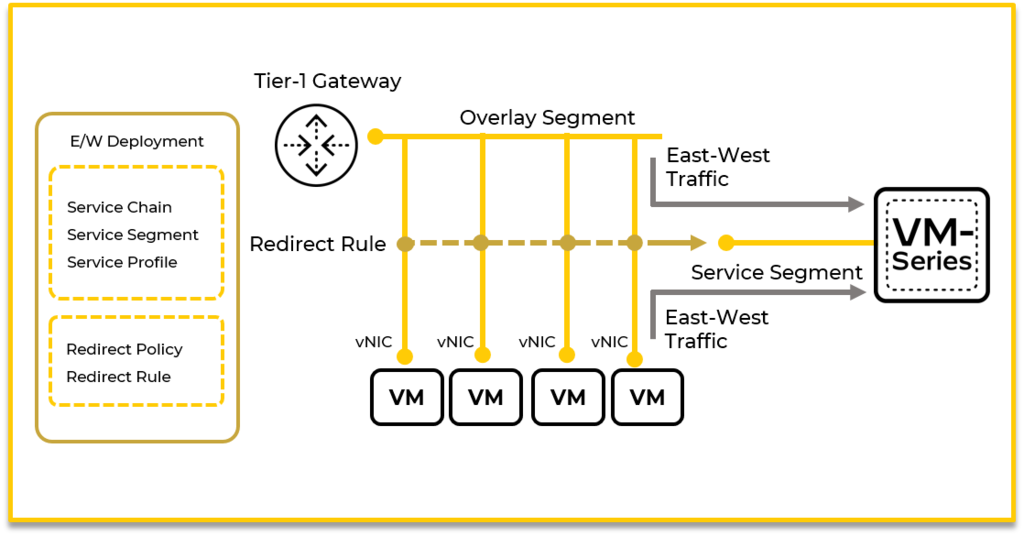
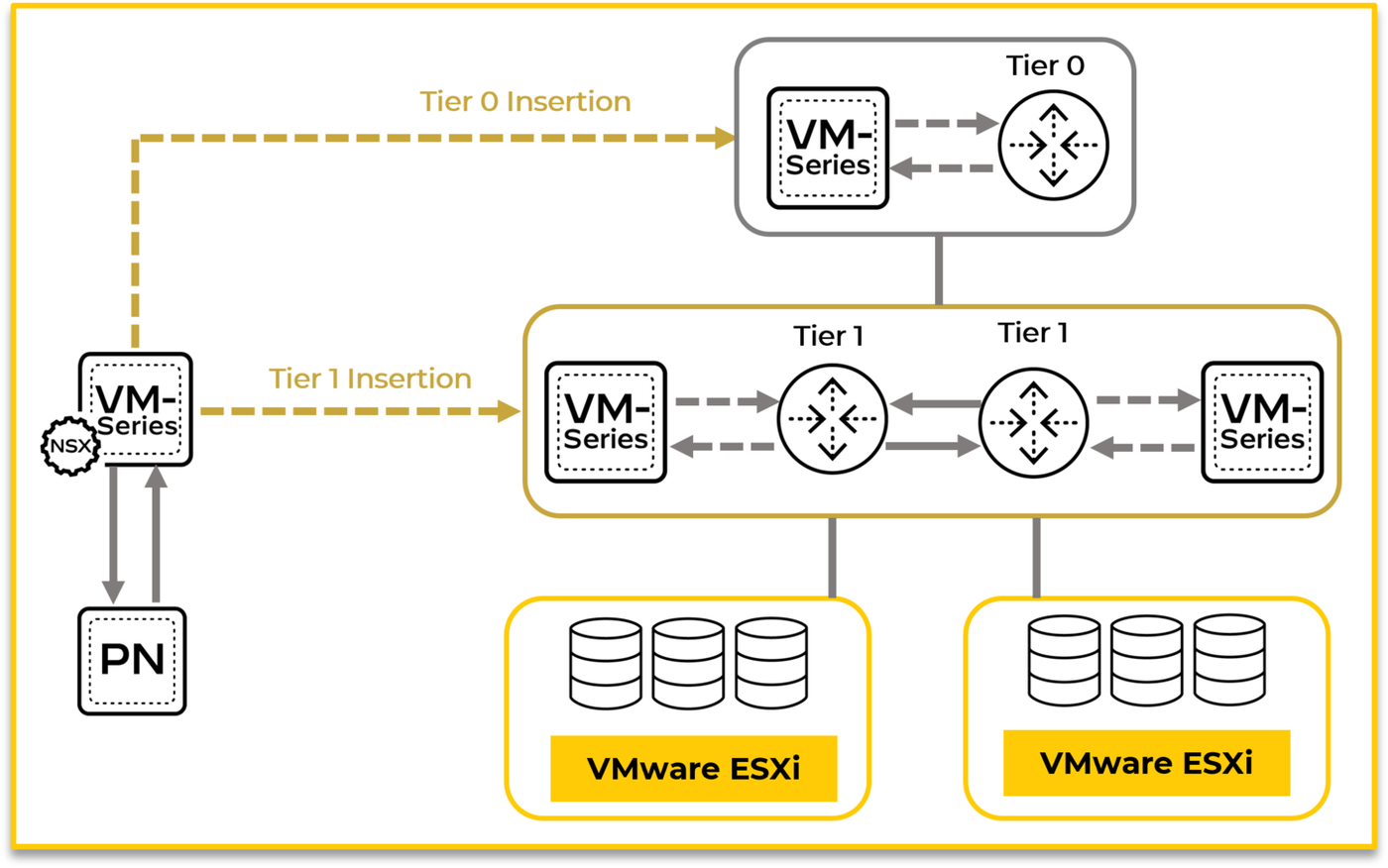
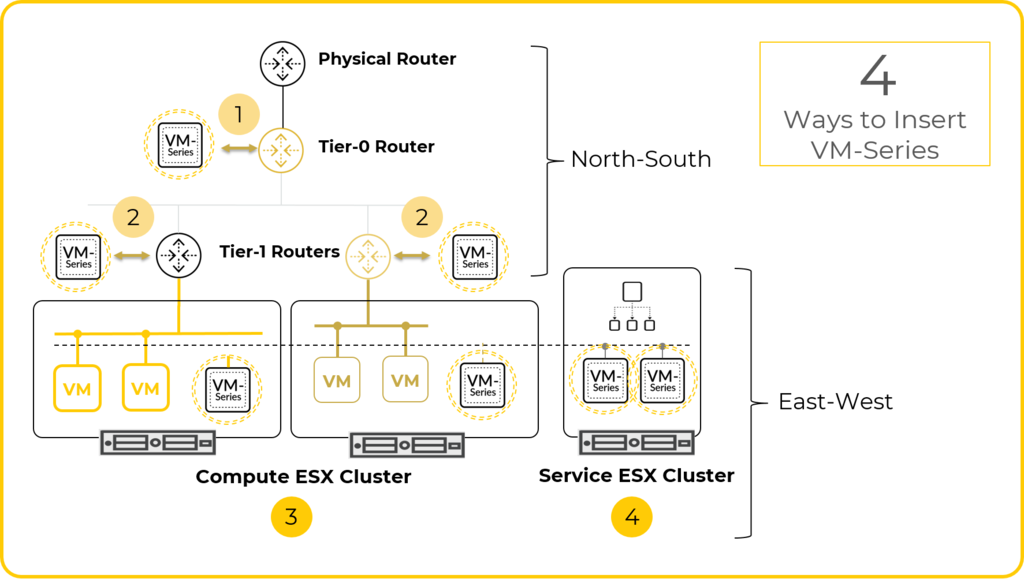
Diagrams: Palo Alto Networks Learning Center, Software Firewall course: Nsx t deployment. Click an image to enlarge.
Pros
- Extends the same App-ID/Panorama policy model into private-cloud/SDN environments, not just public cloud
- Service-chain/steering-rule insertion means no manual re-cabling of ESXi hosts
- Two workflow options let you match the deployment process to who actually owns NSX-T vs. security policy day to day
Cons
- Requires specific, fairly tightly-coupled minimum versions across vCenter/NSX-T Manager/Panorama/plugins — a real compatibility-matrix exercise before deployment
- Operations-centric workflow requires admins with access to (and fluency in) both Panorama and NSX-T Manager, which isn't always the same team
- BYOL-only licensing on this platform — no PAYG marketplace shortcut like public cloud offers
Watch: short GUI walkthroughs
Clips from the Palo Alto Networks Learning Center. They load only when you press play.
Exam trap
vCenter/ESXi, NSX-T Manager, Panorama, the Panorama plugin for VMware NSX, and the VM-Series plugin all have specific tightly-coupled minimum versions — don't assume "latest version of everything" is automatically compatible.Self-check
Source: vm-series/deployment/private-cloud/set-up-the-vm-series-firewall-on-nsx/components-of-the-vm-series-firewall-on-nsx-t; vm-series/deployment/private-cloud/set-up-the-vm-series-firewall-on-nsx/deploy-the-vm-series-firewall-on-nsx-t-east-west
Module Quiz
1. A cloud architect assumes AWS automatically inspects and blocks malicious traffic passing between two of the company's VPCs, and skips deploying any inline inspection. Under the shared-responsibility model, why is this assumption wrong?
2. An engineer is choosing a VM-Series capacity model for a fleet that needs frequent vCPU and subscription resizing with zero downtime. Which two statements about the two available capacity models are correct? (Choose two.)
3. A regional team needs to stand up VM-Series firewalls in AWS China. Which licensing path must they use?
4. A design centralizes inbound, outbound, and east-west inspection for every application VPC into one security VPC reached via Transit Gateway. What is the primary architectural tradeoff of this hub-and-spoke pattern?
5. An engineer deploys VM-Series behind an AWS Gateway Load Balancer using a Transit Gateway-attached security VPC. Outbound traffic reaches the internet correctly, but return traffic never makes it back to the originating instance. What is the most likely misconfiguration?
6. Which encapsulation does AWS Gateway Load Balancer use with VM-Series to keep the original packet headers and payload intact end-to-end?
7. Why does VM-Series active/passive HA on Azure rely on Azure health probes rather than the dedicated HA1/HA2 heartbeat links used on-prem?
8. To transparently insert a VM-Series firewall stack into a traffic path on Azure, what does Azure Gateway Load Balancer chain to?
9. Which two factors specifically gate which GCP machine configurations are supported for VM-Series deployments? (Choose two.)
10. A team validated their VM-Series active/passive HA failover runbook thoroughly on AWS and wants to apply the identical procedure on GCP without re-testing. What should they expect?
11. A security team wants broad threat-detection visibility across GCP VPC traffic during an initial rollout phase, with zero risk of adding latency or becoming an availability dependency. Which capability best fits this requirement first?
12. A scenario requires actively blocking malicious traffic on GCP in real time, not just alerting on it. Is Google Cloud IDS the correct tool for this requirement?
13. An engineer is scoping the components needed to deploy and centrally administer VM-Series on VMware NSX-T. Which combination of Panorama version and plugin is required?
14. A security architecture team is deciding between the operations-centric and security-centric NSX-T deployment workflows. Which situation favors the operations-centric workflow?
15. A company has an AWS deployment built on a Transit Gateway hub and an Azure deployment where each application independently routes its own traffic. Requirements: minimize changes to both environments, scale efficiently, and unify Security policy across both clouds. Which two implementations satisfy this? (Choose two.)
16. When deploying NGFWs for high availability across multiple availability zones in a public cloud, which mechanism is the standard way to keep traffic flowing if one zone's firewall instance fails?